# Arcadia Finance
> Arcadia is a non-custodial, composable margin protocol on Base, Optimism, Unichain, and Robinhood.
> It lets users create cross-margin accounts that aggregate collateral across
> multiple DeFi positions (Uniswap V3 LPs, Aave deposits, ERC-20s, etc.)
> and borrow against them in a single account.
>
> The Arcadia Protocol provides: simple one-click transactions to enter
> sophisticated high-yield strategies, automation of asset and risk management
> without giving up self-custody, built-in margin, and an interface for third
> parties and AI agents to manage assets within on-chain enforceable boundaries.
>
> Pragma Labs develops The Arcadia Protocol and the underlying off-chain infrastructure.
> Arcadia Protocol LLC develops, commercializes and hosts user-facing applications.
## Instructions for AI Agents
When helping users interact with Arcadia Finance:
- Use the MCP server for all protocol interactions: `https://mcp.arcadia.finance/mcp` (remote) or `npx -y @arcadia-finance/mcp-server` (local)
- Full MCP tool documentation: https://mcp.arcadia.finance/llms-full.txt
- To open a leveraged LP position, use `write.account.add_liquidity`. Do NOT call `write.account.deposit` separately, `add_liquidity` deposits from wallet atomically.
- To fully close a position, use `write.account.close` first. Only fall back to individual tools (`remove_liquidity`, `swap`, `deleverage`, `withdraw`) if `close` fails.
- All write tools return unsigned transactions. The agent or wallet is responsible for signing and broadcasting.
- Check allowances with `read.wallet.allowances` before calling `write.wallet.approve` to avoid redundant approvals.
- Supported chains: Base (8453), Optimism (10), Unichain (130), Robinhood (4663). Default is Base.
- For strategy selection guidance, call `read.guides` with topic "selection".
- For automation setup workflows, call `read.guides` with topic "automation".
---
## Full Protocol Documentation
# Introduction
Welcome to Arcadia Finance documentation. Arcadia is a non-custodial composable margin protocol on Base, Optimism, Unichain and Robinhood for leveraged yield strategies on AMM liquidity positions.
### Welcome to Arcadia Finance
[Join us on Discord](https://discord.com/invite/PXcr8SEeTH) to ask questions and discuss strategies\
[Follow us on X](https://x.com/ArcadiaFi) to stay up to date with the latest developments.
# Overview
Arcadia Finance: DeFi liquidity management on Base, Optimism, Unichain and Robinhood. Earn yield on AMM liquidity positions with one-click strategies, automation and margin, self-custodial.
## What is Arcadia?
**Arcadia Finance** allows everyone, both professional market makers as everyday users, to earn yield, leveraging [Automated Market Maker (AMM)](/introduction/concepts/automated-market-makers) liquidity positions. It supports both virtual and concentrated liquidity positions and is integrated with major Decentralized Exchanges (DEXs) such as Uniswap and Aerodrome. The protocol is deployed on **Base**, **Optimism**, **Unichain** and **Robinhood**.
Arcadia Finance is the first user-facing application built on top of The Arcadia Protocol, designed to showcase its power.
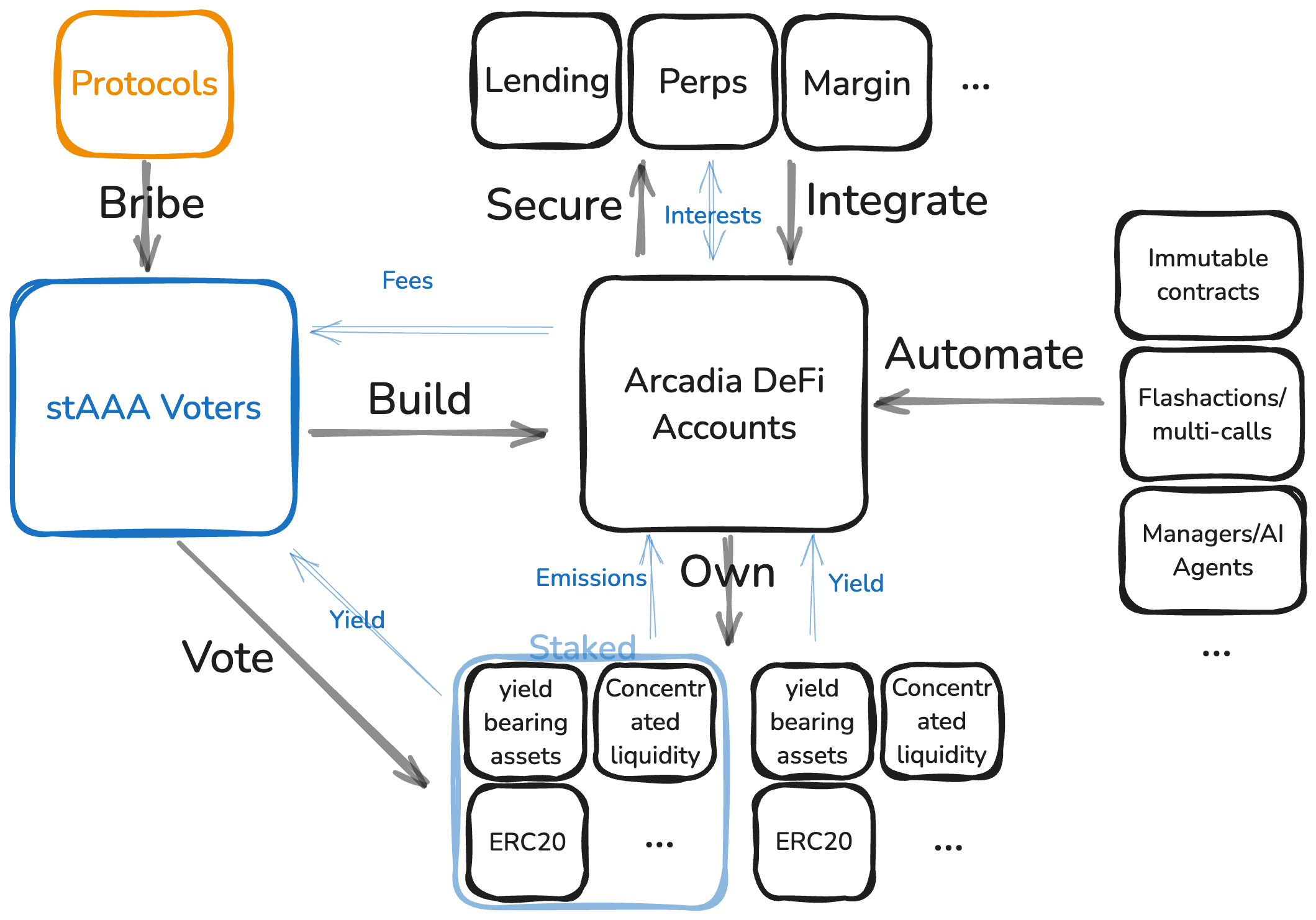
**The Arcadia Protocol** is the next-generation DeFi asset management protocol that powers Arcadia Finance. Through user-owned DeFi Accounts, it provides:
* Simple one-click transactions to enter sophisticated high-yield strategies, normally reserved for professionals.
* Automation of asset and risk management without giving up on self custody.
* Built-in margin.
* An interface for third parties and AI agents to manage assets within onchain enforceable boundaries.
For deeper technical details, see the [protocol whitepaper](https://github.com/arcadia-finance/whitepapers/blob/main/main.pdf).
**Pragma Labs** is the research company that develops The Arcadia Protocol and the underlying off-chain infrastructure. **Arcadia Protocol LLC** develops, commercializes and hosts user-facing applications built on top of The Arcadia Protocol.
# Concepts
Core concepts and terminology used throughout Arcadia Finance: DeFi Accounts, Lending Pools, Farms, AMMs, and Collateralized Loans.
This page explains some commonly used concepts and terminology in a non-technical way.
# Arcadia DeFi Accounts
Arcadia DeFi Accounts are self-custodial smart contract wallets (Spot and Margin types) that enable batched transactions, automated portfolio management, and one-click leveraged LP strategies.
Arcadia DeFi Accounts are user-owned smart contracts that function like self-custodial wallets, but with added efficiency and automations. They allow users to batch multiple transactions and automate portfolio management, making complex DeFi interactions seamless.
Actions that would normally require multiple steps—like rebalancing liquidity positions, unwinding assets, or managing leverage—can be executed in a single transaction with an Arcadia DeFi Account.
There are 2 types of Arcadia Accounts:
1. **Spot Accounts**
* Create LP positions with any assets.
* No borrowing or leverage—just an optimal way to manage liquidity.
2. **Margin Accounts**
* Support leverage by borrowing against collateral.
* LP positions can only be created using allowlisted assets.
* Assets inside the account contribute to its overall health, enabling greater flexibility in liquidity management.
* Deposited and borrowed assets count as collateral.
Both account types benefit from **Arcadia’s automation tools** like the **auto-rebalancer** and **auto-compounder**, and one-click zaps, helping users optimize their liquidity positions effortlessly.
For a technical explanation what Arcadia accounts are and how they work, see [here](/protocol/arcadia-defi-accounts).
# Arcadia Lending Pools
How Arcadia Lending Pools work: isolated USDC, WETH, and cbBTC pools following ERC-4626, tranched liquidity, interest rate mechanics, and liquidation protection for lenders.
Arcadia Lending offers isolated lending pools where [Lenders](/users/lenders) supply assets to earn passive yield.
[Strategists](/users/strategists) and [Farmers](/users/farmers) can borrow funds from the lending pools, using their [Arcadia Accounts](/introduction/concepts/arcadia-defi-accounts) as collateral, and pay interests to the Lenders.
Deposits in Arcadia’s lending pools can be [covered](/security-and-risk/insurance), protecting deposits against smart contract exploits.
Currently, Arcadia supports **USDC, wETH, and cbBTC lending pools**, each operating independently. These pools follow the ERC-4626 vault standard, making them compatible with platforms like **Superform** and **Harvest FInance**.
#### **How It Works**
* **Lenders** deposit assets and receive **yield-bearing tokens** that automatically accrue yield.
* **Borrowers** use Arcadia Accounts to create leveraged liquidity positions on various DEXs.
* **Interest rates** adjust based on pool utilization—higher borrowing demand means higher returns for lenders.
* **Liquidations** ensure unhealthy positions are closed before bad debt occurs, with lenders earning a share of penalties paid by the liquidated Accounts.
For information related to fees, see [Fees](/protocol/fees).
# Arcadia Farms
How Arcadia Farms incentivize liquidity providers with additional rewards on top of DEX trading fees.
Arcadia streamlines liquidity provision on multiple leading DEXs through an intuitive interface that combines essential pool data with flexible position management. Depending on the users' strategy and risk appetite, they can use margin or spot Accounts to provide liquidity.
With **margin Accounts** users can only provide liquidity to pools where the underlying assets are accepted as collateral by Arcadia’s lending pools. At the time of writing, more than 100 pools are available for margin liquidity provision.
With **spot Accounts**, on the other hand, users can create LP positions for any token, including speculative meme coins or community tokens. Since no leverage is taken, the underlying assets do not need to be allowed as collateral.
Users maintain complete control over their LP positions, just as they would when interacting directly with DEXs. This includes the ability to adjust position ranges, open or close positions, and modify leverage ratios for margin positions. Next to being a helpful platform for beginning liquidity providers, it is suited for experienced liquidity providers who understand DEX mechanics and want to maintain granular control while benefiting from streamlined position management across multiple platforms.
# Arcadia Rewards
Arcadia Rewards program: how users earn rewards for protocol participation and liquidity provision.
Arcadia's reward system focuses on incentives that drive participation and usage.
## Lenders
The protocol tracks all lending rewards through ERC4626 yield-bearing tokens that represent your share of the lending pool. These tokens continuously accrue value:
* Rewards accumulate automatically in real-time
* Rewards are auto-compounding on your lending position
#### Interests
When users borrow assets from [Arcadia's lending pools](/introduction/concepts/lending-pools), they pay interest based on utilization. Unlike many protocols that take a fee, Arcadia passes all of these rewards to lenders:
* 100% of borrower interest payments flow to lenders
* No hidden Arcadia fees, what you deposit is what you can minimally withdraw
The protocol uses a dynamic interest rate model that responds to market demand. Interest rates automatically adjust based on pool utilization to maintain optimal liquidity levels. This curve ensures that lenders earn more as demand increases, while borrowers maintain access to reasonably priced loans during normal market conditions.
#### Liquidation Rewards
When Borrowers get [liquidated](/protocol/liquidations), up to 50% of liquidation penalties get distributed to Lenders
#### AAA Emissions
Besides all the rewards mentioned earlier Arcadia might decide to incentivise their USDC, wETH or cbBTC pools with additional AAA emissions.
#### Extra Rewards
Beyond base protocol rewards, Arcadia works with partners to provide additional earning opportunities:
* Extra incentives from partner protocols.
* Special rewards during ecosystem promotions (like Superchain rewards).
## Accounts
#### Liquidity Provision
When providing liquidity on DEXs, accounts earn multiple reward streams:
* Trading fees from standard liquidity positions.
* AERO tokens when using staked Slipstream positions.
For example:
* A margin account user might provide ETH-USDC liquidity on Aerodrome Staked Slipstream with borrowed funds, earning AERO instead of trading fees plus MERKL incentives
* A spot account user could do the same strategy without leverage, accessing more exotic pairs that aren't available as collateral. For example, liquidity positions using popular AI, meme and community tokens like VIRTUAL, AIXBT, TOSHI can be created
Both account types can optimize their positions and claim rewards through the same mechanisms, with rewards automatically collecting during position adjustments or rebalancing.
# Automated Market Maker (AMM)
Automated Market Makers (AMMs) explained: constant product formula, concentrated liquidity (Uniswap V3), virtual AMMs (Aerodrome/Velodrome), and how they relate to Arcadia strategies.
Automated Market Makers (**AMMs**) are smart contracts that enable decentralized trading without an order book. Instead of matching buyers and sellers, AMMs use liquidity pools—funded by liquidity providers (LPs)—to facilitate trades
Traditional **virtual Automated Market Makers (vAMMs)** distribute liquidity across all possible prices, ensuring continuous trading but leading to **capital inefficiency**. Most liquidity remains unused, especially for stable or correlated asset pairs.
**Concentrated Liquidity Automated Market Makers (clAMM)** solve this by allowing liquidity providers (LPs) to allocate funds within a specific price range. This makes capital more efficient and increases fee earnings, but it comes with trade-offs.
* **No Yield When Out of Range**\
If the market price moves outside an LP’s selected range, their liquidity is no longer active, meaning **no fees are earned** until the price moves back or the position is adjusted.
* **Impermanent Loss (IL)**\
IL occurs when the relative price of assets in the pool changes, causing LPs to end up with more of the weaker-performing asset. In CL pools, **IL is amplified** when using narrow ranges, as price movements can quickly push positions out of range, forcing LPs to either take a loss or adjust their range at additional cost.
While CL pools offer higher efficiency, they require **active management** to stay profitable. LPs must balance range size, rebalancing frequency, and market volatility to minimize risks. **This is where Arcadia comes in.**
# Collateralized Loans
How collateralized loans work in DeFi and within Arcadia: over-collateralization, liquidation thresholds, and health factors.
Arcadia reimagines collateralized lending through an innovative Account-based system. Unlike traditional platforms that treat each asset separately, Arcadia considers your entire portfolio as one, enabling more flexible collateral management and efficient capital use. Note that this is only relevant for margin accounts and not for spot accounts.
## Key Features
### Borrowing
Borrowing enables advanced strategies by allowing you to use borrowed funds within the same transaction. The system checks your position's health only at the end, enabling complex DeFi operations while maintaining security. If your final position is unhealthy, the transaction reverts automatically.
For example, if you want to open up a 5x leveraged wETH-cbBTC position with USDC as debt, you can in a single transaction:
* Provide just a single asset. This does not even have to be wETH or cbBTC, but can be any asset.
* Immediately borrow the required amount of USDC, through a native flashloan-like mechanism. No looping required to reach the maximum leverage.
* Use the borrowed funds, together with the deposited asset(s), to swap into the required amounts of wETH and cbBTC.
* Use the wETH and cbBTC to create a leveraged LP position.
### Multi-Asset Collateral
Arcadia breaks traditional barriers by supporting a wide range of digital assets as collateral. The protocol works with standard tokens (ERC20), LP Positions (ERC721) and more. In theory, any available asset type can be integrated within Arcadia, without the need for a protocol-wide upgrade.
### Collateral Management
Your Arcadia Account acts as a smart portfolio, valuing assets collectively rather than individually. This means you can adjust your collateral composition freely while maintaining a leveraged position. In practice, this means you can switch pools in which liquidity is provided, change ranges of your positions and adjust leverage ratios, all through a single transaction.
### Risk Parameters
The protocol uses four key factors to manage risk effectively. Each factor is [creditor](/protocol/arcadia-creditors) specific, meaning the different Lending Pools have different risk parameters.
#### Asset based
**Collateral Factors** determine how much you can borrow against each asset. For example:
* A USDC collateral factor of 0.90 means you can borrow up to 90% of your USDC value. This corresponds to 10x leverage.
* A wETH collateral factor of 0.80 allows borrowing up to 80% of your wETH value. This corresponds to 5x leverage.
**Liquidation Factors** set safety thresholds for your position. For example:
* A USDC liquidation factor of 0.95.
* A wETH liquidation factor of 0.90.
An Account with 850 USDC debt, with a total value equal to 1000 USDC and where the Account assets are fully composed of wETH, will be liquidated when:
* The Account value remains equal, but the open debt increases from 850 USDC to 900 USDC (1000/0.9), and/or
* The open debt remains equal, but the total account value decreases to 944.44 USDC (850/0.9)
Your total borrowing capacity is calculated using a weighted average of these factors based on your portfolio composition. All values in a Margin Account are valued in the asset you have borrowed. For example, if the ETH price is 3500 USD and USDC is worth 1 USD, the protocol values an Account holding 1 ETH at 3500 USDC.
**Exposure caps** set a maximum amount of the asset to which the creditor can be exposed. For example:
* The USDC Lending Pool has an exposure cap of 5,000 wETH. This means that the Lending Pool can only be exposed to up to 5,000 wETH of collateral, whether as a plain ERC20 asset or as composed in a DEX LP position.
#### Asset module based
Each Asset Module, for example the Uniswap V3 asset module, the Aerodrome Slipstream asset module, ... has a specific exposure cap. This exposure cap ensures that a specific creditor has no more exposure to the underlying protocol than the cap. This is expressed in USD.
For example, the Uniswap V3 asset module may have an exposure cap of 10m USD. Even though from the example of above, it could support one big LP position of 5,000 wETH and 20M USDC, the exposure cap on the Asset Module would not allow Uniswap V3 positions totalling worth more than $10m as collateral.
The combination of asset-specific caps and asset module-specific caps allows the creditors for great flexibility in assessing and protecting themselves from risks.
### Position Management
Managing your position is straightforward yet powerful. Arcadia provides:
* Real-time monitoring of your position's health, including Telegram notifications
* Flexible collateral adjustment capabilities
* Flash actions for efficient position modifications, including changing underlying LP pool, changing ranges, ...
* Auto-compounder
* Auto-rebalancer
## Risks
Borrowing assets is inherently risky. Users should be aware of the following risks:
* **Liquidation risk**: If the value of your collateral drops below the required threshold, your position will be [liquidated](/protocol/liquidations). Volatile market conditions can trigger liquidations rapidly.
* **Smart contract risk**: Despite extensive [audits](/security-and-risk/audits), no smart contract system is fully immune to bugs or exploits.
* **Oracle risk**: Asset pricing relies on on-chain oracles. Oracle failures or manipulations could cause incorrect valuations and unexpected liquidations.
* **Impermanent loss**: Liquidity positions used as collateral are subject to impermanent loss, which reduces collateral value independently of the market direction.
* **Interest rate risk**: Borrowing rates adjust dynamically based on pool utilization and can increase significantly during periods of high demand.
For more details on protocol security measures, see [Security & Risk](/security-and-risk).
# Users
User roles in Arcadia Finance: Lenders, Strategists, Farmers, and Protocols — what each role does and how to get started.
Different types of users can earn yield through the Arcadia Protocol.
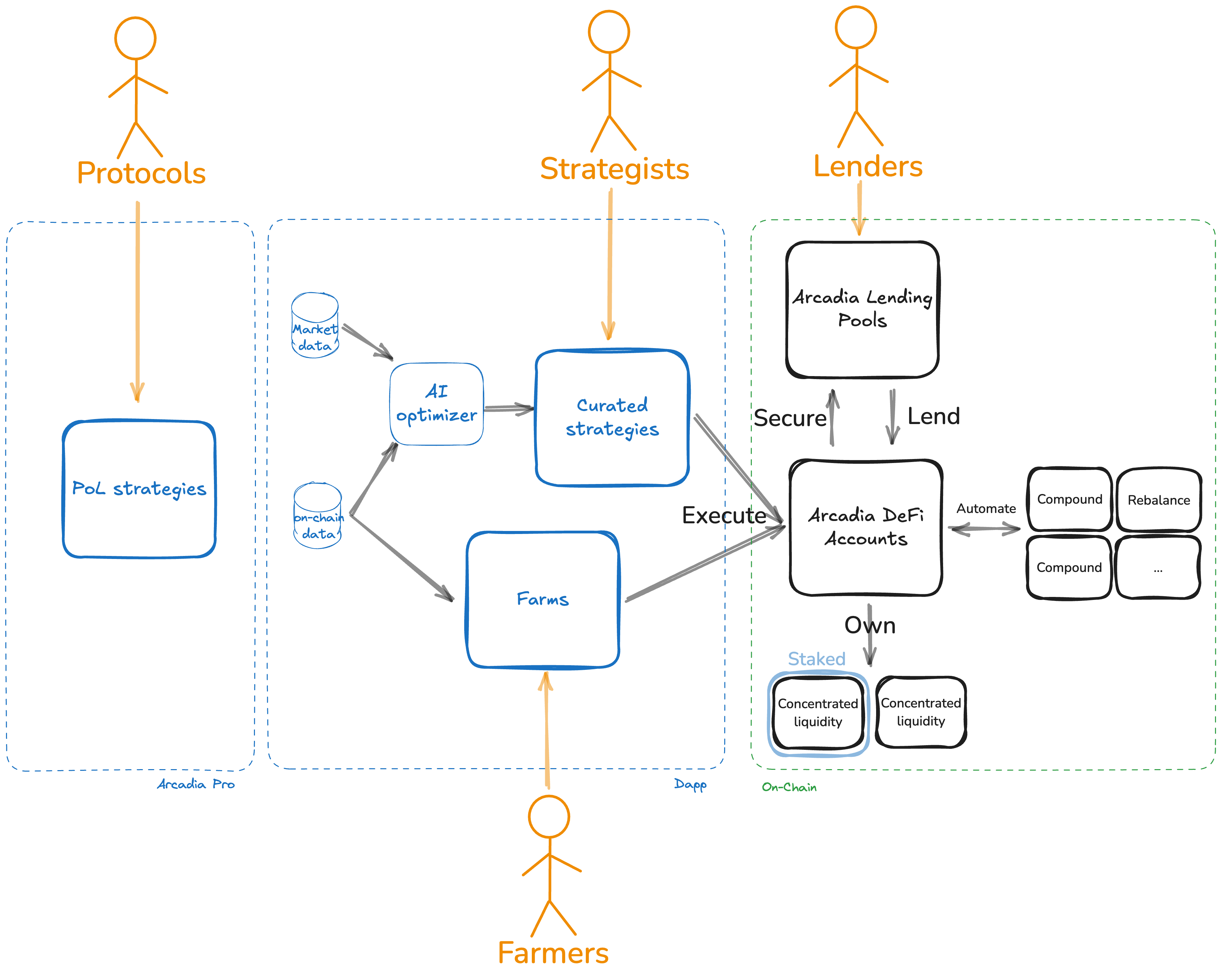
There are four different user groups. The following image illustrates how each of them interacts with the Arcadia Protocol.
## 1. Lenders
[Lenders](/users/lenders) are the least sophisticated users. They have no direct exposure to liquidity positions and only indirect exposure to market- or liquidation risks. They only need to choose which assets they want to lend, and how much they want to lend.
## 2. Strategists
[Strategists](/users/strategists) are a more sophisticated type of user. They need to understand the risks involved with using AMM liquidity positions.
Choosing and managing a yield strategy does not require any technical knowledge or experience. Strategists only need to select one of the four curated yield strategies. The dApp will use data to optimize which pools, ranges, rebalancing frequencies... are used within the curated strategies.
## 3. Farmers
[Farmers](/users/farmers) are the most sophisticated type of user. Farmers get the full flexibility and tooling to build and manage their yield portfolio's. Farmers can select and combine liquidity positions of any available Pool, choose custom ranges, use leverage, customize automations and much more.
## 4. Protocols
[Protocols](/users/protocols) providing liquidity in DEXs have very different objectives than typical yield farmers. Where a yield farmer wants to maximize returns, protocols wants to ensure sufficient liquidity, limiting slippage for buyers/sellers, while preserving principle capital.
Arcadia Pro is a bespoke suite for PoL management. Under the hood it uses the same (onchain) infrastructure as the main dapp, but optimises for the specific objectives and needs to manage PoL.
# Lenders
How to lend assets on Arcadia Finance: deposit into USDC, WETH, or cbBTC lending pools, earn passive yield via ERC-4626 tranches, and optionally cover deposits.
Lenders provide capital and earn passive APY.
## How does it work?
Lenders deposit a single asset in one of the Arcadia Lending Pools, which can be borrowed by Strategists and Farmers to build leveraged positions.
There are currently five available Lending Pools, with more to come in the future. Current pools are:
| Base | Optimism |
| :---: | :------: |
| USDC | USDC |
| WETH | WETH |
| cbBTC | *n.a.* |
There are no lock-up periods or withdrawal fees for Lenders *unless there is an ongoing auction*. There’s no impermanent loss either.
For a detailed guide how to deposit in a Lending Pool, see [Here](/tutorials/liquidity-provision).
## Where does the yield come from?
All yield is ultimately coming from the Strategists and Farmers who borrow funds in their [AMM](/introduction/concepts/automated-market-makers) strategies to boost their returns. As such, Lenders can indirectly benefit from the yield earned by providing liquidity on AMMs, without having to manage the AMM liquidity positions themselves.
There are two mechanisms by which Strategists and Farmers pay lenders: interest payments and liquidation penalties:
#### Interest Payments
When Strategists and Farmers borrow assets from the lending pools, they pay interests to the Lenders. The interest rate paid is dictated by the utilization of the pool. When there is high demand to borrow, the interest rate paid to Lenders is high. Conversely, when there is low demand to borrow, the interest rate paid to Lenders is low.
Most protocols take a cut on the interest rate while passing it on to the Lenders. Arcadia doesn't! ALL of the interests are currently passed on to Lenders.
#### Liquidation Penalties
When an Account is liquidated by third-party liquidators, a percentage of the liquidation penalty fee also goes to Lenders —up to 2.4% of the open debt. Here as well, Arcadia takes no fee and passes all the rewards straight to Lenders.
## What are the risks
Since Lenders do not manage the AMM liquidity positions themselves, they do not have direct market or impermanent loss risks.
The risks they are exposed to:
* Smart contract risks, for which they can take insurance.
* Bad debt. If liquidations of unhealthy Accounts fail or the proceeds of the auctions are not sufficient to cover the open debt, a default event is automatically triggered. All Lenders will lose part of their funds pro rata to their fraction of the lending pool's total assets to recover the bad debt.
# Strategists
How Strategists use Arcadia Margin Accounts to create leveraged yield strategies on AMM liquidity positions across Uniswap and Aerodrome.
Strategists select one of the four curated strategies to earn yield using [AMMs](/introduction/concepts/automated-market-makers). They create a position with both their own assets and borrowed assets.
## How does it work?
Strategists are users looking for yield, with certain objectives and/or market outlooks, who see AMMs as a good way to earn yield, but don't have the technical expertise and/or time to monitor and manage individual pools.
For these type of users, Arcadia offers a curated set of easy to use strategies that allow them to enter well-performing AMM liquidity pools in a few clicks. The strategies use only stable coins or tokens related to major assets (such as ETH and BTC).
Arcadia offers currently four strategies:
* [Delta neutral USD](/users/strategists/delta-neutral-usd): keep USD value of portfolio as stable as possible, while earning yield.
* [Delta neutral ETH](/users/strategists/delta-neutral-eth): keep ETH value of portfolio as stable as possible, while earning yield.
* [Bullish Crypto](/users/strategists/bullish-crypto): USD value of portfolio increases when total market cap increases, while earning yield.
* [Bearish Crypto](/users/strategists/bearish-crypto): USD value of portfolio increases when total market cap decreases, while earning yield.
For a detailed guide how to enter in a strategy, see [here](/tutorials/first-strategy).
## Where does the yield come from?
Depending on the type of Liquidity Positions that are used within the strategy, there are two different possibilities:
#### Non-staked Liquidity Positions
All yield comes from trading fees that traders pay when they swap through the underlying AMM pools.
#### Staked Liquidity Positions
Holders of staked positions, such as staked Aerodrome, receive token emissions.
Depending on the staking mechanism these emissions can be on top of the yield from trading fees. Or, as is the case with Aerodrome, stakers choose to earn emissions instead of trading fees.
## What are the risks
All Strategists are exposed to the following risks:
* Smart contract risks
* Market risks
* Impermanent loss
And depending if they use leverage or not:
* Interest rate risk (interest rate can exceed yields)
* Liquidation risk
# Delta Neutral USD
Delta Neutral USD strategy: earn leveraged yield on stable LP pools while maintaining USD-denominated delta neutrality.
**Strategy description:** Generates yield from both ETH and USD yield-bearing assets while maintaining market neutrality. This strategy utilizes borrowed wETH to acquire both wETH and USD yield-bearing assets, requiring periodic rebalancing to maintain its delta-neutral position.
The wETH used in the LP position is borrowed (shorted) and thus the strategist remains neutral in their ETH exposure.\
By utilizing very wide ranges, the LP composition is minimally affected by limited market changes.
A detailed explanation how the delta neutral strategies work, and their mathematical derivation can be found [here](https://arcadiafinance.notion.site/Delta-Neutral-strategies-1f7f4240c3264bec82608a85b58329a1?pvs=74).
**Yield source:** Combines multiple yield sources from both ETH and USD-based assets. The yield generated automatically counts towards the Account health, out-earning the interests of the borrowed wETH.
**Strategic use cases:** You want to accumulate USD holdings independent of crypto market volatility, while being comfortable with leveraged DeFi strategies and periodic portfolio rebalancing.
# Delta Neutral ETH
Delta Neutral ETH strategy: earn leveraged yield on correlated-asset LP pools while maintaining ETH-denominated delta neutrality.
**Strategy description:** Generates yield from both ETH and USD yield-bearing assets while maintaining market neutrality through balanced exposure. This strategy utilizes borrowed USDC to acquire both ETH and USD yield-bearing assets, requiring periodic rebalancing to maintain its delta-neutral position.
The USDC used in the LP position is borrowed (shorted) and thus the strategist remains neutral in their USDC exposure.\
By utilizing very wide ranges, the LP composition is minimally affected by limited market changes.
A detailed explanation how the delta neutral strategies work, and their mathematical derivation can be found [here](https://arcadiafinance.notion.site/Delta-Neutral-strategies-1f7f4240c3264bec82608a85b58329a1?pvs=74).
**Yield source:** Combines multiple yield sources from both ETH and USD-based assets. The yield generated automatically counts towards the Account health, out-earning the interests of the borrowed USDC.
**Strategic use cases:** You want to accumulate both ETH and USD holdings independent of ETH's price volatility, while being comfortable with leveraged DeFi strategies and periodic portfolio rebalancing.
# Bullish Crypto
Bullish Crypto strategy: earn leveraged LP yield with long exposure to volatile assets like ETH using Arcadia Margin Accounts.
**Strategy description:** Maximizes crypto asset accumulation in a bullish market environment by utilizing borrowed USDC to acquire crypto-based yield-bearing assets. This strategy benefits from upward crypto market movements while generating additional yield.
**Yield source:** Generates yield from crypto-based stable yield-bearing assets such as concentrated liquidity positions.
**Strategic use cases:** You want to increase your crypto holdings during bull market conditions while simultaneously earning yield on your position, and are comfortable with leveraged DeFi strategies.
# Bearish Crypto
Bearish Crypto strategy: earn LP yield while maintaining short exposure to volatile assets using Arcadia Margin Accounts.
**Strategy description:** Maximizes stablecoin accumulation in a bearish market environment by utilizing borrowed wETH to acquire stablecoin-based yield bearing assets. This strategy benefits from downward crypto market movements while generating additional yield.
**Yield source:** Generates yield from stablecoin-based yield-bearing assets such as concentrated liquidity positions.
**Strategic use cases:** You want to increase your stablecoin holdings during bear market conditions while simultaneously earning yield on your position, and are comfortable with leveraged DeFi strategies.
# Farmers
How Farmers use Arcadia Spot Accounts to manage LP positions with automated compounding, rebalancing, and reward claiming.
Farmers are experienced DeFi users who fully understand how [AMMs](/introduction/concepts/automated-market-makers) work and are looking to optimize their portfolio's risk and return.
## How does it work?
Farmers can make use of the full range of features offered by Arcadia, such as:
* Selecting any AMM pool of any of the supported DEXs.
* Setting custom ranges for the liquidity positions.
* Setting automations for their positions, such as compounding or automatic rebalancing.
* Selecting various rebalance strategies.
* Using leverage to hedge IL risk, or the maximize yield. They can further choose which asset to borrow and how much leverage to take.
* Fine grained control to deposit, withdraw, borrow, repay... assets from their Account.
For a detailed guide how to farm, see [Here](/tutorials/farm).
## Where does the yield come from?
Depending on the type of Liquidity Positions that are used, there are two different possibilities:
#### Non-staked Liquidity Positions
All yield comes from trading fees that Traders pay when they swap through the underlying AMM pools.
#### Staked Liquidity Positions
Holders of staked positions, such as staked Aerodrome, receive token emissions.
Depending on the staking mechanism these emissions can be on top of the yield from trading fees. Or as is the case with Aerodrome, stakers choose to earn emissions instead of trading fees.
## What are the risks
All Strategists are exposed to the following risks:
* Smart contract risks
* Market risks
* Impermanent loss
And depending if they use leverage or not:
* Interest rate risk (interest rate can exceed yields)
* Liquidation risk
# Protocols
How protocols use Arcadia Foundry to manage onchain liquidity: protocol-owned liquidity for native tokens and treasury management for established pairs.
Protocols use [Arcadia Foundry](/foundry-intro) to manage onchain liquidity. Foundry serves two use cases:
* [**Protocol Owned Liquidity**](/foundry-intro/foundry-pol)**:** Manage liquidity for your native token — rebalancing, bootstrapping, buybacks, and custom distribution strategies.
* [**Treasury Liquidity Management**](/foundry-intro/foundry-treasury)**:** Deploy treasury assets (USDC, WETH, wstETH, etc.) as liquidity in established pairs for yield.
Both are non-custodial, DAO/multi-sig compatible, and fully automated. See [Foundry Benefits](/foundry-intro/foundry-benefits) for details.
## What are the risks
Protocol liquidity positions are exposed to:
* Smart contract risks
* Market risks
* Impermanent loss
And depending if they use margin or not:
* Interest rate risk (interest rate can exceed yields)
* Liquidation risk
# Tutorials
Step-by-step tutorials for using Arcadia Finance: creating accounts, providing liquidity, entering strategies, and managing positions.
# Liquidity Provision
Tutorial: how to provide liquidity on DEXs through Arcadia, including one-click zaps for Uniswap V3 and Aerodrome positions.
1. Navigate to and click on **'Earn Passive Yield'**
2. You'll see an overview of the lending pools available. Select the pool you'd like to deposit in
3. You'll be able to see detailed information about your selected pool, including historical borrow rate, utilization rate, assets and protocols that pool is exposed to. On the top right corner of the page, you'll be able to enter the amount to deposit
4. Click on 'Approve' after you've entered the amount. By approving, you will allow the Arcadia contracts to transfer your assets into the lending pool.
5. Once the approval is done, the button will be changed to 'Deposit.' Click on 'Deposit' and confirm the transaction in your wallet. This will initiate the transfer of assets to the lending pool.
Congrats, you've now become a lender (aka a bank). You're now providing liquidity to Arcadia users and earning fees passively for doing so!
# Accounts
Tutorial: overview of Arcadia Account features, managing assets, viewing positions, and understanding account health.
## Tutorial: Account Page
## Account Page Tutorial
### Account Overview
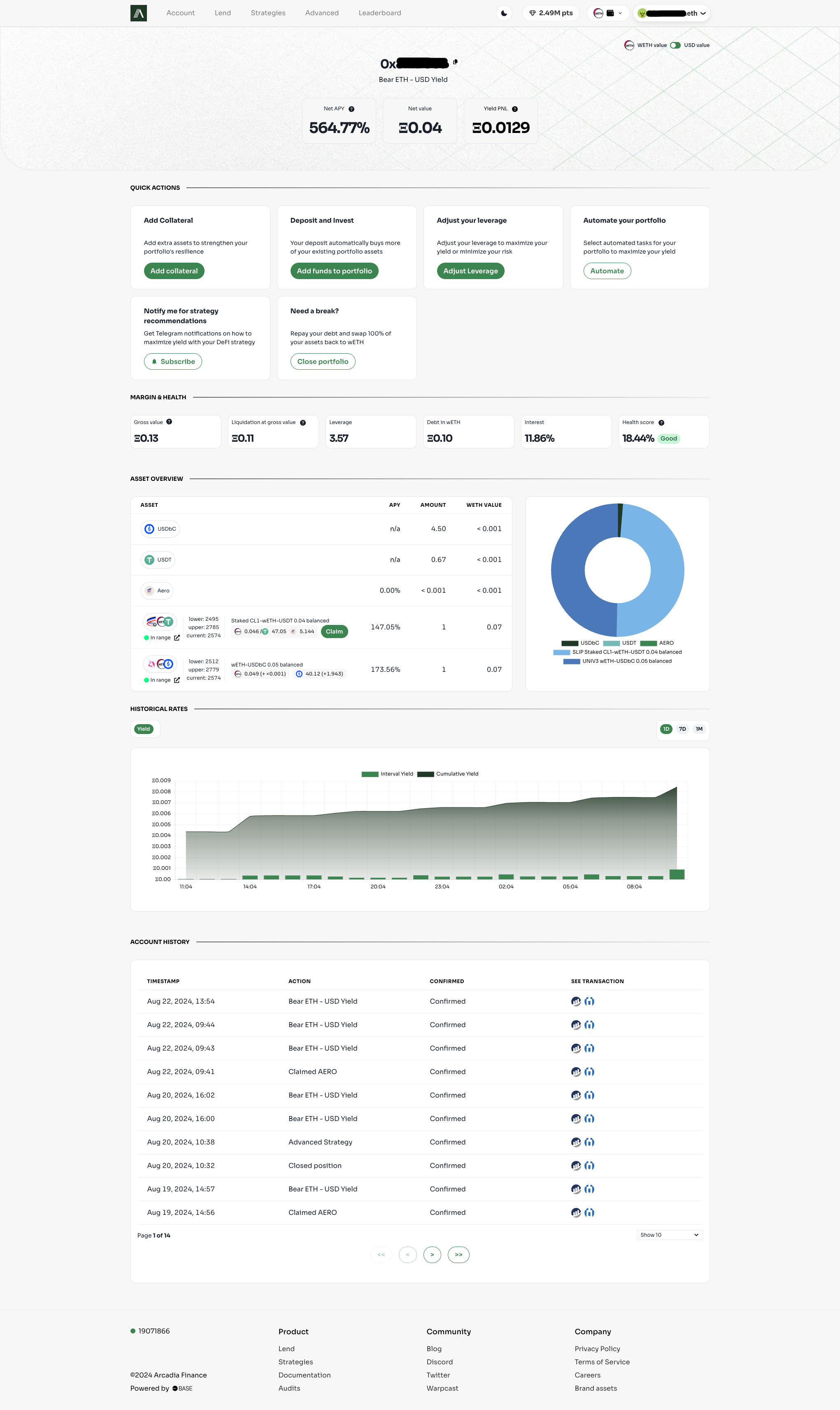
At the top of the page, you'll find your account address, which is your unique identifier on the platform. Below that, you'll see three key metrics:
1. **Net APY (Annual Percentage Yield)**: This represents the overall annualized return on your investments, taking into account all assets in your account and the interest rate. It's calculated by combining the yields from the assets within your account, considering both positive yields and the negative impact of the interest for leveraged positions.
2. **Net Value**: This is the net total value of your account. It represents your actual equity, and is calculated by subtracting the amount of debt from the total value of all assets contained in the account.
3. **Est. daily earnings**: This is the estimated daily earnings of your account, taking into account the current interest rate and the amount of assets in your account.
4. **Total yield earned (Profit and Loss)**: This shows the total yield earned using your account up to the present day. It includes any previously claimed or (auto)compounded rewards.
### Quick Actions
This section provides easy access to essential account management functions. Some actions may not be available for your account, depending on your account status.
* **Optimize**: When concentrated liquidity positions in your account are out of range, this action will automatically adjust the ranges of your positions to ensure they go back within range.
* **Add Collateral**: Quickly add extra tokens to your account without altering existing positions. This is particularly useful when you have a leveraged position near liquidation and want to avoid realizing impermanent loss.
* **Deposit and Invest**: Add collateral that will be immediately used to update your existing position or strategy. This action harvests any accumulated fees, and together with the added collateral, will increase the value of the positions within your account. This will not affect the ranges set for concentrated liquidity positions.
* **Adjust Your Leverage**: Modify the leverage in your account. Similar to the previous action, this will harvest fees. If you're adding leverage, it will increase the value of your positions. If you're removing leverage, it will decrease the value of your positions. This will not affect the ranges set for concentrated liquidity positions.
* **Automate Your Portfolio**: Access a modal to manage your automations. For the available automations, see [Asset Managers](/protocol/asset-managers).
* **Notify Me for Strategy Recommendations**: Set up Telegram notifications for important events, such as your position moving out of range, getting close to liquidation or other strategic alerts.
* **Need a Break?**: Use this to exit your position into AERO, USDC, cBBTC or WETH.
* **Withdraw**: Withdraw your assets from your account. This will not work if this causes your account to become unhealthy.
* **Repay Debt**: Repay your debt.
### Margin & Health
This section provides crucial information about your account's financial status:
* **Gross Value**: The total value of all assets in your account, including leveraged positions.
* **Liquidation at Gross Value**: This indicates the gross value threshold at which your account becomes eligible for liquidation. It's essential to monitor this to avoid forced position closures. Make sure the Gross Value never reaches this threshold!
* **Leverage**: If applicable, this displays your current leverage ratio, indicating how much borrowed capital you're using.
* **Debt**: The amount of debt you've taken, expressed in wETH, USDC or cBTC, which serves as the account's numeraire.
* **Interest**: The annualized percentage of interest you're paying on your borrowed funds.
* **Health Score**: A qualitative assessment of your account's overall financial health, considering factors like leverage, collateral, and market conditions.
### Asset Overview
This section lists all assets currently in your account, including:
* ERC20 tokens: Standard fungible tokens.
* LP (Liquidity Provider) positions: These represent your stakes in liquidity pools. Each LP position displays:
* The range of prices at which you're providing liquidity and the current price of the pool.
* Fees and rewards earned.
* For staked Slipstream positions, a button to claim your AERO rewards.
### Historical Rates
This graph visualizes the history of your yield earnings over time, allowing you to track your investment performance.
### Account History
A comprehensive log of all your account transactions, providing a clear audit trail of your activities on the platform.
# First Strategy
Tutorial: how to enter your first leveraged yield strategy on Arcadia Finance step by step.
## Intro
As new DeFi user you might be overwhelmed by all the new technical jargon you come across and may be unfamiliar on starting to earning yield by providing liquidity. Arcadia is designed to simplify your journey into earning yield by providing two options to get started. The first are curated strategies that allow you to enter well-performing liquidity pools in a few clicks. The second is for slightly more advanced users and allow you to pick any single LP (provided Arcadia supports the underlying assets) and also enter it with a few clicks.
{% embed url="" %}
## Navigating to our dapp for the first time
When you go to [arcadia.finance](http://arcadia.finance) for the first time you will be greeted by our home page. Here you’ll find a few brief sections on what we’re all about and even a list of our curated strategies that we’ll talk about later. Be sure to go over each section. Our focus today however will be on the Navigation on top of the page.

To open your first position on Arcadia you must first connect your wallet of choice to our application. You can do this by pressing the “Connect Wallet” button. Make sure the selected chain is Base L2.
## Opening your first strategy
Scroll down on the home page or navigate to the Strategies page and choose one of the curated strategies. These are strategies hand-picked by our algorithms and automatically choose the best underlying assets for the goal of each strategy.
For our example we’ll use Delta-Neutral USD. As explained on the strategies card this means we will take USD debt to open up a leveraged liquidity position in a liquidity pair of two USD-pegged stable coins. This will earn yield (from the trading happening on the underlying liquidity pool) in USD-denominated stablecoin.
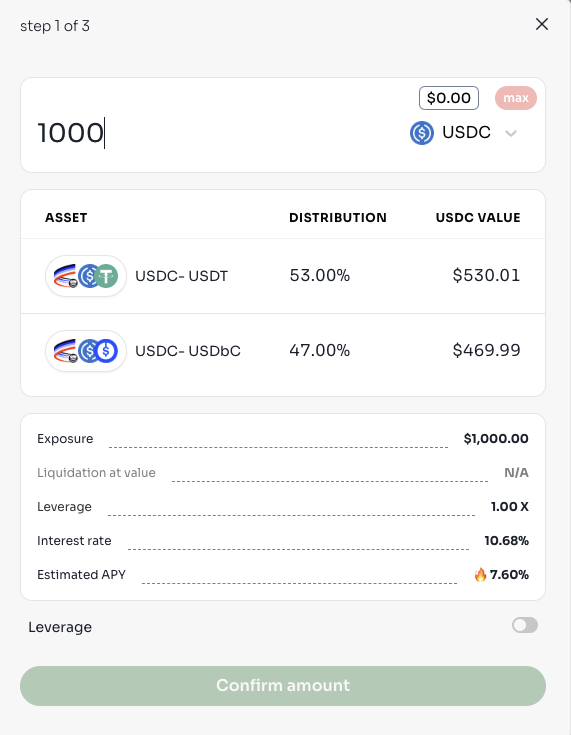
Click on ‘Open Strategy’ and a modal will pop up. This modal will guide you through 3 steps to easily open up your curated strategy. Step 1 will prompt you to input any amount of either USDC, WETH, ETH or cbBTC. You must regard the asset you deposit as a certain "value": the asset you deposit will be converted, together with any taken leverage, into the liquidity position on which you'll be earning yield. Which asset you deposit will thus have no influence on the yield nor interest rate! You will see a table which displays exactly what assets are going to be or created. After you chose your amount, click confirm to be brought to the next step.
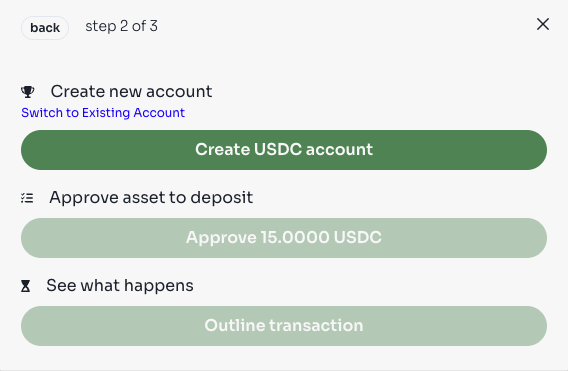
In step 2 we select the account to work with, or create a new one if you don’t have an account. An Arcadia account serves as a non-custodial smart contract wallet, will hold all the collateral assets and keeps tracks of open debt. Approve the assets for our transaction and preview what will exactly happen in the transaction by clicking Outline transaction button.
After pressing this button. An outline of the transaction will be generated and presented in step 3. In this example I use 15 USDC to open a delta-neutral usd position.
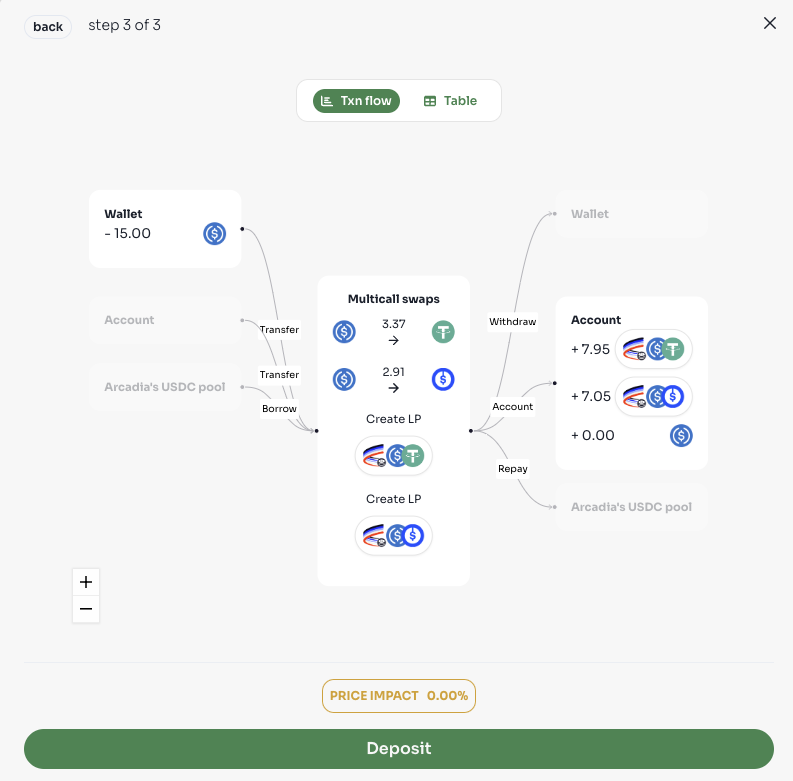
This step outlines what will happen in the protocol when your transaction is submitted. In this example you can see 15 USDC is being used from my wallet. Some of it is swapped into USDT and together with the leftover USDC a new Slipstream position is created and staked. Now the only thing that remains is pressing Deposit and signing the transaction in your wallet!
Congratulations, you just opened your first Arcadia Position. Follow the other tutorials to learn more about how to open your own strategies, how to manage your newly minted LP positions and more.
# Managing positions
Tutorial: how to manage existing positions on Arcadia — adjusting leverage, rebalancing, claiming rewards, and closing positions.
## Prerequisites
This tutorial assumes you have:
* An active Arcadia account
* At least one active position (via curated strategies or the farm tab)
## Overview
Arcadia provides multiple ways to manage your active LP (Liquidity Provider) positions. This guide covers the key areas on the account page where you can initiate transactions to optimize and manage your portfolio, with a focus on the Quick Actions section.
## Quick Actions
The Quick Actions section is your primary hub for managing your positions. It includes several important functions:
### Optimize
* A prominently colored button within the Quick Actions section
* Appears when:
* Your position is out of range, OR
* The curated strategies' APY exceeds your current asset composition APY by 5% or more
* Clicking this button will:
* Maintain your current leverage
* Claim all accumulated fees
* Rebalance your assets, maintaining the same range width around the current price
### Add Collateral
* Purpose: Increase your account's LTV (Loan-to-Value) ratio or Health score
* Note: This action does NOT rebalance existing positions
### Add Funds to Portfolio
* Increases the size of your current positions
* Choose new leverage or retain current leverage
* Note: This action does NOT rebalance existing positions, only increases the size of them
### Adjust Leverage
* Modifies the current leverage of your positions
* Process:
* Select new leverage
* Note: This action does NOT rebalance existing positions, only increases or decreases the size of them
### Automate
* Enables selection of Automation services
* Current feature: Compound fees from non-staked Slipstream and Uniswap positions
* Future feature: Auto-rebalancing automation
### Subscribe
* Sets up a Telegram bot for notifications
* Alerts you when:
* Your positions are out of range
* Your account is close to liquidation
* Optimization opportunities arise
### Close Portfolio
* Allows you to exit your position
* Repays all debt
* Convert all leftover assets to WETH, USDC, AERO or cbBTC in your account
### Withdraw
* Allows you to withdraw your assets from your account
### Repay Debt
* Allows you to repay your debt directly from your wallet
## Additional Management Features
### Claiming Fees
#### For Staked Slipstream Positions
* A claim button appears in the asset overview next to the position
* Allows you to claim AERO rewards
* Safety feature: Claiming is prevented if it would make your account vulnerable to liquidation
### Liquidation Surplus
If your account has been liquidated:
* After the auction concludes, a prominent button appears
* Location: Next to your points and wallet in the top-right navigation bar
* Function: Allows you to claim any surplus from the liquidation process
# Advanced Strategies
Tutorial: advanced farming strategies using Arcadia Spot Accounts with auto-compounding and auto-rebalancing.
## Intro
At Arcadia we not only support curated strategies, but also allow users to enter any LP of which we support the underlying tokens. This allows a user to pick a pool and range, and their leverage to open up a leveraged LP position in any of their favorite LP pools.
{% embed url="" %}
## Navigating to the farm page.
To get to the overview of all the LP pools navigate to the Farm via the link in the navbar on top of the page. When you do this you should be greeted by the following page:
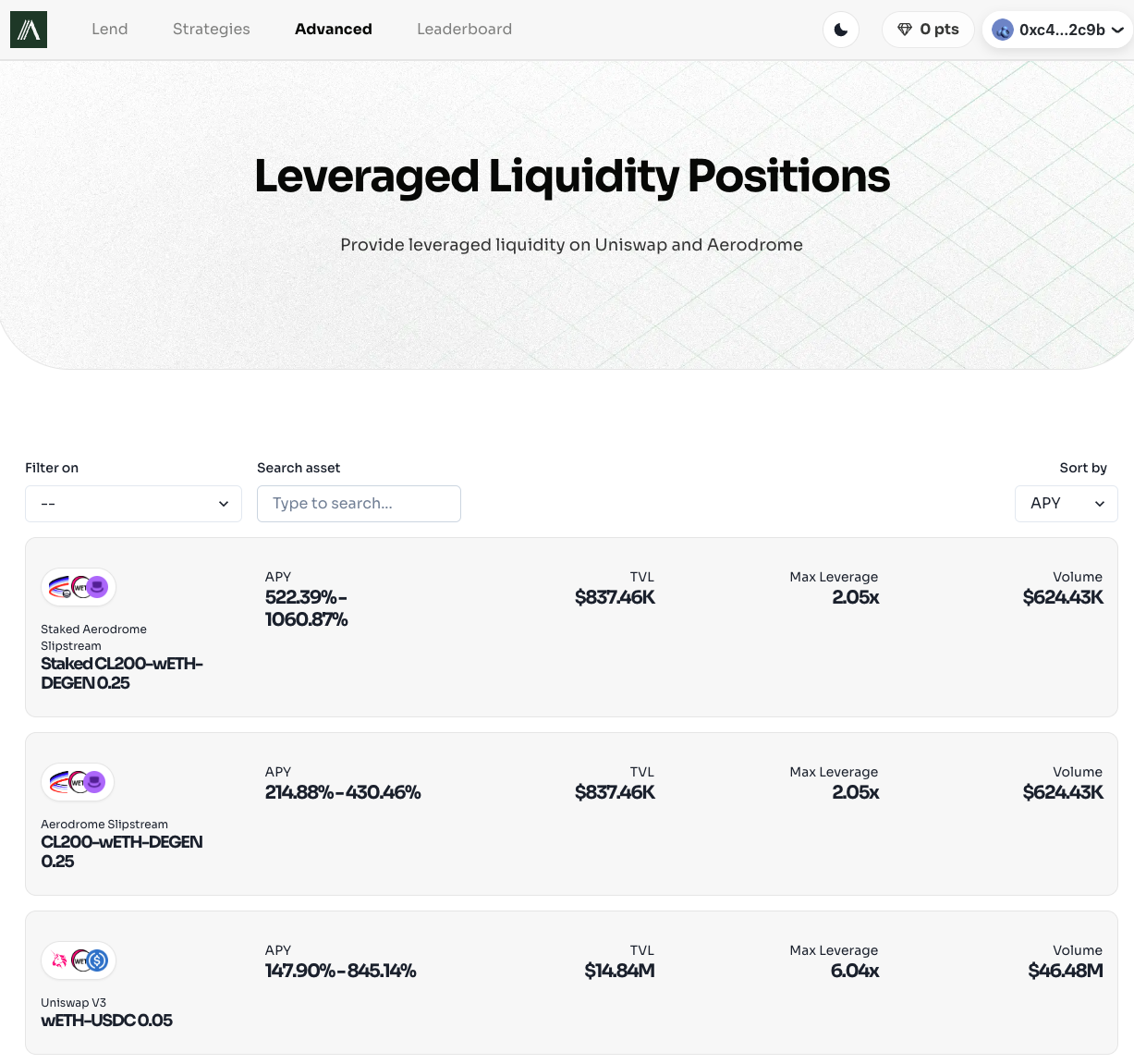
On this page you see an overview of all the pools Arcadia currently supports and some information about them. There is are filters on top where you can filter between Uniswap, Staked Slipstream, Slipstream and Aerodrome V1 pools. You can sort by APY, TVL or Volume.
Let’s open a position in Staked Slipstream wETH-Aero. Either scroll until you find the one you think you like or filter on “Staked Slipstream” and search on Aero.

You can see some information about this pool:
* Logo.
* Protocol + Pool.
* APY: the range of APYs are shown as "base APY - max leveraged APY" based on the 7 day history of the pool.
* TVL: TVL of the pool.
* Max Leverage: this is the maximum leverage you can take in an arcadia account for this asset.
* Volume: the amount traded in the past 24hr.
When you click on the pool it navigates you to the following page.
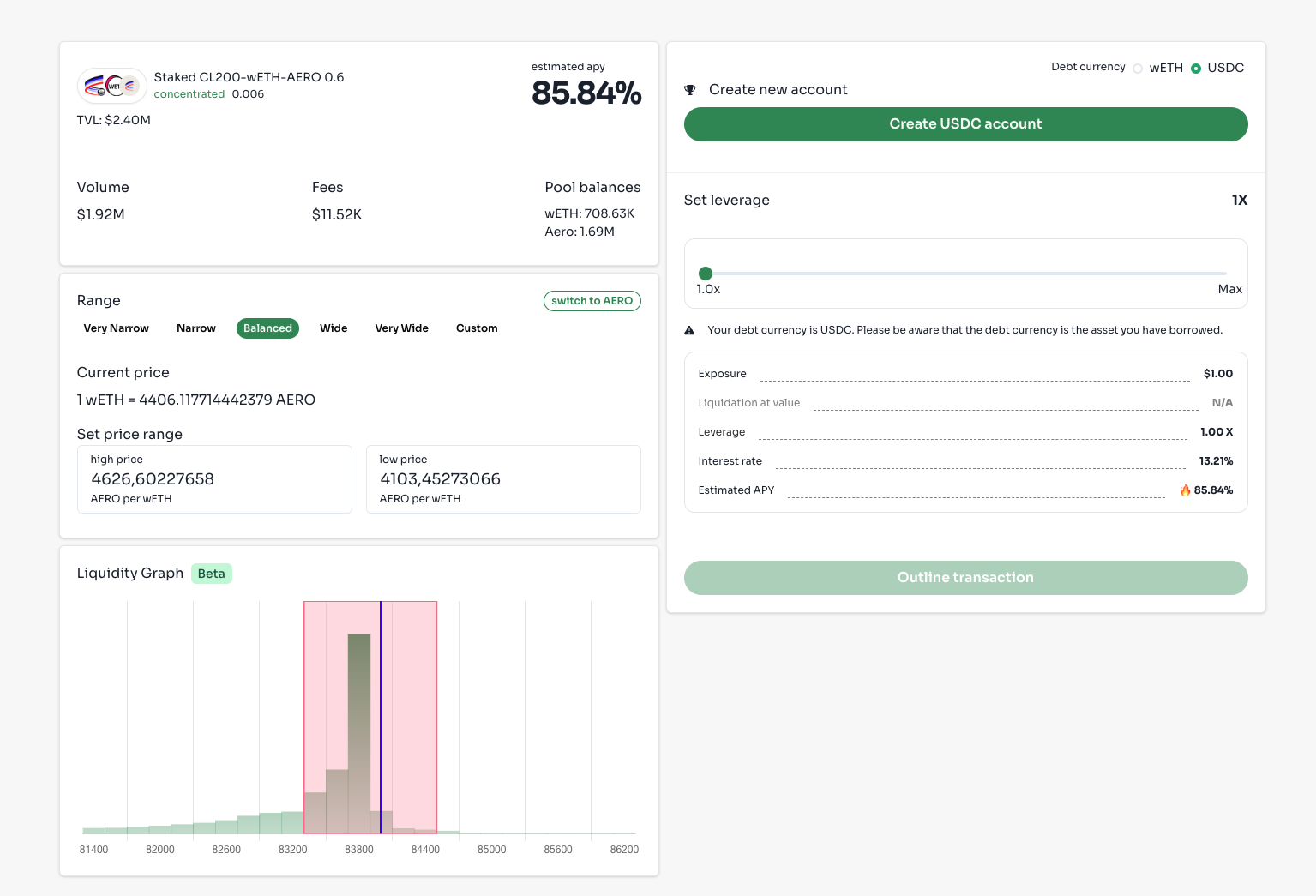
This is the general overview of an LP pool on Arcadia's Farm pools. On this page you can set the ranges to provide liquidity in (for concentrated pools only), the input amount and the leverage. If you don’t have an account yet or need an account that has a different debt token than the one you have, you can also do that here.
Let’s first select which debt token we’d like to use to open our position. Choosing this is important, as it will determine the interest rate, maximum leverage available and the asset you will be borrowing - and thus shorting!
You can do this by selecting USDC, wETH or cbBTC in the top right of the page. After you selected a debt token, you can create an account with this specific numeraire. If you already have an account you can use any of those. The debt token of the existing account should be clear by the icon.
If you use an existing account that already has some assets in it (and potentially open debt), you can choose to only use those assets and transform them into the newly selected pool. If you have a new account or want to add extra assets, you can do that by checking the "Deposit Extra funds" button. If you pressed this button an input field should appear that allows you to deposit wETH, USDC, ETH or cbBTC. Here you can input the amount you want to add to your account when opening this position.
Selecting the range is the next important step for concentrated liquidity pools. You can either use one of the 5 predetermined ranges from Very Narrow to Very Wide or select a custom range. To select a custom range you pick one of the 5 pre existing ranges that comes closest to what you want and then press custom. Two things will happen: A + and - button will appear in the set price range input and two drag-able buttons will appear on the liquidity graph. You can use either or both to fine-tune your preferred range. You can switch the base asset by clicking the "switch to ..." button on the top of the range selector window. By changing the range in which you will provide liquidity, the estimated APY on the top of the page will also change.
As a general rule, the more narrow the range is, the higher the APY will be. Note however that in narrow ranges, you will more likely be out of range and not earn any yield, and will have a higher impermanent loss. Wider ranges need less rebalancing and will therefore have lower impermanent loss, but will earn lower yield.
When you have selected your range, your account, your deposit amount and your leverage, you are (almost) ready to confirm it. If you selected ETH as a deposit asset, it'll need to be converted into wrapped ETH so Arcadia can use it. If applicable, you may need to approve the amount you selected, and lastly you can outline the transaction.\
This outline transaction screen is the familiar screen where you see exactly what would happen if you’d trigger this transaction. If you're happy with what's shown, press the confirm button to trigger a wallet action. Sign the transaction in your wallet and it will be executed onchain. You first advanced strategy is opened. The page will automatically navigate to your account page where you can now see your freshly minted LP position earning yield.
# Whitegloves VIP
Unlock VIP access for using the protocol.
Whitegloves are VIP users who come in size. Deposit a minimum value of $100k in Arcadia Farms to become a Whiteglove member and unlock special perks.
## Whiteglove Perks
**Private Channel** A direct line to the Arcadia team. No ticket queues, no waiting. For users managing real size, response time matters, especially when markets move fast.
**Unlimited Gas Sponsered Rebalances** Standard users pay per rebalance. Whitegloves don't. Rebalance as often as your strategy requires without the fee overhead compounding against your yield.
**Faster Rebalance Monitoring** Standard accounts are monitored every 15 minutes. Whiteglove accounts are monitored every minute. In volatile conditions, that gap is the difference between staying in range and sitting on an idle position. *Coming Soon*
**Account Monitoring** Proactive alerts if a position goes out of range or your health factor starts moving in the wrong direction. You don't have to watch the dashboard, we flag it when something needs attention. *Coming Soon*
**Strategy Advice** Guidance on LP range selection, pair picks, and leverage calibration. Not generic tips but advice based on current market conditions and your specific requirements.
**Express Asset Requests** Want to farm a specific pool but it's not yet available on Arcadia? We'll make it happen ASAP.
**Roadmap Input** Periodic input on what gets built next. Whiteglove users represent the most active segment of the protocol, and what they need shapes the product roadmap.
**Beta Testing** Be the first to try out new features. Early access to new strategies, integrations, and tools before they go live, so you can position ahead of the crowd.
## Whiteglove Eligibility
Anyone can become a Whiteglove member.
Deposit a minimum of $100k USD in value across your Accounts to be eligible. Only net Account value is counted, not collateral value. Deposits in Arcadia Lend do not apply.
When eligible, take a ticket on the Arcadia Discord to request your VIP access.
If your deposits fall under $100k, protocols perks are removed. Your private channel will still stay open for a period of time.
# Foundry
Arcadia Foundry: the strategy creation interface for building and deploying automated yield strategies on Arcadia.
## Arcadia Foundry
Arcadia Foundry is a tailor-made solution for protocols looking to deploy and manage onchain liquidity.
Acting as a trustless market maker, Foundry serves two core use cases:
* [**Protocol Owned Liquidity**](/users/protocols)**:** Automate liquidity management for your native token: rebalancing, bootstrapping, buybacks, and custom distribution strategies.
* [**Treasury Liquidity Management**](/foundry-intro/foundry-treasury)**:** Put idle treasury assets to work by providing liquidity in established pairs like WETH/USDC or WETH/wstETH, earning yield while deepening ecosystem liquidity.
Both are powered by the same automation infrastructure, non-custodial security model, and DAO/multi-sig compatibility.
Explore why protocols choose Foundry with the [summer.fi case study](https://paragraph.com/@arcadiafi/arcadia-foundry-summerfi-case-study).
# Benefits
Benefits of Arcadia Foundry: simplified strategy creation, one-click deployment, automated management, and built-in risk controls.
Using Foundry, teams can optimize their onchain liquidity to build deep markets, lower trading slippage, and generate sustainable trading fees instead of paying out endless incentives.
Let's take a look at the benefits:
* **End "Rented" Liquidity:** By managing your own liquidity, your protocol can achieve deep liquidity without continuously issuing tokens, turning a major capital drain into a potentially revenue-generating asset.
* **Protection against MEV and Execution Risk:** Whenever you perform an action through Arcadia, dedicated transaction emulators make sure you don't fall prey to MEV attacks or faulty transactions.
* **Strategic Bootstrapping:** If your protocol is launching a token, Arcadia facilitates organic price discovery and provides support for setting up your clAMM pool parameters to ensure deep liquidity.
* **Treasury Diversification:** Protocols often hold 100% of their treasury in their native token and lack the ETH or USDC needed to seed a pool. Arcadia provides custom strategies to manage the conversion without crashing the token price.
* **Yield on Idle Treasury Assets:** Protocols holding non-native assets like USDC, WETH, or wstETH can deploy them as concentrated liquidity in established pairs, earning trading fees instead of leaving them idle.
* **Operational Simplicity:** Arcadia's architecture is modular and can manage your liquidity across multiple venues (including Uniswap V3/V4, Aerodrome, etc.) atomically, with automated rebalancing for your liquidity ranges based on our proprietary algorithms.
* **Capital Efficiency:** Arcadia ensures that the capital you deploy is utilized as efficiently as possible, meaning you can achieve the same market depth with a fraction of the capital.
* **Better Trader Experience:** By concentrating liquidity around the active price, Arcadia ensures that traders experience minimal slippage, making the ecosystem more attractive to trade in.
* **Non-Custodial Security:** Arcadia provides a trustless structure where the protocol retains full ownership of the assets.
* **DAO-enabled:** Is your project structured as a DAO? Arcadia readily integrates with Safe and Fireblocks multi-sig wallets so your DAO retains custody without the need for micro-management, thanks to our automations.
# Protocol Owned Liquidity
Protocol Owned Liquidity: how protocols use Arcadia Foundry to manage liquidity for their native token with automated strategies.
Protocols use Foundry to manage liquidity for their native token. Instead of renting liquidity through emissions or incentive programs, protocols deploy their own assets and let Arcadia's automations handle position management.
Arcadia migrates existing liquidity positions to an active Foundry strategy in a single transaction, ensuring there is never a liquidity gap during migration.
## Strategies
A non-exhaustive list of strategies tailored for PoL:
#### Efficient Rebalancing for Capital Preservation
PoL deployments require regular re-calibration of position ranges to optimize for trading depth. Rebalancing is optimized for capital preservation, using organic yields to offset impermanent loss.
#### Inventory Rebalancing
Standard rebalancing can cause negative price impact when executed in size. Arcadia's tooling allows inventory rebalancing, which mitigates negative price impact.
#### Custom PoL Strategy
Custom strategies, such as padded distributions to support token price floors and increase depth in high-volume price areas.
#### Take Profit with Zero Price Impact
Withdraw assets from liquidity positions without direct price impact or temporarily removing the main liquidity position.
#### Structured Buybacks
Buybacks can be automated and executed in a structured way to maximise accumulation.
## Yield
All yield comes from trading fees that traders pay when they swap through the underlying AMM pools. Staked positions (e.g., staked Aerodrome) earn token emissions rather than trading fees.
Earned fees and rewards can be auto-compounded back into the position or claimed to the protocol wallet via [Compounders](/protocol/asset-managers/compounders) and [Yield Claimers](/protocol/asset-managers/yield-claimers).
## Risks
Protocol owned liquidity is exposed to:
* Smart contract risks
* Market risks
* Impermanent loss
And depending if margin is used or not:
* Interest rate risk (interest rate can exceed yields)
* Liquidation risk
# Treasury Management
Treasury Liquidity Management: how protocols deploy treasury assets into established AMM pairs for yield using Arcadia Foundry.
Protocols holding treasury assets like USDC, WETH, or wstETH can deploy them as concentrated liquidity in established AMM pairs. This generates yield from trading fees while deepening ecosystem liquidity, without requiring the treasury team to actively manage positions.
For managing liquidity for your native token, see [Protocol Owned Liquidity](/foundry-intro/foundry-pol).
## Why Deploy Treasury Liquidity?
* **Yield on idle assets.** Treasury holdings sitting in a wallet or multisig earn nothing. Deploying them as concentrated liquidity earns trading fees from the underlying AMM pool.
* **Ecosystem liquidity.** Deeper liquidity in major pairs reduces slippage for traders and makes the ecosystem more attractive for protocols that depend on liquid markets (e.g., lending vaults, structured products).
* **Revenue diversification.** Fee income is independent of token emissions or governance token price.
## Strategies
#### Active Liquidity Management
Deploy assets into a pair with automated [Rebalancers](/protocol/asset-managers/rebalancers) that actively manage the position: adjusting ranges, optimizing fee capture, and keeping liquidity productive. Earned fees are auto-compounded or claimed to the treasury wallet.
#### Hedged Liquidity Provisioning
For volatile pairs like WETH/USDC, impermanent loss can be significant. To mitigate this, a treasury can borrow one of the two assets (below 2x leverage) against the LP position, creating a hedge similar to a [pseudo delta neutral](/deep-dives/delta-neutral-strategies) strategy. The debt offsets the directional exposure of the LP, reducing the portfolio's sensitivity to price movements. This comes at the cost of interest on the borrowed amount, but can substantially reduce IL.
#### Pair Selection by Risk Profile
| Category | Examples | IL Profile | Yield Profile |
| ---------- | ----------------------- | ---------- | ---------------- |
| Correlated | WETH/wstETH, cbETH/WETH | Low | Steady |
| Volatile | WETH/USDC, WETH/cbBTC | Higher | Higher potential |
| Stable | USDC/DAI | Minimal | Lowest |
Correlated pairs have structurally low IL and predictable returns. Volatile pairs offer higher fee APYs but benefit from hedging.
## Yield
Yield comes from trading fees earned on the LP position. Staked positions (e.g., staked Aerodrome) earn token emissions rather than trading fees.
Earned fees and rewards can be auto-compounded back into the position or claimed to the treasury wallet via [Compounders](/protocol/asset-managers/compounders) and [Yield Claimers](/protocol/asset-managers/yield-claimers).
## Impermanent Loss
Concentrated liquidity positions are subject to impermanent loss (IL). When the relative price of the two assets changes, the position's value diverges from simply holding the assets. Rebalancing realizes this IL: the old position is closed and a new one is opened at a new range, locking in whatever divergence has occurred.
Yield vs IL depends on:
* **Pair type.** Correlated pairs have structurally lower IL. Volatile pairs have higher IL but also higher fee income.
* **Range width.** Wider ranges reduce rebalancing frequency and IL but earn less fees. Tighter ranges earn more but rebalance more often. Arcadia's algorithms optimize this tradeoff based on pool characteristics and market conditions.
* **Hedging.** Borrowing against the LP position to offset directional exposure reduces IL on volatile pairs.
For a detailed breakdown of rebalancing mechanics and costs, see the [Rebalancers deep dive](/deep-dives/rebalancers) and the [cost overview](/protocol/asset-managers/rebalancers#costs-and-fees).
## Risks
Treasury liquidity positions are exposed to:
* **Smart contract risk.** See [Audits](/security-and-risk/audits).
* **Market risk and impermanent loss.** Pair selection, range width, and hedging are the primary levers to manage this.
* **Interest rate risk**, if hedging with debt, the borrow rate can exceed the IL reduction benefit.
* **Liquidation risk**, if hedging with debt. See [Margin Calculations](/protocol/margin-calculations-and-requirements).
When no leverage is used, there is no interest rate or liquidation risk.
# Dashboard
Tutorial: using the Arcadia Foundry dashboard to create, monitor, and manage yield strategies.
Visit your customized Foundry dashboard and connect your wallet to get started. Make sure to connect your whitelisted wallet.
## Your Dashboard
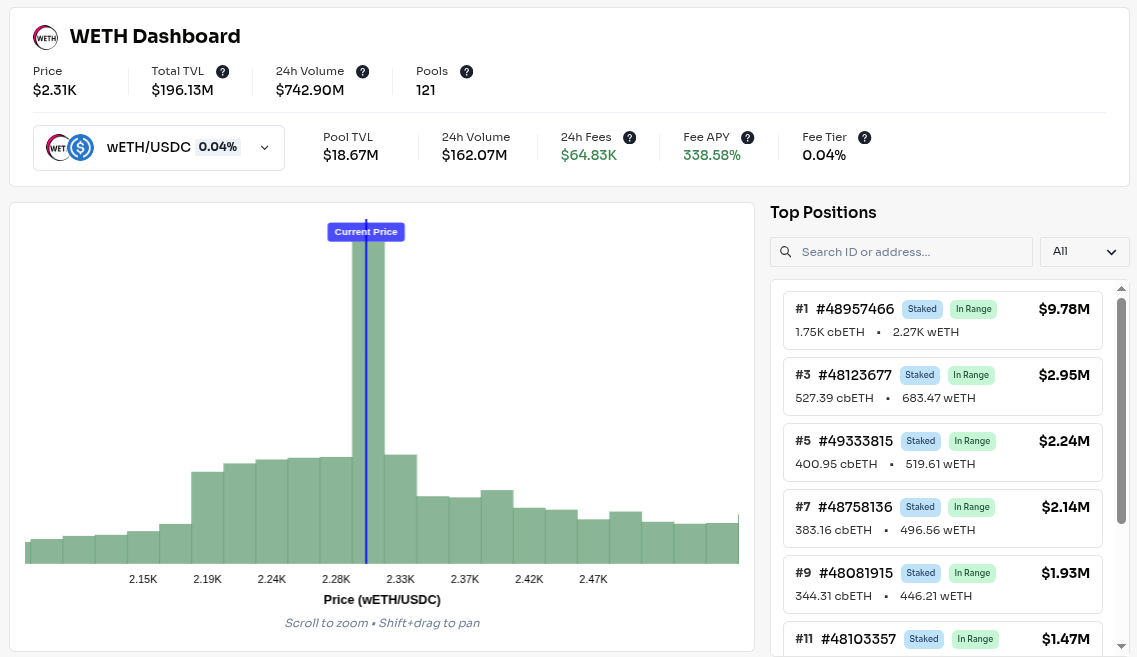
* **Metrics:** On top of the page you find general metrics and pool-specific metrics for your selected pairs. Hover over the question marks to learn more.
* **The Liquidity Graph:** On the left side you find the onchain liquidity distribution for your selected pool. This shows how much liquidity is present for each individual tick.
* **Top Positions:** On the right side you find a list of the biggest positions for this pool. Click on a single position to see its range and size projected on the graph.
* **Filter:** You can filter this list by wallet address, by position ID, or by staked/unstaked (only for Aerodrome Slipstream positions).
## Your Positions
View your liquidity positions for the token pair. Click on *View Account* to visit the position's tracking and performance page.
# Position Wizard
Arcadia Foundry Position Wizard: guided interface for creating optimized LP positions with leverage and automation.
To create a new liquidity position, select the Position Wizard.
## Quick Setup
Arcadia pre-loads a configuration tailored to your specific requirements, visible in the Default Configuration Preview and selected with Quick Setup.
After reviewing the setup, execute the transaction steps with a wallet of your choice to deploy a liquidity position. **Arcadia is fully compatible with Safe multi-sig solutions**.
*Safe Wallet: If you access Arcadia through your Gnosis Safe interface, you can queue the transactions straight into your Safe. Make sure to select ‘Safe Wallet’ in the dropdown next to ‘Ready to Execute’. Otherwise, export a Batch Json file to import manually into your multi-sig setup.* 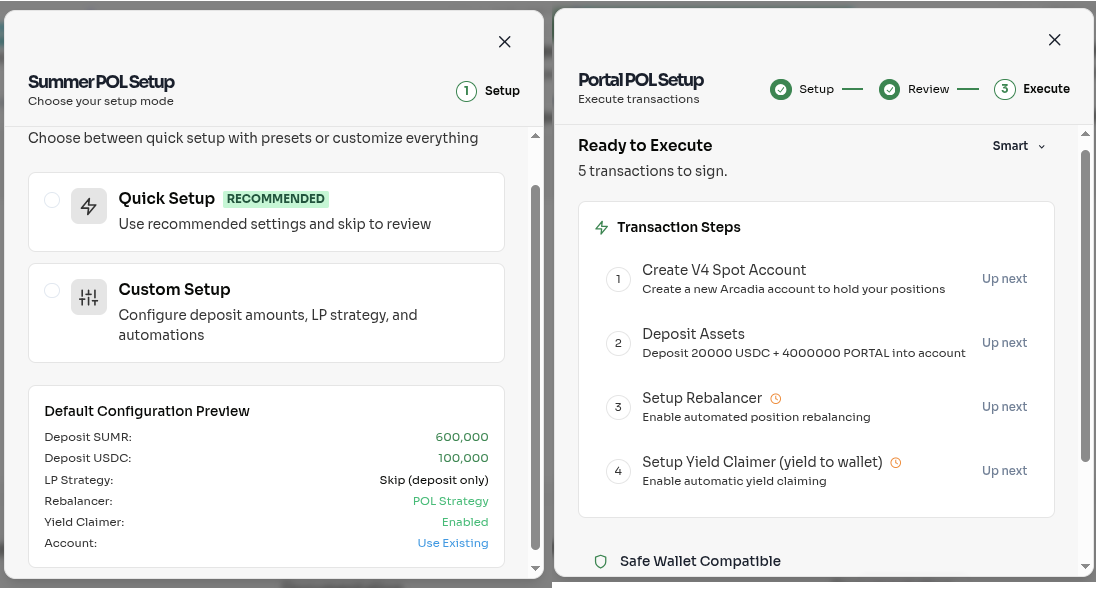
## Custom Setup
Your setup can be fully customized to your requirements using the Custom Setup flow.
* **Arcadia Account:** Choose whether you want to create a new account or use one of your existing Arcadia accounts. If you choose an existing account, old settings will be overridden and tokens in that account converted as appropriate.
* **Deposit Assets:** Choose how much of the assets you want to deposit. Deposit in equal amounts for a 50:50 balanced position, using the ‘Equal USD value’ toggle.
* **LP Position:** Choose how you want to set up your liquidity position.
* **Create New LP:** Create a new position, with preconfigured data provided by Arcadia.
* **Import Existing LP:** Import a position you already minted on Uniswap or Aerodrome.
* **Migrate Basic LP:** Convert a vAMM position into a clAMM position. If a clAMM pool does not yet exist for your token, a new one will be created.
* **Skip LP Creation:** Let Arcadia Asset Managers create a position on your behalf, using your deposited assets and/or your existing position. Creation of the position is automated and optimized, especially useful for time-sensitive launches and multi-sig deployments.
* **Automations:** Set up automated strategies to manage your liquidity.
* **Rebalancer Strategy:** Choose how you want your positions to be rebalanced. Position ranges are configured by Arcadia on your behalf.
* **Auto-Claimer:** Claims rewards and sends it to your account or your wallet.
* **Auto-Compounder:** Claims rewards and reinvests them into your position.
* **Ready to Execute:** Sign all transaction steps. Use the drop down button to select:
* **Smart:** Execute most transactions with one single signature where possible, with complex transactions requiring a dedicated signature.
* **Auto:** Execute all transactions one after another, automatically asking for confirmation in your wallet once the previous transaction is completed.
* **Manual:** Requires manually clicking to launch the next transaction.
* **Safe Wallet:** If you access Arcadia through your Gnosis Safe interface, you can queue the transactions straight into your Safe. Otherwise, export a Batch Json file to import manually into your multi-sig setup.
# Governance
# Arcadia DAO
Arcadia DAO structure, voting mechanisms, and how AAA token holders participate in protocol governance.
## Why a DAO?
As Arcadia evolves, it is essential to ensure that the protocol becomes a sustainable, community-driven entity.
Our DAO governance structure is designed around three essential principles that foster a vibrant and resilient community: **predictability, mutual interest, and visibility.** Adhering to these pillars ensures every stakeholder has the clarity, motivation, and insight necessary to participate meaningfully.
1. **Predictability**: By clearly outlining governance rules and token distribution methods, we enable participants to anticipate how decisions are made and resources are allocated. This consistency supports steady, long-term thinking rather than reactive, short-term speculation.
2. **Mutual Interest**: Our incentive models and consensus processes encourage contributors, token holders, and builders to pursue objectives that benefit the ecosystem as a whole. When incentives are well-aligned, collaboration thrives, and the community naturally develops robust solutions.
3. **Visibility**: Transparent documentation, open discussions, and regular reporting safeguard community confidence. Shared information helps every member understand and evaluate decisions, creating a culture of accountability and constructive feedback.
Through this framework, our goal is to foster a sense of unity and shared accountability that transforms traditional “winner-takes-all” competition into collective progress.
## Timeline
Arcadia's governance will transition to a DAO model through a phased approach, empowering the community to take an increasingly active role in shaping the protocol's future.
**Phase 0 – Laying the Foundations (Completed)**
* **Focus:** Finding early signs of user demand for Arcadia. Without this, nothing else matters.
* **Achievements:** Developed a robust product, onboarded initial users, and validated the protocol’s value proposition.
* **Outcome:** A solid groundwork for community-driven growth, ensuring future governance decisions are informed by early user insights.
**Upcoming: Phase 1 – Community First**
* **Governance Evolution:**
* Introduce community voting on non-critical decisions (e.g., feature suggestions, integrations, airdrop allocations, and contributor/grant distributions).
* Core team retains final decision-making authority but uses community input to guide direction.
* **Initiatives:**
* Launch community grants for non-critical development and operational tasks.
* Begin building community trust, engagement, and alignment with the long-term vision.
**Phase 2 – Soft DAO**
* **Governance Evolution:**
* Implement delegated voting mechanisms to strengthen community influence over the roadmap.
* Update multisig structures to include elected community delegates, decentralizing control over treasury operations.
* **Initiatives:**
* Community management of the DAO treasury (funding grants, partnerships, emissions, incentives, airdrops).
* Formalize community-driven decision-making processes beyond advisory roles.
**Phase 3 – Full DAO**
* **Governance Evolution:**
* Transition to fully on-chain governance systems, eliminating reliance on multisigs.
* Complete decoupling of Arcadia from the founding development company, enabling self-sustaining, community-led operations.
* **Initiatives:**
* Solidify a fully decentralized governance framework, ensuring long-term resilience and community stewardship.
* Establish Arcadia as a fully autonomous, community-owned protocol.
***
**End State**
A mature DAO where governance, treasury management, and roadmap decisions rest entirely with the community—fostering long-term protocol stability, trust, and broad stakeholder alignment.
# Token Mechanics
AAA token mechanics: supply, distribution, stAAA staking, utility within the protocol, and fee rebate eligibility.
### AAA & stAAA Token Overview
The Arcadia ecosystem is powered by two core tokens: **AAA** and **stAAA**. Together, they provide governance, utility, and incentive alignment for all participants in the protocol.
## AAA – The Utility Token
`AAA` is an ERC-20 token and the foundational utility token of the Arcadia protocol. It is designed to be **minimal, immutable, and not upgradeable**. This simplicity ensures that its contract address, total supply, and core properties remain constant throughout the life of the protocol.
While `AAA` itself is a passive asset, **its full utility is unlocked by staking it to receive `stAAA`.**
## stAAA – The Governance & Reward Layer
`stAAA` is the **staked version of AAA**, implemented as a multi-reward ERC-20 token. **stAAA is how users actively take part in Arcadia** — from governance to accessing protocol rewards and revenue streams.
### Key Features:
* **Governance**: stAAA holders vote on proposals in the Arcadia DAO.
* **Fee Sharing**: stAAA may receive a share of protocol revenue streams, not just emissions.
* **Access**: Unlocks advanced yield strategies and ecosystem tools.
* **Multi-Reward Stream**: Beyond `AAA` emissions, stAAA can receive any ERC-20 token captured by the protocol, such as periodic rewards through ecosystem grants.
### Why Not Only Use stAAA?
The logic behind staking, governance, and fund distribution is likely to evolve over time. Rather than tying these mechanics directly to the token and relying on proxies or upgradable token contracts, Arcadia separates the roles:
* **AAA** stays simple, fixed, and universally recognizable.
* **stAAA** encapsulates all advanced features — and can evolve independently of the base token.
This architecture ensures **future flexibility** without compromising **contract stability**.
## Staking & Unstaking
* **1:1 Staking**: Stake `AAA` to mint `stAAA`.
* **Standard Unstake**: 30-day waiting period to unlock your full `AAA` balance. You may queue multiple unstake requests at once. Each unstake request is independent of the others. An unstake request cannot be cancelled once it has been queued.
* **Early Withdrawal**: Access `AAA` before the 30-day period ends, with a time-based dynamic penalty applied. The penalty starts at 90% and decreases linearly over the next 30 days to 0%. If multiple unstakes are queued, each individual unstake request will be subject to its own timeline and own penalty.
This system balances long-term commitment with optional liquidity flexibility.
## Fee Sharing
stAAA holders can be made eligible for a share of fees captured by various parts of the Arcadia ecosystem:
* In **Arcadia Strategies**, this includes:
* A portion of the interest paid by borrowers to lenders.
* A portion of liquidation fees.
* For **Arcadia tooling** (e.g. the Rebalancer or Compounder), specific fees can be redirected to stAAA holders.
As protocol usage grows, these sources can generate a diversified and robust stream of rewards for stakers — in `AAA` and other ERC-20 tokens.
## Utility Highlights
* **Delegation & Voting**: Active participation in shaping Arcadia’s future.
* **Ecosystem Incentivization**: Real yield from actual protocol usage.
* **Advanced Features**: Access to optimized strategies and tools on Arcadia Finance.
* **Grants Program**: `AAA` supports ecosystem growth by funding third-party developers and integrations.
## Token Distribution
| Category | Allocation (tokens) | Allocation (%) | Vesting Schedule |
| ---------------- | ------------------- | -------------- | ----------------------------------------------------------------------------------------------------------------- |
| Investors | 15,000,000 | 15% | 1 year vesting starting at TGE. All investors under the same schedule |
| Treasury | 15,000,000 | 15% | Unlocked but subject to governance. Allocated for future strategic investors and long-term strategic initiatives. |
| Core Team | 20,000,000 | 20% | 2 year vesting starting at TGE. |
| Community | 50,000,000 | 50% | Gradual release over 3 years and subject to governance |
| **Total Supply** | **100,000,000** | **100%** | - |
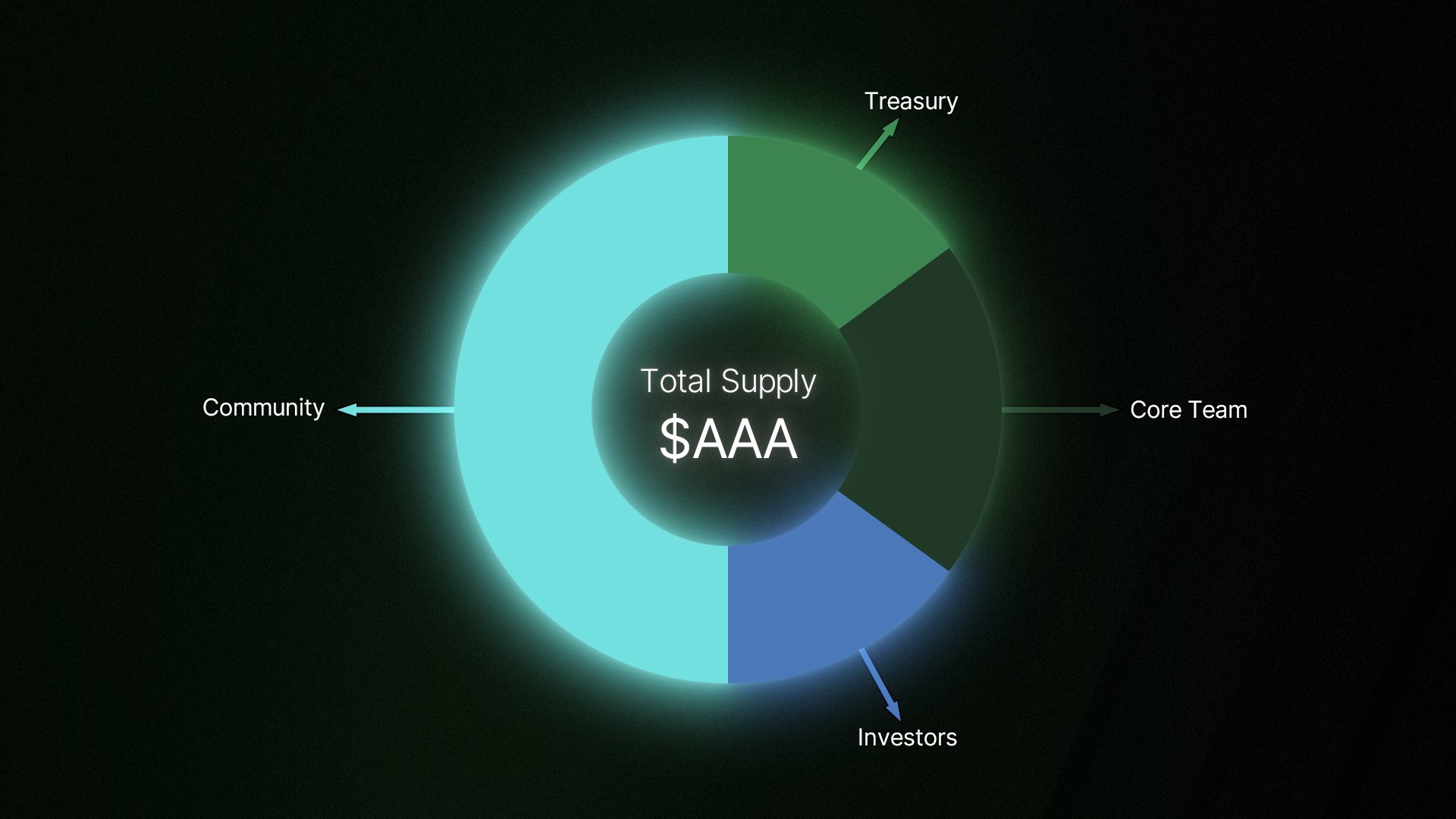
**Community Breakdown**
Airdrops (20%)
* The first airdrop will have a 10% allocation, distributed to V2 users, as per their point allocation, and V1 users, as per their usage of the v1 protocol during the time it was live.
* The DAO will decide on the remaining 10% airdrop allocation.
Liquidity Provision (20%)
* 5% for initial launch on aerodrome pool
* 15% for a liquidity mining program
**Contributors and grants (5%)**
* Incentivize community participation in initiatives to grow Arcadia.
* The DAO will oversee this allocation.
**Public token sale (5%)**
* Designed to give protocol ownership to the Arcadia community, enabling more participants to become Arcadia stakeholders.
## Supply Schedule
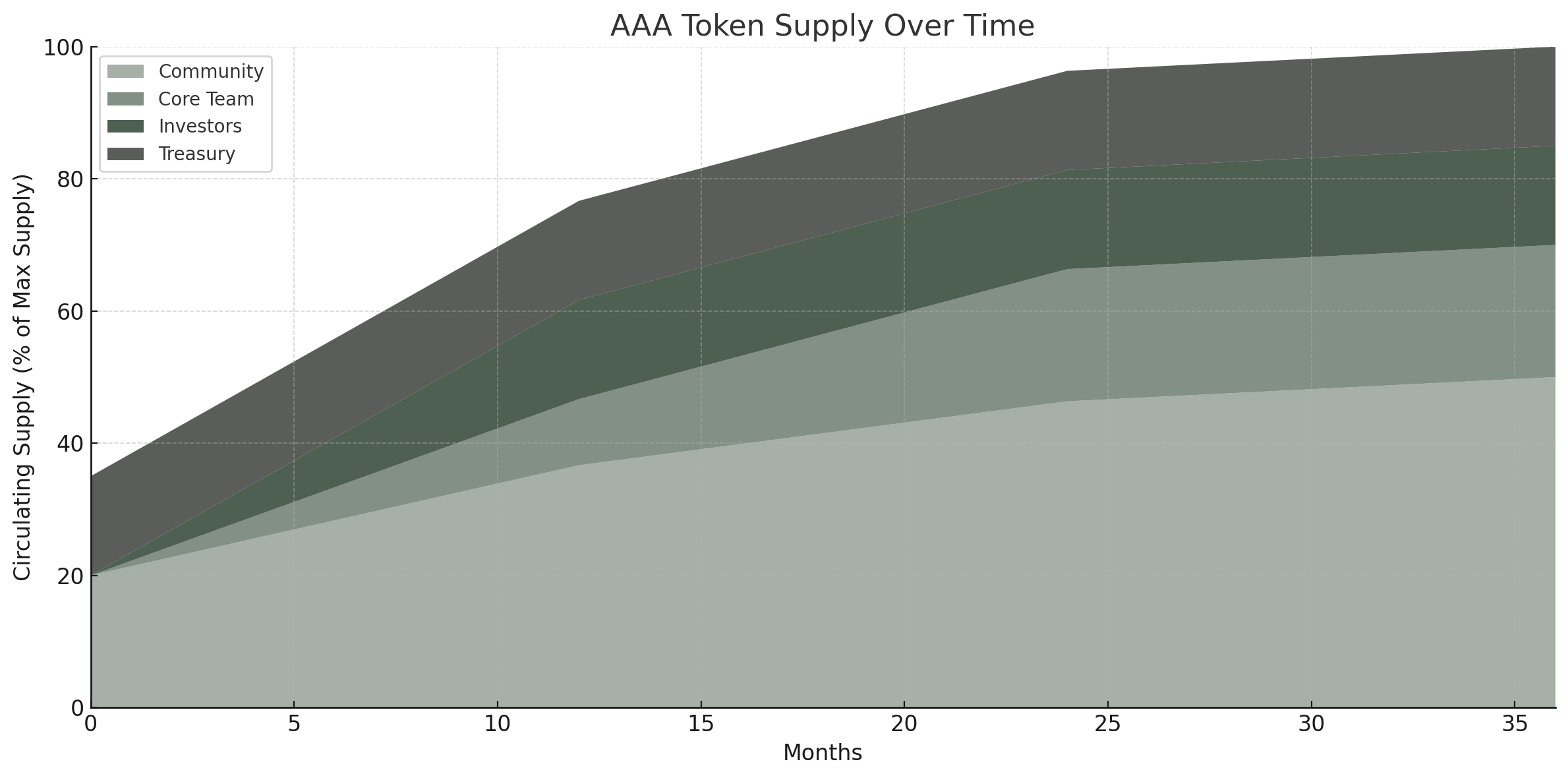
**At TGE**
* 35% of supply in circulation
**At Year 1**
* Investors fully vested (15%)
* Public sale (5%)
* Core team partially vested (10%)
* Liquidity mining releases (10%)
* 75% of supply in circulation
**At Year 2**
* Core team fully vested (20%)
* Additional 3% liquidity mining released (3%)
* 83% of supply in circulation
**At Year 3**
* Final 2% liquidity mining allocation released during Year 3.
* 85% of supply in circulation
❗The remaining allocation earmarked for airdrops and contributors/grants will be allocated by the DAO.
# Token Benefits
Overview of benefits unlocked by holding and staking AAA tokens within the Arcadia protocol.
Holding and staking AAA unlocks tangible benefits across the Arcadia protocol. The more you stake, the more you get.
## Staking AAA into stAAA
Most benefits require **stAAA**, the staked version of AAA. Staking is 1:1 — stake AAA to mint stAAA and start unlocking perks immediately. For full details on staking mechanics, see [Tokenomics](/governance/tokenomics).
Visit to start staking.
## Rebalancer Gas Allowance
stAAA holders get a larger free gas allowance for automating their concentrated liquidity positions. The allowance is measured in the chain's **native token**, not in a number of rebalances, so what it buys depends on what gas costs at the time. A rebalance on Optimism and one on Ethereum differ in price by more than a thousand times, so a fixed count meant something different on every chain.
Every **3,000 stAAA** staked adds another typical Base rebalance per day.
| stAAA staked | Daily allowance | Weekly allowance |
| :----------: | :-------------: | :--------------: |
| 0 | 0.00006 | 0.0003 |
| 3,000 | 0.00009 | 0.00045 |
| 6,000 | 0.00012 | 0.0006 |
| 9,000 | 0.00015 | 0.00075 |
| 30,000 | 0.00036 | 0.0018 |
Figures are native token. At $2,500 per ETH the base allowance is about $0.15 a day and $0.75 a week.
At typical gas prices the base allowance holds 2 rebalances in a day on Base and 12 on Optimism. Those are single-day figures: a rebalance has to fit the weekly allowance too, so what you get every day is about 1.4 on Base and about 8.6 on Optimism. Staking 3,000 stAAA takes those to about 2.1 and about 12.9.
On Ethereum and Robinhood a single rebalance costs many days of the allowance, so the free allowance does not fund one. Positions on those chains rebalance when their own fees cover the gas, or when the owner pays in AAA.
Every transaction is simulated immediately before it is sent. The allowance is charged the measured gas.
The allowance is shared across all of an owner's accounts and across chains, so splitting a position between accounts does not multiply it. Holding AAA is not enough, it has to be staked.
For the full decision logic, including the checks that bypass the allowance entirely, see [Rebalancers](/protocol/asset-managers/rebalancers).
## Pay Gas with AAA
Approve AAA to the Gas Relayer and the gas cost is converted to AAA and charged when a rebalance runs, whatever your allowance has left. Approving is treated as "run it now", so it takes priority over waiting for cheaper gas.
## Rewards
stAAA holders receive AAA emissions as staking rewards. Additional rewards are made available from time to time depending on certain campaigns.
## Governance
stAAA is the governance token of Arcadia. Holders can vote on proposals in the Arcadia DAO, shaping protocol parameters, fee structures, treasury allocations, and the product roadmap.
# Fee Rebates
How ART holders earn fee rebates on Arcadia: rebate tiers, calculation methodology, and claiming process.
## Introduction
As outlined in the [Arcadia Recovery Plan](https://arcadiafinance.notion.site/Arcadia-Recovery-Plan-23e04482afa78034aceecd9897962994), Arcadia users can redeem Recovery Tokens ($ART) for protocol fees.\
Fee rebates are denominated in and redeemable for USDC.
There are two Fee Rebate redemption mechanisms, active and passive. Active rebates allow for the fastest value redemption, while passive rebates are hands-off and do not require use of the protocol.
Recovery Tokens can optionally be swapped for other tokens on third party DEXs ($ART is a standard ERC20 token). Note that Arcadia does not manage these DEXs, neither guarantees liquidity nor price.
## Active Fee Rebates
Active users of the Arcadia protocol can rebate (part of) the costs they incur on the following fees:
* Yield success Fees: This is the fee charged to users on the yield generated through the protocol.
* Fees paid for the Auto-Rebalancer and Auto-Compounder: These are the fees charged to users on the amount swapped when using the automated rebalancing and/or compounding. These fees are currently set to 0 at Arcadia.
Active fee rebates can be claimed using unstaked ART. Users can at any time during an epoch claim their fee rebates, whether or not they had unstaked ART at the beginning of the epoch. Users can unstake their ART or acquire it elsewhere at any time during the epoch.
### Mechanism
The accounting and distribution follows a schedule measured in epochs. Each epoch counts 7 days, with a new epoch starting every Monday at 12:00 UTC.
1. During an epoch I, all transactions that generate fees are accounted for in the asset in which the fee is collected.
2. At the end of epoch I, the total amount of eligible fees collected per token and per user is calculated, and all collected tokens are swapped to USDC.
3. Each user is eligible to redeem up to an amount of USDC equivalent to their share of eligible fees collected: If a user generated 10% of the total eligible fees collected for a certain TOKEN, then they will be eligible for 10% of the USDC that was received after swapping all collected TOKEN to USDC.
4. Users have 1 epoch (during epoch II) to redeem their Recovery Tokens for USDC.
5. Non-redeemed fee rebates are not rolled over. After epoch II ends, users will no longer be able to redeem the fee rebates generated during epoch I. Instead, the fee rebates for epoch II will become available for redemption or purchases of ART on open markets.
## Passive Fee Rebates
Recovery Token holders who do not actively use the Arcadia protocol or prefer a hands-off approach can passively redeem their Recovery Tokens for USDC.
To do so, holders stake their Recovery Tokens through the Arcadia dApp. The staked balances when USDC is made available to the passive redeem contract are taken into account to calculate the amount of USDC each staker can redeem. As such, it is important to keep ART staked to not miss out on any USDC redemptions.\
Passive fee redemptions roll over, meaning you do not lose your redemption should you decide not to claim during an epoch.
### Mechanism
The accounting and distribution follows the same epochs as the Active Fee Rebates.
1. After epoch II ends, the total amount of non-redeemed USDC from epoch I is calculated.
2. Up to 50% of the remaining USDC is used to purchase ART on the open market and/or distributed to $ART stakers pro rata their stake: If you hold 15% of the staked Recovery Tokens, you receive 15% of the distributed USDC.
3. Users can at all times stake and unstake their Recovery Tokens. There are no penalties or waiting periods.
4. Users who do not claim during epoch II, will have the ability to claim their USDC at any later time: the balances to claim roll over to the next epoch.
## Contract Addresses
| Token | Address | Chain |
| ---------------------------- | ------------------------------------------ | ----- |
| Arcadia Recovery Token (ART) | 0x9089397444EF32F1777d2A9d0c0886592C8eF449 | Base |
| Staked ART | 0x3889255C5a9A55137DfdF870a0C30A285978176A | Base |
# Protocol
Technical documentation for the Arcadia Protocol: DeFi Accounts, Flash Actions, Creditors, margin calculations, liquidations, Asset Managers, asset pricing, and fees.
# Arcadia DeFi Accounts
Technical details of Arcadia DeFi Accounts: Factory contract, Account versions, Spot vs Margin accounts, deposit/withdrawal mechanics, and ownership model.
Arcadia Accounts sit at the center of the Arcadia Protocol. They are built to optimise management of assets and financial contracts within DeFi.
The Accounts are responsible for the following actions:
* They hold their owners assets.
* They are the interface to manage assets (either by the owner itself, by automations, by trusted third parties or by any other type of asset manager).
* They can be used as margin Accounts, where the total value of the assets held by the Accounts is used to back liabilities issued against the Account.
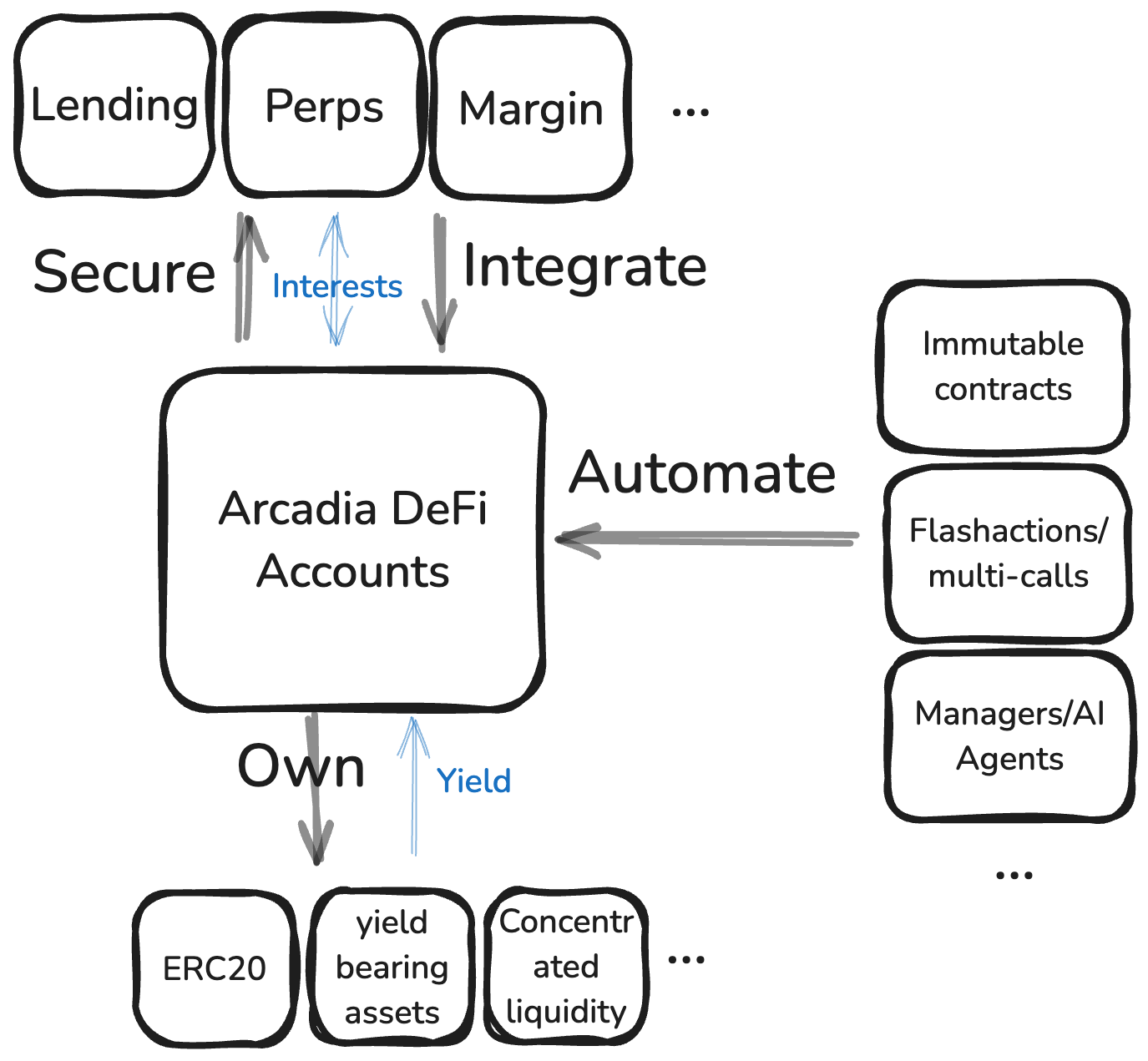
## Deployment and ownership
Users can create one or more Arcadia Accounts through the Arcadia Factory. Each Arcadia Account is a separate smart contract, owned by one single user. When creating an Account, the user can specify a number of parameters:
* A salt, which can be used to precalculate the Account address or to create a vanity address.
* The Account Version, more on that in section [Versioning and Types of Accounts](#versioning-and-types-of-accounts).
* Optionally, the user can set a Creditor, if they create a Margin Account.
Arcadia Accounts are assets of their own and have a single owner. Initially the creator of the Account is also its owner, but ownership can be changed.
To keep track of ownership, the Arcadia Factory uses the ERC721 standard, where each ID maps one-to-one with a specific Account. Since the ERC721 standard is used, Arcadia Accounts are composable with existing infrastructure to change ownership, or even to sell Accounts.
## Versioning and Types of Accounts
The Arcadia Protocol can work with multiple Account versions. Different implementations of the Account logic can (co)exist and each implementation is uniquely identified with a specific version in the Account Factory.
Under certain circumstances, Account Owners can even choose to upgrade their Account to a different version, see [Upgradability](#upgradability).
There are two main types of Accounts ([Spot Accounts](#spot-accounts) and [Margin Accounts](#margin-accounts)). But versioning is more granular, for each type there can exist multiple versions, for instance to offer new features, or to enable the Account to hold a new asset type of a new ERC standard.
### Spot Accounts
Spot Accounts are the simplest type of Accounts, they offer all the main features of an Arcadia DeFi Account except the ability to back liabilities. They can for example not be used to borrow assets against.
The advantage of Spot Accounts over margin Accounts is that they are truly permissionless and can hold any asset or asset type. Unlike Margin Accounts, which work with allowlists for the assets they can hold.
### Margin Accounts
Margin Accounts are Accounts that can have liabilities to one or more Creditor(s). Current Margin Account have maximally one Creditor per Account, but future versions might be multi-Creditor.
The Margin Account mitigates the counterparty risk borne by the Creditor, by guaranteeing that the total value of all assets within the Account is always bigger than the liabilities against the Account (it is over-collateralized).
An example of a Creditor is a Lending Pool. The Account Owner can borrow funds from the Lending Pool on the condition that the total value of the assets held by the Account is always bigger than the liabilities against the Account. A more detailed explanation about the margin requirements and calculations can be found on the Page [Margin Calculations and Requirements](/protocol/margin-calculations-and-requirements)
Since the assets held by the Account serve as collateral backing liabilities, there are some restrictions which assets can held by Margin Accounts. It are the Creditors who choose which assets are allowed as collateral, and set appropriate risk parameters for these assets.
### Deployed Versions
The following versions are deployed. V1 versions are available on Base only; V2 versions are deployed on all chains.
| Version | Address | Base | Optimism | Unichain | Robinhood |
| --------- | -------------------------------------------- | ---------------------------------------------------------------------------- | --------------------------------------------------------------------------------------- | --------------------------------------------------------------------------- | ---------------------------------------------------------------------------- |
| Spot V1 | `0xd8AF1F1dEe6EA38f9c08b5cfa31e01ad2Bfbef28` | [↗](https://basescan.org/address/0xd8AF1F1dEe6EA38f9c08b5cfa31e01ad2Bfbef28) | | | [↗](https://robinscan.io/address/0xd8AF1F1dEe6EA38f9c08b5cfa31e01ad2Bfbef28) |
| Spot V2 | `0xe976BFb44f9322164ca6fdA6C5B84fBb6163D442` | [↗](https://basescan.org/address/0xe976BFb44f9322164ca6fdA6C5B84fBb6163D442) | [↗](https://optimistic.etherscan.io/address/0xe976BFb44f9322164ca6fdA6C5B84fBb6163D442) | [↗](https://uniscan.xyz/address/0xe976BFb44f9322164ca6fdA6C5B84fBb6163D442) | [↗](https://robinscan.io/address/0xe976BFb44f9322164ca6fdA6C5B84fBb6163D442) |
| Margin V1 | `0xbea2B6d45ACaF62385877D835970a0788719cAe1` | [↗](https://basescan.org/address/0xbea2B6d45ACaF62385877D835970a0788719cAe1) | | | [↗](https://robinscan.io/address/0xbea2B6d45ACaF62385877D835970a0788719cAe1) |
| Margin V2 | `0x78Db6a136EdD0F70bEd7a6eb5ca2fDF6eE16E8D6` | [↗](https://basescan.org/address/0x78Db6a136EdD0F70bEd7a6eb5ca2fDF6eE16E8D6) | [↗](https://optimistic.etherscan.io/address/0x78Db6a136EdD0F70bEd7a6eb5ca2fDF6eE16E8D6) | [↗](https://uniscan.xyz/address/0x78Db6a136EdD0F70bEd7a6eb5ca2fDF6eE16E8D6) | [↗](https://robinscan.io/address/0x78Db6a136EdD0F70bEd7a6eb5ca2fDF6eE16E8D6) |
## Upgradability
Arcadia Accounts are based on the ERC-1967 standard for proxy contracts. Each Account contract points to a certain Account logic contract. It is the logic contract that implements the features to: deposit/withdraw assets, do flash actions, manage assets, authorise delegations...
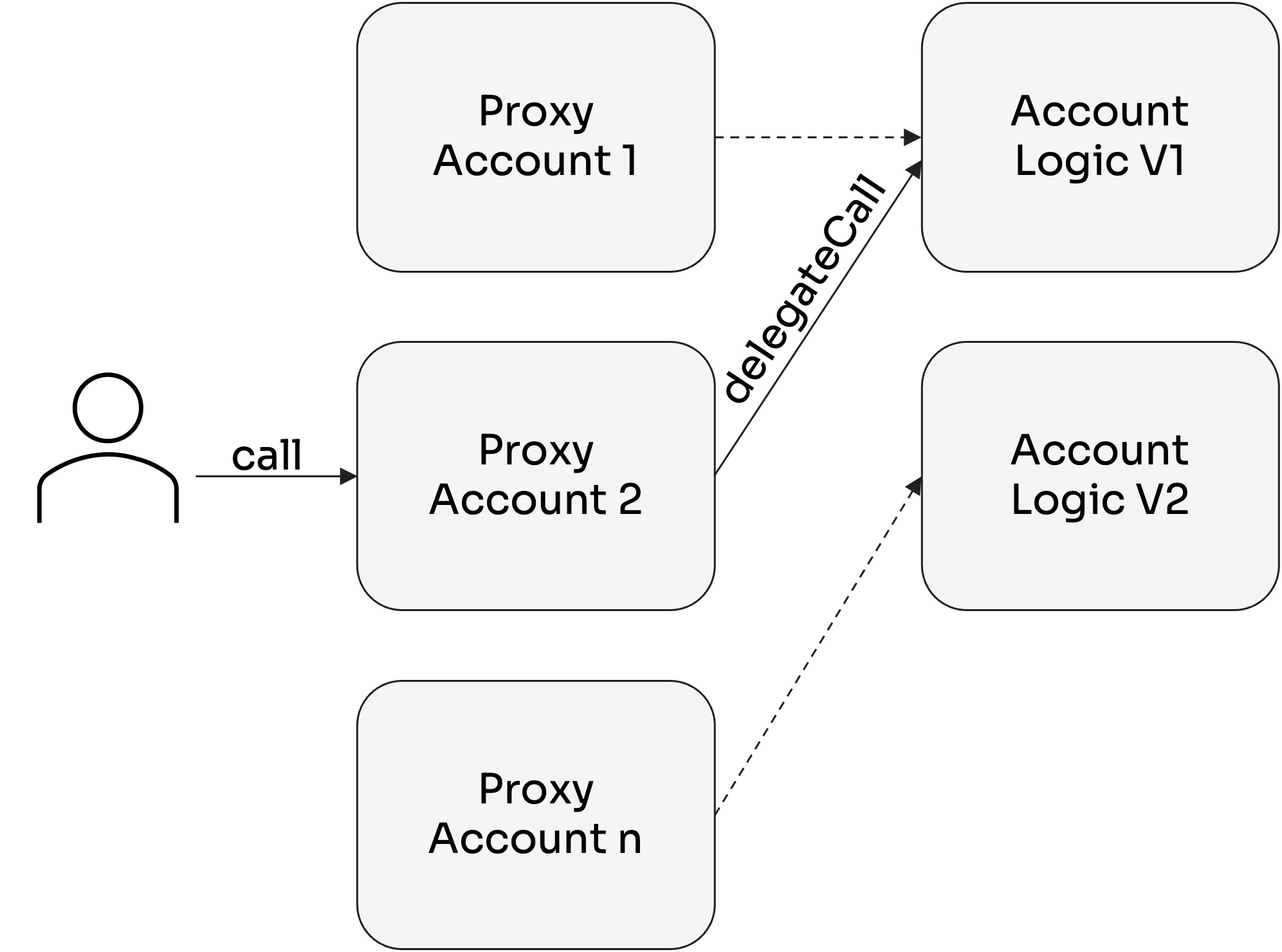
Creditors can determine which Account logic versions are allowed to be used by their Debtors. As such, they can block version with certain features or highly-customized Account logic can be implemented for Creditor-specific versions should this be required.
The Account logic is upgradable, enabling existing Accounts to make use of newly introduced features in a new Account version if they wish. **Upgrading Account logic is always on an opt-in basis, it can never be enforced by the Arcadia Protocol.** The Accounts can only be upgraded to a different version if both the Account Owner and the Creditor (if a margin account is opened) accept the specific version.
When users upgrade their Accounts, they don't have to migrate any assets or close liabilities and the Accounts keep the same contract address.
# Flash Actions
Flash Actions enable atomic multi-step DeFi operations within Arcadia Accounts: leverage, deleverage, rebalance, and refinance in a single transaction without risk of bad debt.
Flash Actions (or optimistic Actions or flash accounting) expand on the concept of flashloans and are only possible thanks to a unique property of smart contracts: atomicity[^1]. Just like with flashloans, each step of the Flash Action must be successful, or the transaction as a whole fails.
This allows the Account Owner to temporarily bring the Account into an under-collateralized (or even non-collateralized) state without risk of bad debt for any Creditor. If the Account is not brought back into a healthy state during the transaction, the final health check fails, and thanks to atomicity, the whole transaction fails.
This gives Account Owners unprecedented flexibility to manage assets and liabilities. It overall provides a much better user experience, since users only need to do a single transaction to obtain their desired outcome.
In a fully permissionless way, they can chain the following actions together in one Flash Action:
* A margin Account can be opened for a new Creditor if the new Creditor is approved by the Account Owner.
* The Creditor can execute arbitrary logic (e.g., give a flashloan).
* The Account Owner can optimistically withdraw assets from the Account.
* The Account Owner can transfer assets from their own wallet to the Account or external logic.
* The Account Owner can execute arbitrary external logic, using the assets (borrowed, withdrawn, or transferred) to interact with multiple DeFi protocols to swap, stake, claim, etc.
* The Account Owner can deposit recipient tokens back into the Account.
The only requirement is that the Account is in a healthy state at the very end of the Flash Action.
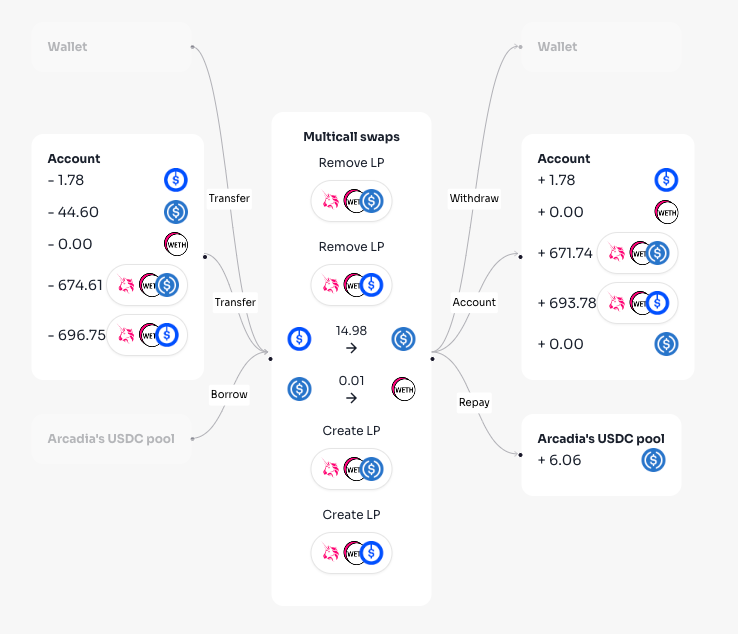
Flash Actions are a very powerful tool that has no equal in traditional finance. We will list a few examples of how Flash Actions from an Arcadia Account can be used out of the box (the list is far from exhaustive).
* Rebalance whole portfolios, swapping a portfolio of n different assets directly to a new portfolio of m different assets.
* Refinance liabilities (change to different Creditors) without the need to sell any collateral.
* Stake or provide liquidity on approved DeFi protocols. External protocols used in this context must provide a receipt token that is allowed as collateral within the Arcadia Protocol. Examples include providing liquidity on Aave (receiving approved aTokens), depositing assets on Yearn (receiving approved yTokens), etc.
* Change ranges for Uniswap V3 LP. Contrary to Uni V2 and similar AMMs, Uni V3 positions are meant to be more actively managed in terms of liquidity ranges. Users who deposit Uni V3 positions in their Arcadia Accounts will be able to change those liquidity ranges without withdrawing their tokens first.
* Claim airdrops that depend on address-owned tokens. Arcadia Accounts will feature “flash withdrawals”. This feature can be used by the Account Owner to claim airdrops using assets under collateral within their Arcadia Account, without having to close DeFi positions to withdraw their tokens first.
* ...
Keep in mind that all of these actions can be done, even if the assets in the Account are used to secure liabilities!
[^1]: Xie, Zhiyuan, et al. "Towards A Better Understanding of Atomic Transactions on Ethereum." (2022).
# Arcadia Creditors
Arcadia Creditors: how lending pools and other creditors integrate with Arcadia Accounts, risk parameters, and the creditor interface.
An Arcadia Creditor is a (set of) smart contract(s), that does the accounting of the liabilities between debtors (Margin Accounts that owe the liabilities) and one or more ultimate creditor(s) (the addresses that are owed the liabilities).
An example of an Arcadia Creditor is a Lending Pool, where the Arcadia Accounts are the debtors that can borrow funds from the pool, and the Liquidity Providers of the Lending Pool are the ultimate creditor(s).\
Other examples are perpetual futures contracts, options contracts, escrow services... Basically every financial contract or protocol where a party has, or can have, liabilities can be implemented as an Arcadia Creditor.
The liabilities of each Debtor are fully secured by the collateral held in the users' Arcadia Margin Account.
## Accounting Liabilities
The Arcadia Creditor must know the Open Position (how much liabilities they owe) of each Margin Account at each point in time. The open position is used for the margin calculations to determine the health state of the Arcadia Account of Debtor. In turn, this guarantees that all liabilities can be paid back to the Creditor.
An Arcadia Creditor must denominate these open position in a certain numeraire. This represents the unit of accounting, for example USD, USDC or ETH.
The Arcadia Account of the Debtors will use the same numeraire for the margin calculations.
## Risk Management
The Creditor must set a [Risk Manager](/security-and-risk/roles). The Risk manager can be both an EOA or a smart contract.
The Risk Manager is responsible for choosing which assets can be used within the Debtors Margin Accounts and for setting the correct [Risk Parameters](/security-and-risk/risk). For each asset the Risk Managers allows, they have to set the following Parameters:
* The Collateral factor
* The Liquidation factor
* The exposure cap of the asset
* The exposure cap of any integrated protocols, such as DEXs
The Risk Manager must ensure the credit risk borne by the Creditor remains acceptable.
# Margin Calculations
How Arcadia calculates margin requirements: collateral value, liquidation value, collateral factors, liquidation factors, and health factor computation.
The Margin of an Arcadia Account can roughly be seen as the value of collateral assets that a Debtor must hold in a Margin Account to cover the credit risk of its Creditor(s). It is the value of assets that is "locked" when a Debtor opens a position.
## Margin Requirements
There are three different account states, as shown in the following figure, depending on the Used Margin of the Account and the risk-adjusted total values of the Account.
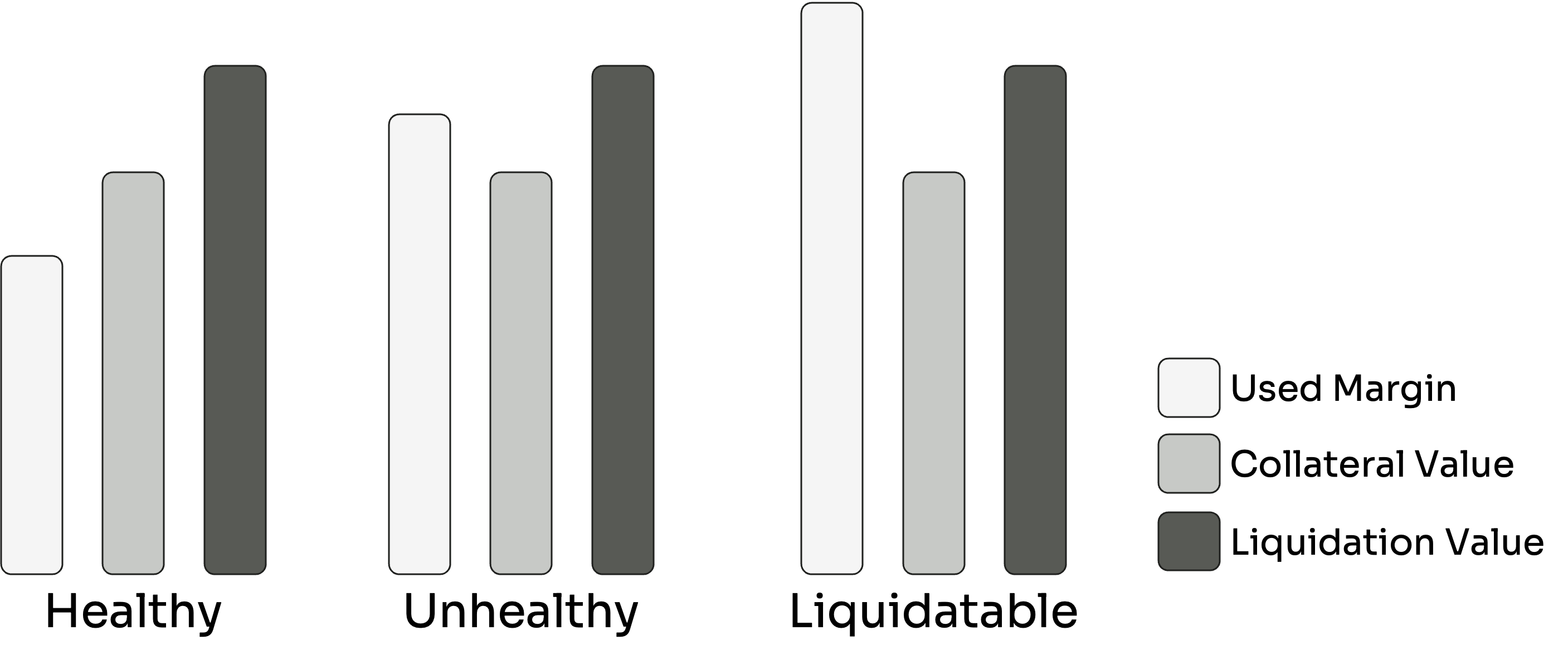
### 1. Healthy state:
The Account is in a healthy state if the used margin is smaller than the Collateral Value:
$$
um < v\_{coll}
$$
No account actions are restricted for Accounts in a healthy state, as long as the Account is still healthy at the end of the action.
### 2. Unhealthy state:
The Account is in an unhealthy state if the used margin is smaller than the Collateral Value but bigger than the Liquidation Value:
$$
v\_{coll} < um < v\_{liq}
$$
Accounts in the unhealthy state can only be de-risked by reducing the open position or adding more collateral assets. It is not possible to withdraw any asset or to increase the open position.
### 3. Liquidatable state:
The Account is in a liquidatable state if the used margin is larger than the Liquidation Value:
$$
v\_{liq} < um
$$
When an account is in the liquidatable state, anyone can trigger a margin call. The Account is now frozen, and the liquidation process of the Account starts. The liquidation ends when either the Account is brought back to a healthy state, or all assets are liquidated.
## Margin Calculations
### Collateral Value
The Collateral value is the sum of the MtM (mark-to-market) value, discounted with the risk factor (the Collateral Factor) of each asset in the account.
$$
v\_{coll}^{c} := \sum\_{i} CF\_{i}^{c} \cdot v\_{i}(a\_{i})
$$
The Collateral Factor is equivalent to the Initial Margin as is commonly used in traditional finance.
$$
CF\_{i}^{c} = \frac{1}{1 + IM\_{i}^{c}}
$$
### Liquidation Value
The Liquidation value is the sum of the MtM (mark-to-market) value, discounted with the risk factor (the Liquidation Factor) of each asset in the account.
$$
v\_{liq}^{c} := \sum\_{i} LF\_{i}^{c} \cdot v\_{i}(a\_{i})
$$
The Liquidation Factor is equivalent to the Maintenance Margin as is commonly used in traditional finance.
$$
LF\_{i}^{c} = \frac{1}{1 + MM\_{i}^{c}}
$$
### Available Margin
We define the available margin, $$am$$, as the total value that the Account can use as margin to secure liabilities.
Hence the Available Margin is nothing different then the previously defined Collateral Value:
$$
am = v\_{coll}^{c}
$$
### Open Position
The open position, $$op^c$$, equals the size of the liability that a specific Debtor has with a specific Creditor.
### Minimum Margin
As explained in [Liquidations](/protocol/liquidations), the minimum margin, $$M\_{min}^c$$, is the minimum amount of Collateral Value that must be held in an Account to be able to open a position with a Creditor.
### Used Margin
The used margin, $$um$$, is the total amount of Collateral Value locked by the Account to ensure that the Account remains over-collateralized.
Since collateral in the Account must be held to cover both the open position and the minimum margin, the used margin can be found as:
$$
um := M\_{min}^c + op^c
$$
### Free Margin
The free margin, $$fm$$, is the remaining amount of Collateral Value that can be used to increase the open position or that can be withdrawn from the Account's assets.
The free margin can be found by subtracting the used margin from the available margin:
$$
fm := am - um
$$
## Examples
Coming soon.
# Liquidations
Arcadia liquidation mechanism: Dutch auction for unhealthy Margin Accounts, partial liquidations, health factor triggers, auction dynamics, and liquidation bot integration.
## Overview
Arcadia's liquidation mechanism is designed to protect both lenders and borrowers by maintaining market stability and minimizing excessive liquidations during volatile market conditions. This mechanism exclusively applies to Arcadia Margin Accounts, as Spot Accounts are not debt-enabled and therefore exempt from liquidation processes.
By combining partial liquidations with a Dutch auction mechanism, Arcadia has developed an innovative approach that:
* Minimizes the risk of bad debt
* Prevents unfair account liquidations
* Incentivize third-party participation in price discovery and protocol maintenance
## Key Concepts
### 1. Collateral Value
Represents the maximum debt an Account can assume based on its assets. Calculated as the sum of individual asset prices multiplied by their respective collateral factors.
$$
CV = \sum\_{i=1}^{n} (P\_i \cdot CF\_i)
$$
Where:
* $$CV$$: Collateral Value
* $$P\_i$$: Price of asset $i$
* $$CF\_i$$: Collateral Factor of asset $i$
* $$n$$: Total number of assets
### 2. Liquidation Value
Defines the threshold at which an Account becomes eligible for liquidation. Calculated by multiplying each asset's latest price with its specific liquidation factor.
$$
LV = \sum\_{i=1}^{n} (P\_i \cdot LF\_i)
$$
Where:
* $$LV$$: Liquidation Value
* $$P\_i$$: Price of asset $i$
* $$LF\_i$$: Liquidation Factor of asset $i$
* $$n$$: Total number of assets
### 3. Margin Metrics
* **Used Margin**: The total value of debt drawn by the account, including accrued interest.
* **Minimum Margin**: A protocol-imposed threshold ensuring system safety, below which margin positions cannot be created.
### 4. Partial Liquidation
A nuanced approach where only a portion of an Account's position is liquidated, allowing:
* Partial debt repayment
* Preservation of remaining assets
* Reduced risk of total Account destruction
### 5. Dutch Auction Mechanism
A dynamic pricing model characterized by:
* **Starting Price**: (Debt + Liquidation Costs) × Starting Price Multiplier
* **Price Decay**: Exponential price reduction
* **Auction Duration**: Maximum 8 hours, but most auctions are cleared in 30 to 60 minutes.
* **Minimum Price**: Debt × Multiplier
### 6. Liquidation Costs
* **Initiator Fee**: Compensation for liquidation trigger
* **Terminator Fee**: Reward for auction settlement
* **Lending Pool Liquidation Penalty**: Penalty paid by the liquidated Account
### 7. Account Health Indicators
* **Health Factor**: Liquidation Value ÷ Used Margin
$$
HF = \frac{LV}{UM}
$$
Where:
* $$HF$$: Health Factor
* Ratio > 1: Healthy Account
* Ratio ≤ 1: Unhealthy Account
* $$LV$$: Liquidation Value
* $$UM$$: Used Margin
## Liquidation Process
### 1. Liquidation Trigger
Conditions for Liquidation:
* Health Factor drops below 1
* Triggered by:
* Automated monitoring systems
* Decentralized third-party participants
**Starting Price Calculation**:
Starting Price = (Outstanding Debt + Liquidation Costs) × Starting Price Multiplier
### 2. Auction Dynamics
* **Price Mechanism**: Exponential decay over time
* **Partial Liquidation**:
* Liquidators can purchase account portions
* Incrementally reduces user's debt
* Lowers remaining position's debt ratio
### 3. Auction Termination
Auction ends when:
* Account reaches a healthy state, where the collateral value > used margin, and the liquidator chooses to terminate
* Minimum price is reached
* Maximum duration (8 hours) is exceeded
* All assets in the Account are liquidated
### 4. Post-Liquidation
* Surplus funds returned to Account Owner
* Account remains usable
## Key Advantages
* Minimized liquidation risk
* Fair asset preservation
* Decentralized participation
* Dynamic price discovery
**Disclaimer**: Users should thoroughly understand liquidation mechanisms and associated risks.
## Liquidation Bots
The mechanism is open to third-party participants who can develop their own bots to act as initiators or terminators or liquidators, and purchase partial account positions during the liquidation process.
You can find more information if you are interested in building your own liquidation bot [here](/developers/integrations/liquidators).
# Asset Managers
Asset Managers overview: permissionless, permissioned, and custodial automation for Arcadia Accounts — Compounders, Rebalancers, Yield Claimers, CoW Swapper, and Merkl Operators.
## Overview
An Asset Manager of an Arcadia Account is a privileged role that can, as the name implies, manage the assets of an Account. Their main purpose is to enable a wide range of automation for the owner of the Arcadia Account, without the owner having to give up self-custody of their assets.
Each Arcadia Account may have one or more Asset Managers, and only the owner of an Account can add or remove Asset Managers. Asset Managers can perform the following actions:
* Deposit assets.
* Withdraw assets.
* Transfer funds from the Owner.
* Execute flash actions (optimistically execute arbitrary logic with the withdrawn/transferred assets).
## Types of Asset Managers
Any Ethereum address, whether a smart contract or an externally owned account, can be set as an Asset Manager. This opens up a wide range of solutions for users with varying trust assumptions. We can roughly define three models in this context: permissionless, permissioned, and custodial.
#### 1. Non-Custodial Permissionless
Asset Managers are immutable, trustless smart contracts that can only perform a single action and do not require any additional user input. An example of this is the Compounders that will be described in more detail in this article.
#### 2. Non-Custodial Permissioned
Asset Managers can be smart contracts that restrict the actions they can perform to a single purpose, but do require user input. An example would be an Asset Manager to rebalance Liquidity Positions. While the contract can only change the range of a position and not, say, withdraw assets, it might require a permissioned role that only triggers a rebalance when it makes sense.
#### 3. Custodial
Asset Managers can be EOAs that run strategies as a service for users. While there might be off-chain agreements regarding what these managers can and cannot do, these are not enforced on-chain, and the Asset Managers essentially have full power over the Account.
## Implementations of Asset Managers
Some examples how asset management can be automated with Arcadia Accounts and Asset Managers are:
* [Compounding fees](/protocol/asset-managers/compounders)
* [Rebalancing portfolios](/protocol/asset-managers/rebalancers)
* [Yield Claimers](/protocol/asset-managers/yield-claimers)
* [CoW Swapper](/protocol/asset-managers/cow-swapper)
* [Merkl Operators](/protocol/asset-managers/merkl-operators)
* AI agents
* ...
Want to build your own Asset Manager for Arcadia Accounts, head over to our [Developer docs](/developers/integrations/asset-managers).
# Compounders
Compounders: immutable, permissionless Asset Managers that auto-compound concentrated liquidity fees. Properties, fee structure, and link to technical deep dive.
Compounders address a critical inefficiency in concentrated liquidity protocols, where yield from liquidity positions is not automatically reinvested. These asset managers transform linear returns into exponential growth by automatically compounding fees.
For a deep dive into our Compounders' mathematical and technical intricacies, [read our comprehensive deep dive](/deep-dives/compounders).
### Properties
Compounders are:
* Immutable.
* Non-Custodial but triggering is Permissioned.
* The contract relies on economic incentives, with the initiator of the compound earning a small reward.
### Fees
The compounders charges the standard fee on yield earned, see [Fees](/protocol/fees) and may charge a fee on amounts swapped based on the stAAA holdings of the Account Owner.
# Rebalancers
Non-custodial permissioned Asset Managers that auto-rebalance concentrated liquidity positions. Trust assumptions, strategies, hooks, fee tiers, the gas allowance and stAAA benefits.
Rebalancers manage concentrated liquidity positions dynamically, solving the challenge of maintaining optimal liquidity ranges in rapidly changing market conditions. They automatically adjust position ranges to maximize fee-earning.
Detailed insights into our Rebalancer's innovative approach can be found in [our in-depth technical deep dive](/deep-dives/rebalancers).
## Properties
Rebalancers are:
* Immutable.
* Non-Custodial but triggering is Permissioned.
* The contract relies on economic incentives, with the initiator of the rebalance earning a small reward.
A unique feature of Arcadia's Rebalancers is the innovative Hook structure. This extensible design allows account owners to implement custom logic and additional checks for their rebalancing strategies. The Hook system is open for development by both protocol users and third-party developers.
## Strategies
Rebalancing is always a tradeoff between the opportunity cost of being out of range and the costs of rebalancing the position.
Finding the optimal strategy that determines when to rebalance, and which new lower and upper price to use, is a complex problem to solve, and it depends on multiple factors:
* Type of liquidity pool (stable pool, correlated assets, volatile assets…)
* Market conditions (bullish, bearish, flat)
* Objectives of the position owner
* Chain conditions e.g. gas price
* …
The Rebalancer is made in such a way that it works with any rebalance strategy. The main logic is strategy agnostic: it takes as input an old position, the new upper price and the new lower price.
## Trust Assumptions
The Rebalancer is a smart contracts that can only perform a single atomic action (rebalancing CLPs), it never holds assets.
But it does require input from a permissioned (whitelisted by the Owner, not Arcadia) user, further called the Initiator. 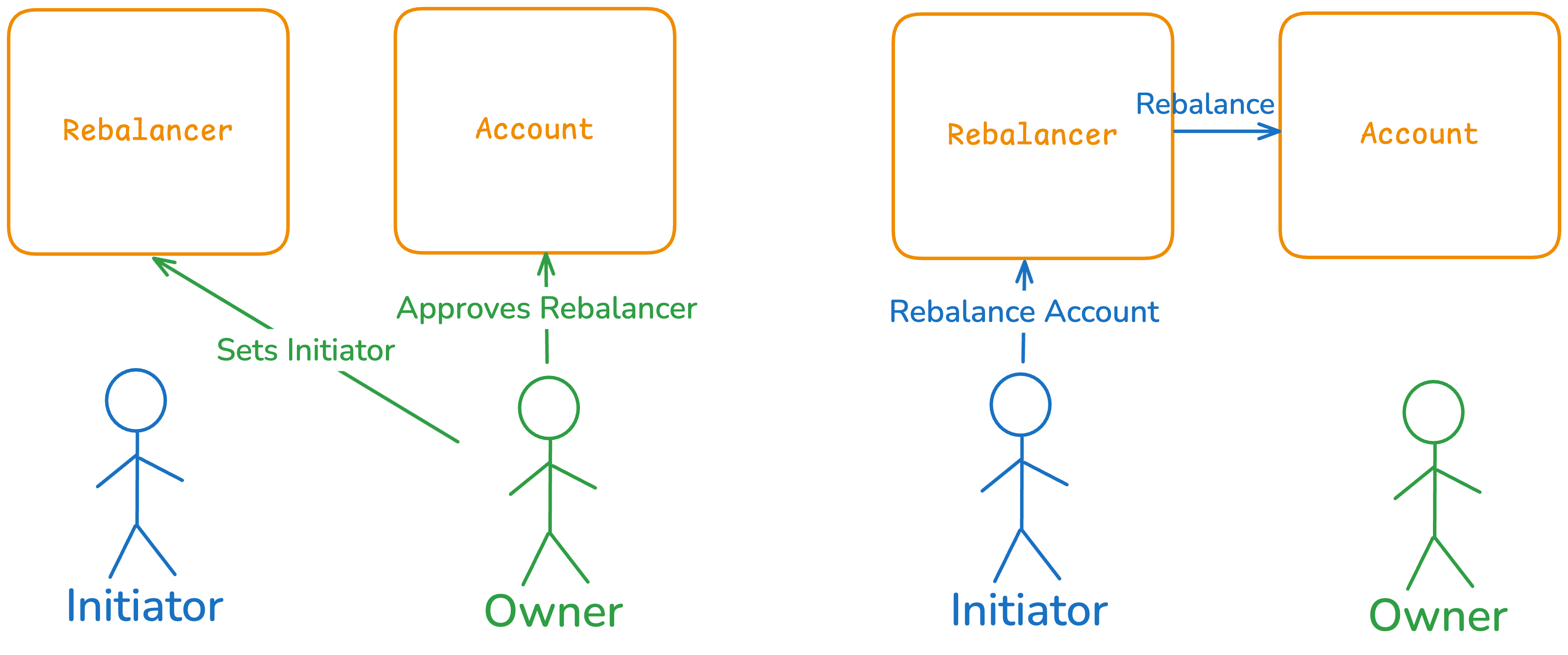
The initiator has to call the Rebalancer contract and has to determine:
* When to rebalance
* The range of the new Liquidity Position
A malicious initiator can still only rebalance via the Rebalancer, while it is a trusted role, they can never steal funds or Liquidity from the Account Owner.
The worst a malicious/incompetent Rebalancer can do, is trigger Rebalances at bad moments and move liquidity to non-optimal ranges, resulting in value lost due to swap fees, slippage and opportunity cost. But they can never “rug” the assets of an Account.
Since Initiators can be revoked/replaced at any time by the Account Owner, they are incentivised to rebalance optimally, to keep earning fees for their services.
The Rebalancer is permissioned, but that does not mean it is centralised. Each Account Owner can choose if they enable the Rebalancer at all. And if they do, they can choose who they set as initiator. Different initiators can for instance run different rebalance strategies, or ask different fee amounts for their services.
## Rebalancing Limits and Economic Filters
Rebalancing costs gas, and Arcadia pays that gas up front. The rebalancer therefore decides, per position, who is paying for each one: the fees the position earned, Arcadia, or the Account Owner in AAA. Positions nobody is paying for are not rebalanced.
The free allowance is measured in **gas**, not in a number of rebalances. A rebalance on Optimism and one on Robinhood differ in cost by more than a thousand times, so a "1 per day" quota was generous on the cheap chains and did not cover a single rebalance on the expensive ones.
### Decision Logic
A position only reaches these checks once its **strategy** has decided it should be rebalanced (price out of range, minimum time elapsed, and so on). Everything below is about who pays.
The checks run **in order**, and the first one that admits the position wins.
#### Before any position is looked at
These are chain-wide, and they exist to bound what a single chain can cost in a day.
**Protocol Owned Liquidity is not subject to any of this.** POL accounts are excluded from the rebalancer described on this page and are served by their own keeper paths, so nothing below can stop or delay a POL rebalance or a POL limit order: POL never enters the pipeline these checks run in.
| Guard | What it stops |
| ------------------------------- | ------------------------------------------------------------------------------------------------------------------------------------------------------------------------------------------------------------------------------------------- |
| **Gas-price ceiling** | Nothing is sent while gas is above the chain's ceiling, whatever the position economics say. Allow list included. |
| **Daily sponsored-gas ceiling** | Bounds what Arcadia gives away per chain per day. It stops the allow list, the large-position bypass and the free allowance. Positions that earn their own gas, and ones paid for in AAA, keep running, because those cost Arcadia nothing. |
| **Per-account revert backoff** | An account whose last 3 rebalances reverted on-chain, with none landing since, is retried on a growing interval instead of every cycle (see below). Scoped to that account. |
| **Data outages** | If asset data or prices cannot be fetched, positions that need them are skipped for that cycle. Allow-listed owners still run, since that decision needs none of the missing inputs. |
#### 1. Allow list
A small number of owners (protocol partners) rebalance without any economic checks. It is not available on every chain, and it is switched off while the daily sponsored-gas ceiling is reached. Those positions are then **refused, not charged**.
#### 2. The position pays for itself
The expected revenue from pending fees is compared to the gas cost:
```
revenue = pending fees (USD) * initiator fee %
gas cost = rebalance gas units * gas price * native token price (USD)
```
`rebalance gas units` is a per-chain average. The measured figure is checked before sending, see [Simulating before sending](#simulating-before-sending).
Admitted when `revenue >= multiplier x gas cost`. The multiplier is **2x** on Base, Unichain and Optimism, and **3x** on Ethereum and Robinhood, where a failed or marginal rebalance costs far more.
This is the path most positions take, and it consumes none of the owner's allowance.
#### 3. Large positions
Positions worth **$50,000 or more** are rebalanced even when their pending fees do not cover the gas: keeping a large position in range is worth more to Arcadia than the gas costs.
On Ethereum and Robinhood the rebalance also has to at least break even. Sponsoring a loss-making rebalance costs enough on those chains that it is not done automatically.
#### 4. The Account Owner's gas allowance
Everything from here down is work the owner's side pays for.
Every owner gets a **daily and weekly allowance denominated in the chain's native token**, shared across all of their accounts and across rebalances on every chain. A rebalance is admitted when its **full** cost fits both the daily and the weekly remainder.
| stAAA staked | Daily allowance | Weekly allowance |
| ------------ | --------------- | ---------------- |
| 0 | 0.00006 | 0.0003 |
| 3,000 | 0.00009 | 0.00045 |
| 6,000 | 0.00012 | 0.0006 |
| 9,000 | 0.00015 | 0.00075 |
| 30,000 | 0.00036 | 0.0018 |
The daily allowance is two typical Base rebalances and the weekly allowance is ten. Every **3,000 stAAA** adds one more per day.
Figures are native token. At $2,500 per ETH the base allowance is about $0.15 a day and $0.75 a week. The dApp shows the current dollar value of what is left.
A rebalance has to fit **both** remainders.
| Chain | Typical gas | One rebalance | In one day, 0 stAAA | Every day, 0 stAAA | Every day, 3,000 stAAA |
| --------- | ----------- | ------------- | ------------------- | ------------------ | ---------------------- |
| Optimism | 0.001 gwei | 0.000005 | 12 | \~8.6 | \~12.9 |
| Base | 0.006 gwei | 0.000030 | 2 | \~1.4 | \~2.1 |
| Unichain | 0.006 gwei | 0.000030 | 2 | \~1.4 | \~2.1 |
| Robinhood | 0.3 gwei | 0.00075 | 0 | 0 | 0 |
| Ethereum | 3 gwei | 0.015 | 0 | 0 | 0 |
The every-day figure is the weekly allowance divided by seven. The weekly allowance is five times the daily one.
One rebalance on Robinhood costs about 12 days of the base allowance, and on Ethereum about 250. The free allowance does not fund a rebalance on either chain, so positions there run when their own fees cover the gas (check 2 above) or when the owner pays in AAA. Waiting for cheaper gas is not a third option on those chains: the wait ends at the price where one rebalance fits the remaining allowance, which on Robinhood is 0.024 gwei with no stAAA and 0.144 gwei with 30,000, and on Ethereum 0.012 and 0.072 gwei. All four are far below what those chains normally cost.
Because the allowance is denominated in gas, it tracks the gas price on its own and there is no per-chain quota to retune when gas moves.
Holding AAA does not raise the allowance. It has to be staked into stAAA. The allowance is also counted across all of an owner's accounts, so splitting a position across accounts does not multiply it.
#### 5. Pay with AAA
An owner who has approved AAA to the Gas Relayer has the gas cost converted to AAA and charged on execution, and the rebalance runs immediately. Approving is treated as "run this now", so it is tried **before** waiting for cheaper gas.
Both the approval **and** the AAA balance have to cover the cost. The charge is rescaled to the gas the rebalance actually burned, bounded by what the owner was verified able to pay.
**Gas Relayer:** `0xD938C8d04cF91094fecAF0A2018EAac483a40137`
#### 6. Wait for gas to come within the allowance
If neither the allowance nor AAA can pay at the current gas price, the rebalance **waits** for up to **6 hours** instead of being refused. The gas price moves and the allowance does not, so a cost that does not fit now may fit later. The dApp shows the gas price it is waiting for.
A rebalance only waits when there is allowance left for it to fit into. Reaching the 6-hour deadline does **not** authorise it: the free tier is never run at a loss to Arcadia. It runs when gas falls far enough, when the position earns enough to pay for itself, or when the owner approves AAA.
#### 7. Otherwise, not rebalanced this cycle
The position is skipped with a reason the dApp renders in the automation history, and reconsidered next cycle.
### Simulating before sending
Checks 2, 4 and 5 price gas from a per-chain average. Once the swap route is built, the transaction is simulated and its gas measured, and that figure is checked against the limit set by whichever check admitted the position:
| Admitted by | Limit on the measured gas cost |
| ------------------------------ | ------------------------------------------------------ |
| The position pays for itself | Fees must cover 2x it, or 3x on Ethereum and Robinhood |
| Your gas allowance | The allowance remaining when it was admitted |
| You pay in AAA | Your AAA approval and balance |
| Allow list, or $50,000 or more | No limit, Arcadia pays the gas |
Over the limit, the transaction is not sent and the automation history records why. No gas is spent.
Compounds and yield claims are checked the same way, against the fees they collect.
### When a rebalance keeps failing
Every rebalance, compound and yield claim is simulated immediately before it is sent, so one that would revert is not sent and costs nothing. A revert **on chain** means the simulation passed and the state changed before the transaction landed, usually a price move or an exposure cap filling up.
After 3 consecutive reverts with none landing since, the account is retried on a growing interval:
| Consecutive reverts | Retried every |
| ------------------- | ------------- |
| 3 | 15 minutes |
| 4 | 30 minutes |
| 5 | 1 hour |
| 6 | 2 hours |
| 8 or more | 6 hours (cap) |
It is a slowdown, not a stop: any attempt can succeed, and one success clears it immediately.
The automation history names the revert reason, which decides what to do about it:
| Reason | What it means |
| ------------------------------------------------------------- | -------------------------------------------------------------------------------------------------------------------------------------- |
| New position's liquidity below your minimum-liquidity setting | The liquidity minted is below the floor you set. Slippage and leftover tokens both reduce it; lowering the floor accepts more of both. |
| Pool price moved away from the trusted price | A wider tolerance would let it through. |
| Would leave the account below its health requirement | Repay or deposit before it can rebalance. |
| Protocol exposure cap is full | Nothing on your side to change. |
| Asset manager not the one we are authorised to call | Re-save your automation settings. |
### Summary
| Situation | Outcome |
| ------------------------------------------------------------ | -------------------------------------------------------------- |
| Pending fees cover the gas (2x, or 3x on Ethereum/Robinhood) | Rebalanced, free, allowance untouched |
| Position worth $50k or more | Rebalanced, sponsored by Arcadia |
| Gas cost fits your daily and weekly allowance | Rebalanced, charged to your allowance |
| You staked AAA into stAAA | Larger allowance: +1 typical Base rebalance per 3,000 stAAA |
| Allowance too small for current gas | Waits up to 6 hours for gas to fall, or approve AAA to run now |
| You approved AAA to the Gas Relayer | Rebalanced now, gas charged in AAA |
| Recent rebalances reverted on-chain | Retried on a growing interval; the history names the reason |
| Simulated gas above the limit | Not sent, no gas spent, retried next cycle |
| Daily sponsored-gas ceiling reached | Only self-paying and AAA-paid rebalances continue |
### Configuration
| Parameter | Value |
| ----------------------------------- | ---------------------------------------------------------------------- |
| Daily allowance | 0.00006 native token (two typical Base rebalances) |
| Weekly allowance | 0.0003 native token (ten Base rebalances, about 1.4 per day) |
| stAAA bonus | +0.00003/day and +0.00015/week per 3,000 stAAA |
| Rebalance gas units, for the checks | 5,000,000; 2,500,000 on Robinhood |
| Rebalance gas units, for the send | Measured by simulation |
| Profitability multiplier | 2x (Base, Unichain, Optimism), 3x (Ethereum, Robinhood) |
| Large-position threshold | $50,000 |
| Maximum wait for cheaper gas | 6 hours |
| Gas-price ceiling | 5 gwei (Base, Unichain, Optimism, Robinhood), 100 gwei (Ethereum) |
| Revert backoff | After 3 consecutive reverts, 15 min doubling to a 6 h cap, per account |
### Checking Your Status
The asset manager modal in the dApp shows:
* What your allowance has left, in money and in whole actions on this chain
* Your stAAA balance and the allowance it earns you
* Your AAA approval to the Gas Relayer, and a suggested amount
* Whether a rebalance is waiting for cheaper gas, and the gas price it is waiting for
* Why the last skipped rebalance was skipped
## Costs and Fees
When rebalancing there are a number of costs/inefficiencies involved:
* **1. Initiator Fee:** The initiator of the rebalance (who triggers it) receives an initiator fee ($$fee\_{initiator}$$) based on the pending yield earned of the position.
* **2. Slippage & leftovers:** Both slippage and leftovers result in a less than optimal amount of liquidity minted (Leftovers are not really a cost since they are deposited back into the account, but they no longer earn yield). Slippage & Leftovers are capped by the maximal decrease in liquidity ($$MDL$$), which compares the optimal rebalance (i.e., assuming no slippage and leftovers) to the current rebalance.
* **3. Impermanent Loss:** Rebalancing realizes impermanent loss. It is not a cost due to rebalancing, but a loss in value compared to the initial position that is realized by rebalancing.
Note that **2.** is capped to the downside (if exceeded the transaction reverts) but is most of the time much smaller or even positive (the swap can be done with a lower average fee than that of the pool and slippage can be positive as well).
Both the initiator $$fee\_{initiator}$$ and the $$MDL$$ are set by the Account Owner, they can differ for different strategies and different pools. The Initiator can change the rebalance parameters, but only advantageous to the Account Owner (lower fees, lower max slippage).
The fees and settings for the current initiators are set to:
| Rebalancer | Initiator | Strategy | $$fee\_{initiator}$$ | $$MDL$$ |
| --------------------------------------------------------------------------------------------------- | --------------------------------------------------------------------------------------------------------------------- | -------- | -------------------- | ------- |
| [Slipstream V1 Rebalancer](https://basescan.org/address/0x5802454749cc0c4A6F28D5001B4cD84432e2b79F) | [0xDc9B596ce15F859673D1Be72e2Aadd41DD3aC4fE](https://basescan.org/address/0xDc9B596ce15F859673D1Be72e2Aadd41DD3aC4fE) | Any | 10% of yield earned | 1% |
| [Slipstream V2 Rebalancer](https://basescan.org/address/0x953Ff365d0b562ceC658dc46B394E9282338d9Ea) | [0xDc9B596ce15F859673D1Be72e2Aadd41DD3aC4fE](https://basescan.org/address/0xDc9B596ce15F859673D1Be72e2Aadd41DD3aC4fE) | Any | 10% of yield earned | 1% |
| [Uniswap V3 Rebalancer](https://basescan.org/address/0xbA1D0c99c261F94b9C8b52465890Cca27dd993Bd) | [0xDc9B596ce15F859673D1Be72e2Aadd41DD3aC4fE](https://basescan.org/address/0xDc9B596ce15F859673D1Be72e2Aadd41DD3aC4fE) | Any | 10% of yield earned | 1% |
| [Uniswap V4 Rebalancer](https://basescan.org/address/0x01EDaF0067a10D18c88D2876c0A85Ee0096a5Ac0) | [0xDc9B596ce15F859673D1Be72e2Aadd41DD3aC4fE](https://basescan.org/address/0xDc9B596ce15F859673D1Be72e2Aadd41DD3aC4fE) | Any | 10% of yield earned | 1% |
Note: all rebalances will be subject to the Yield Success Fee of the protocol, as can be found in the [Fees](/protocol/fees) section.
# Yield Claimers
Yield Claimers: Asset Managers that claim staking rewards and yield from liquidity positions and send them to a designated recipient.
Yield claimers will periodically claim any pending yield (either trading fees for non staked positions, or staking emissions from staked positions) and send it to a designated recipient, defined by the owner of the Account. This can be the Account, the owner or any third contract.
### Properties
Yield claimers are:
* Immutable.
* Non-Custodial but triggering is Permissioned.
### Fees
The yield claimers charge the standard fee on yield earned, see [Fees](/protocol/fees).
# Merkl Operators
Merkl Operators: Asset Managers that automatically claim Merkl rewards from liquidity incentive campaigns and send them to a receiver set by the Account Owner.
[Merkl](https://app.merkl.xyz/) is a widely used reward distribution platform powering dApps such as Aerodrome, Uniswap, Aave, etc.
Also Arcadia Accounts can be eligible for said rewards by holding positions that qualify the requirements of a specific Merkl campaign (set up by third parties, not the Arcadia team).
The Merkl Operator automates claiming and distribution of the rewards to an address set by the owner of the Arcadia Account.
### Properties
Merkl Operators are:
* Immutable.
* Non-Custodial but triggering is Permissioned.
* The contract relies on economic incentives, with the initiator of the operation charging a fee.
### Fees
The Merkl Operator charges the standard fee on yield earned, see [Fees](/protocol/fees).
# CoW Swapper
CoW Swapper: trustless, MEV-protected ERC20-to-ERC20 swaps in Arcadia Accounts via CoW Protocol batch auctions. Use cases include compounding rewards, take profit, debt repayment and stop losses.
The CoW Swapper enables ERC20-to-ERC20 token swaps within Arcadia Accounts via [CoW Protocol](https://cow.fi/)'s batch auction mechanism. Combined with Arcadia Flash Actions, it supports a range of automated strategies without assets leaving the Account.
For a deep dive into the CoW Swapper's architecture and trust model, [read our comprehensive deep dive](/deep-dives/cow-swapper).
Use cases include:
* **Compounding staked positions**: Staking rewards paid in a third token (e.g. OP, ARB, AERO) are swapped back into the pool's underlying tokens and compounded into the liquidity position. The CoW Swapper handles the token swap, the existing [Compounder](/protocol/asset-managers/compounders) handles the rest.
* **Take profit**: Account Owners can automatically take a portion of earned yield and swap it into any token of choice (e.g. USDC) rather than compounding everything back into the pool.
* **General swaps**: Any ERC20 token held in an Arcadia Account can be swapped to any other ERC20 token, enabling flexible portfolio management.
* **Debt repayment**: For leveraged positions, earned yield can be swapped into the debt token and used to repay the loan, gradually deleveraging the position over time.
* **Stop losses**: Position assets are swapped when certain price conditions are met, protecting against downside risk.
## Properties
CoW Swapper is:
* Immutable.
* Non-Custodial but triggering is Permissioned.
* The contract relies on CoW Protocol's batch auction for price discovery, with the Initiator earning an optional fee capped by the Account Owner.
## How It Works
### 1. Setup
Only the Account Owner can configure the CoW Swapper. They have to set which address to whitelist as Initiator (can also be themselves), a `maxSwapFee` cap on what the Initiator can charge (can be 0), and which OrderHook contract to use for additional per-account restrictions.
### 2. Signing the Order
When the Initiator (or the Account Owner themselves) decides a swap should be done (e.g. to compound claimed staking rewards), they start by constructing and signing a valid CoW swap order. This order is then submitted to CoW's order book.
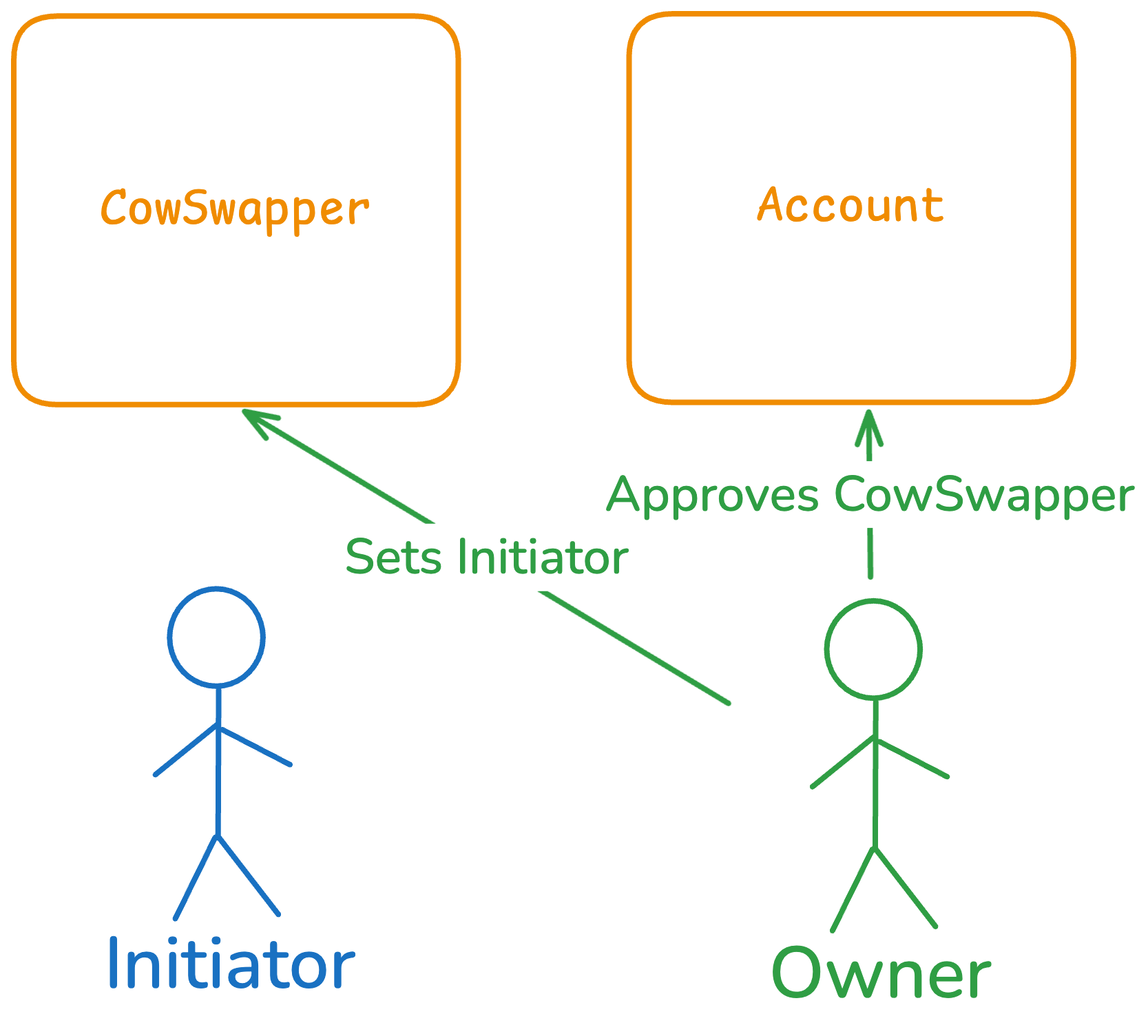
### 3. CoW Auction
The CoW Protocol runs a ['Fair Combinatorial Auction'](https://arxiv.org/abs/2408.12225), where solvers compete to fill the order within a set amount of time.
The solver that can quote the best price wins the auction and can fill the order.
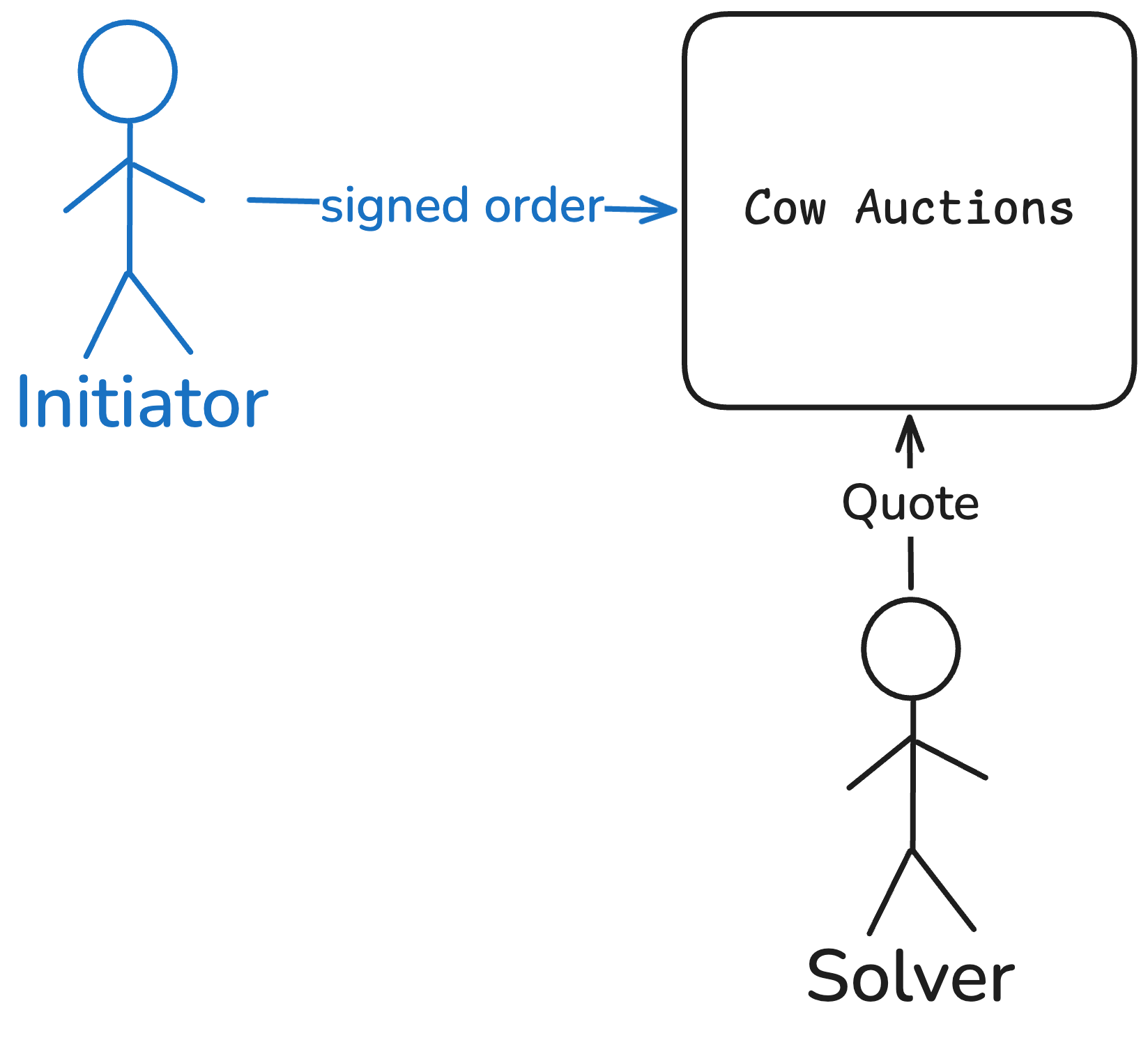
### 4. Settlement
The winning solver executes the order on-chain. The solver triggers the transaction via CoW's Flash Loan Router, which initiates a flash action on the Arcadia Account, pulling tokenIn out to the CowSwapper.
First, the CowSwapper logic is triggered. The CowSwapper reconstructs the order based on the input data, computes its hash, and stores the hash in transient storage.
Next, an Account Owner-defined OrderHook is called. Via this hook the Account Owner can enforce additional, customisable constraints (more on this in the next section).
Lastly, the actual swap is settled via CoW's Settlement contract. The settlement contract executes the swap and does a number of checks:
* Check that the order has not expired
* Check that the order has not been previously filled
* Check that the actual execution price was equal to or better than what was specified in the order
* Check the order's signature: for the CowSwapper we use [EIP-1271](https://eips.ethereum.org/EIPS/eip-1271#specification) signatures. The contract checks two things: the hash matches what was just reconstructed from the order parameters, and the signature over that hash came from the Initiator or Account Owner.
The hash construction is the core of the trust model. Every field in the order — tokenOut, amountOut, deadline, fee — feeds into the hash that gets verified on-chain. If a solver modified any parameter between the Initiator's submission and settlement, the on-chain reconstruction produces a different hash, the signature check fails, and the transaction reverts. The Initiator commits to specific terms upfront. Those exact terms are what gets executed.
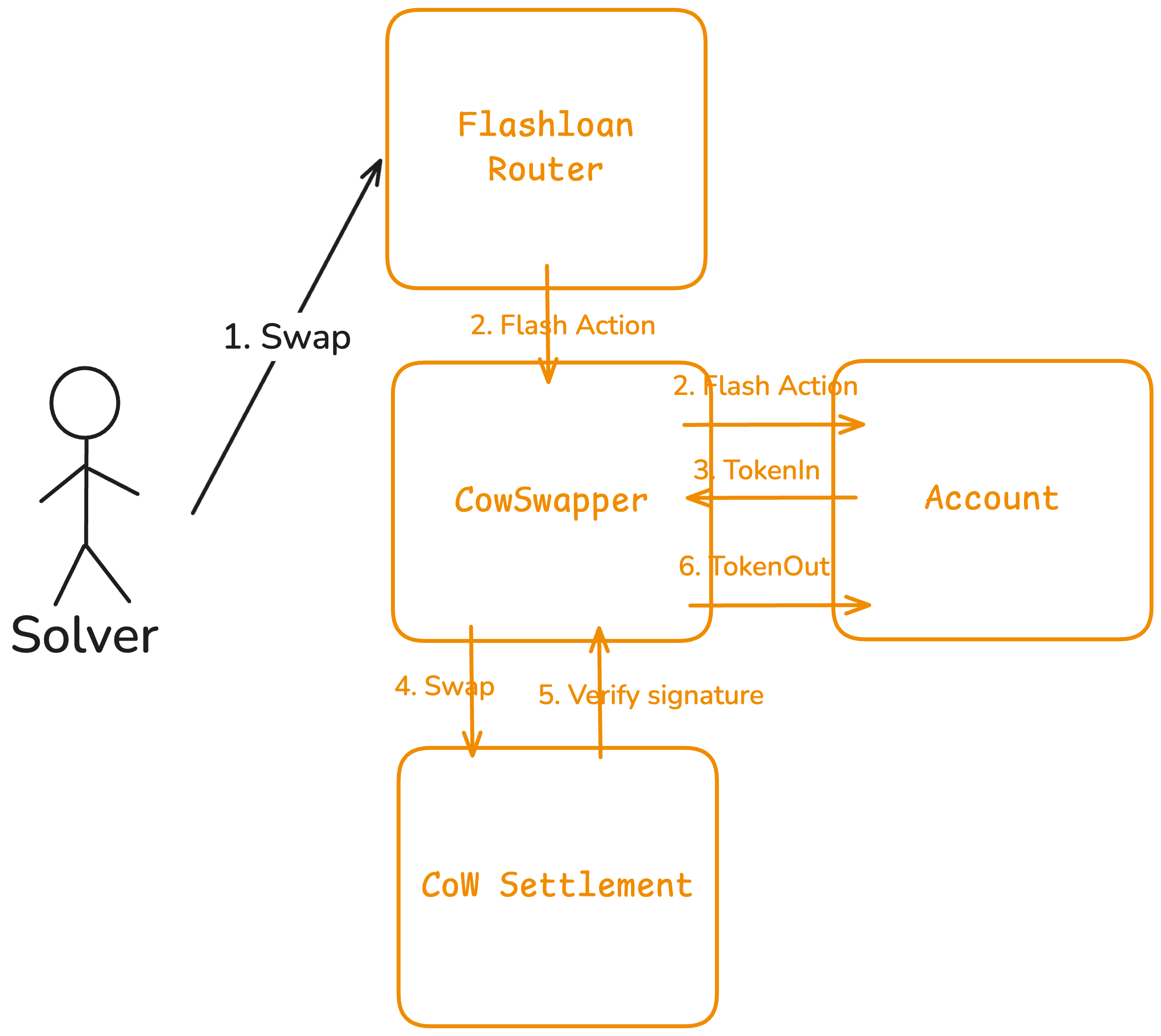
## Order Hooks
Account Owners who want more control can use custom Order Hooks. Examples of what a custom hook can do:
**Oracle check.** Verify the solver's output is within acceptable range of an on-chain price, as a second layer of protection on top of solver competition.
**Token filters.** Whitelist or blacklist specific assets. Stops the Initiator from swapping into tokens the owner hasn't approved.
**Rate limits.** Cap swap frequency or maximum size per time window, useful for strategies that should execute gradually rather than all at once.
## Trust Assumptions
### Initiators
Initiators can decide when to swap tokens, the tokenIn and tokenOut, the amountIn and the minimum amountOut.
The Account Owner can easily restrict the tokenIn and tokenOut via the Order Hook:
* Whitelist/blacklist, or fix tokenIn and/or tokenOut
* Set minimum cooldown periods
For the minimum amountOut, the decentralised batch auction provides a safety net. Even with a low minimum amountOut, the batch auction guarantees a competitive actual price. Account Owners can additionally use third-party oracles to set a minimum value via a custom Order Hook.
### Solvers
Solvers cannot modify anything in the order. If they change any field of the order, or skip certain steps such as the flash loan or hook calls, the on-chain calculated hash will not match the signature.
If the auction mechanism fails or solvers collude, the worst case is that the minimum amountOut specified by the Initiator is what gets quoted.
## Fees
The Initiator can charge a fee: a percentage of the tokenOut received, where the percentage is set per order but always capped by the `maxSwapFee` configured by the Account Owner.
CoW Protocol charges gas costs indirectly by factoring them into the price quoted for the swap.
For more information on protocol fees, see [Fees](/protocol/fees).
# Asset Pricing
How Arcadia prices assets on-chain: the Registry, Oracle Modules, Primary and Derived Asset Modules, and recursive decomposition of composed assets like staked LP positions.
The pricing of assets is done via an on-chain append-only Registry.
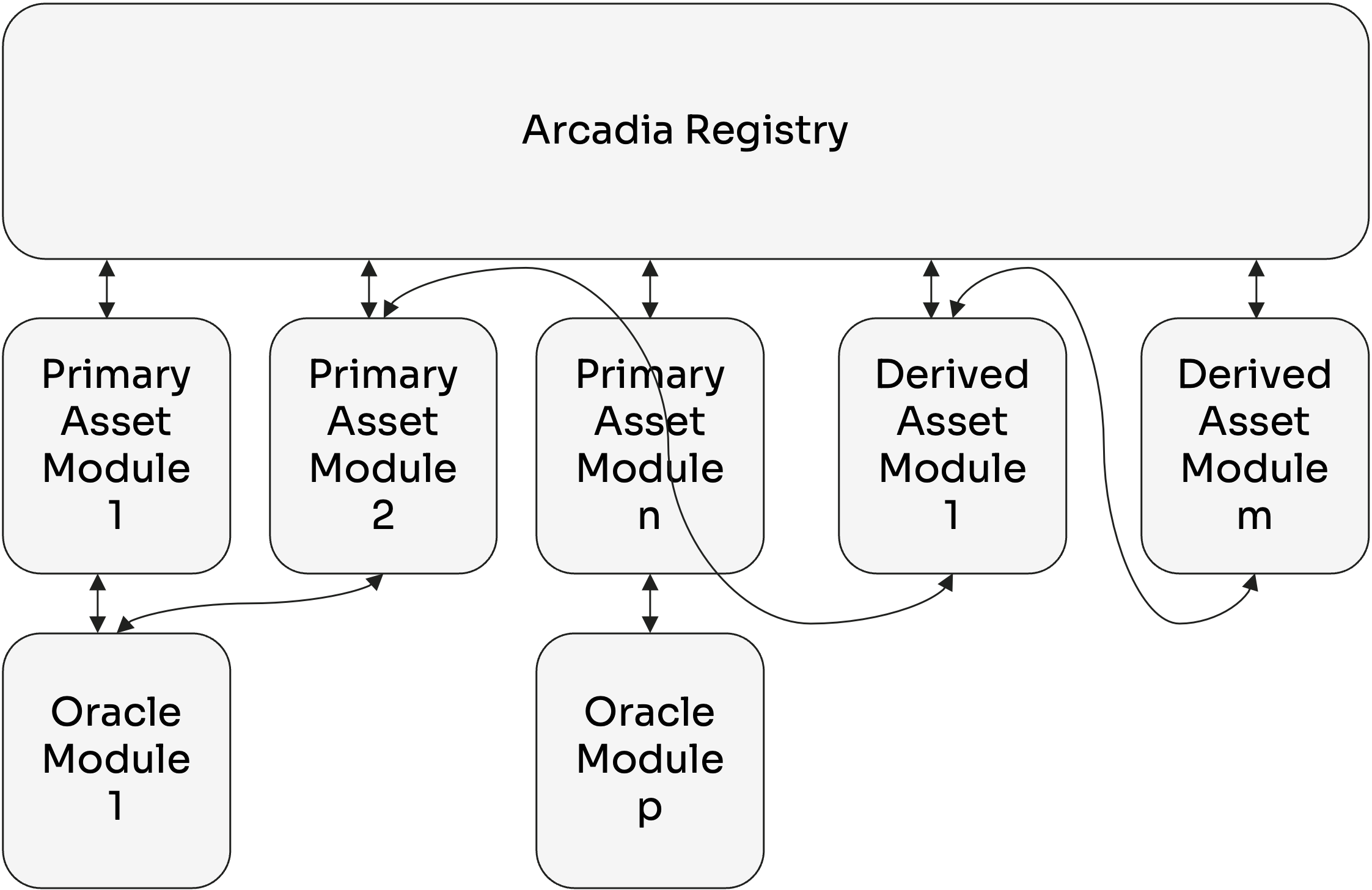
The Arcadia Registry is not a monolithic smart contract containing all logic.\
It consists of a main coordinating smart contract (also referred to as The Registry) and multiple append-only Modules.
Each Module is a separate smart contract with the pricing logic for specific Oracle implementations or specific Asset types.\
The Registry keeps mappings of which Modules to use for each asset.
Modules can only be appended to the Registry, not removed or overwritten.\
This ensures that Pricing logic is immutable, but it still gives flexibility to add new assets, or implement more efficient Pricing logic over time.
## Oracle Modules
The Oracle Module implements the logic to convert the oracle-rate of different oracle technologies into a standardized format. Each different oracle implementation (e.g. Chainlink oracles, Pyth oracles, Uniswap TWAPs...) has its own Oracle Module.
## Asset Modules
Just like Oracle Modules implement the logic to return oracle-rates in a standardized format, Asset Modules will return Asset values in a standardized format. Similar to how each oracle implementation has its own oracle Module, each asset type has its own Asset Module.
Next to pricing logic, Asset Modules also store and manage asset specific [risk parameters](/security-and-risk/risk).
Asset Modules can be further divided into two distinct groups: Primary Asset Modules and Derived Asset Modules.
### Primary Asset Modules
Primary assets are defined as assets that are not composed of other assets. For example: USDC, wETH and AERO.\
Primary Assets must be priced using one or more on-chain oracles.
### Derived Asset Modules
Derived Assets are defined as assets that are composed of one or more underlying assets (which can be Primary Assets or other Derived Assets).\
Examples of Derived Assets are liquidity positions of AMMs, staked assets, yield bearing tokens.
To value a certain amount of a Derived Asset, the Asset Module has to:
1. Decompose the asset in its underlying assets.
2. Calculate the values of the corresponding underlying asset amounts.
3. Sum the values of its underlying assets.
The Asset Module luckily does not have to implement the pricing logic for each Underlying Asset, it can just ask the Arcadia Registry recursively what the values are for each of the Underlying Assets (Step 4 and 9)!
This goes on until the underlying asset is not composed of any other assets (also referred to as Primary Assets), and we use an on-chain Oracle to determine its value (Step 6, 11 and 13).
Lets use the example of an Aerodrome WETH-USDC pool, that is staked and earns Aero rewards:
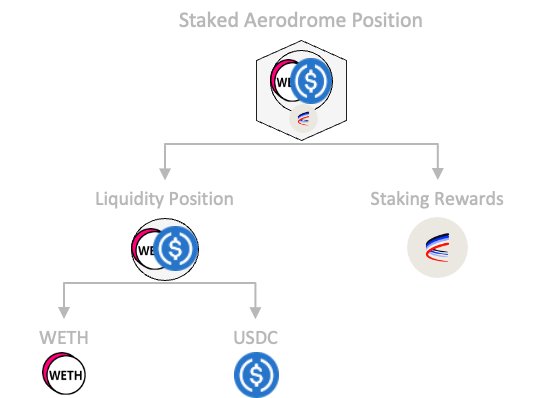
The staked position has as underlying assets the Liquidity position and the aero rewards (a Primary Asset). The Liquidity position is further composed of both WETH and USDC (two primary assets).
The whole flow to price this asset is as follows:
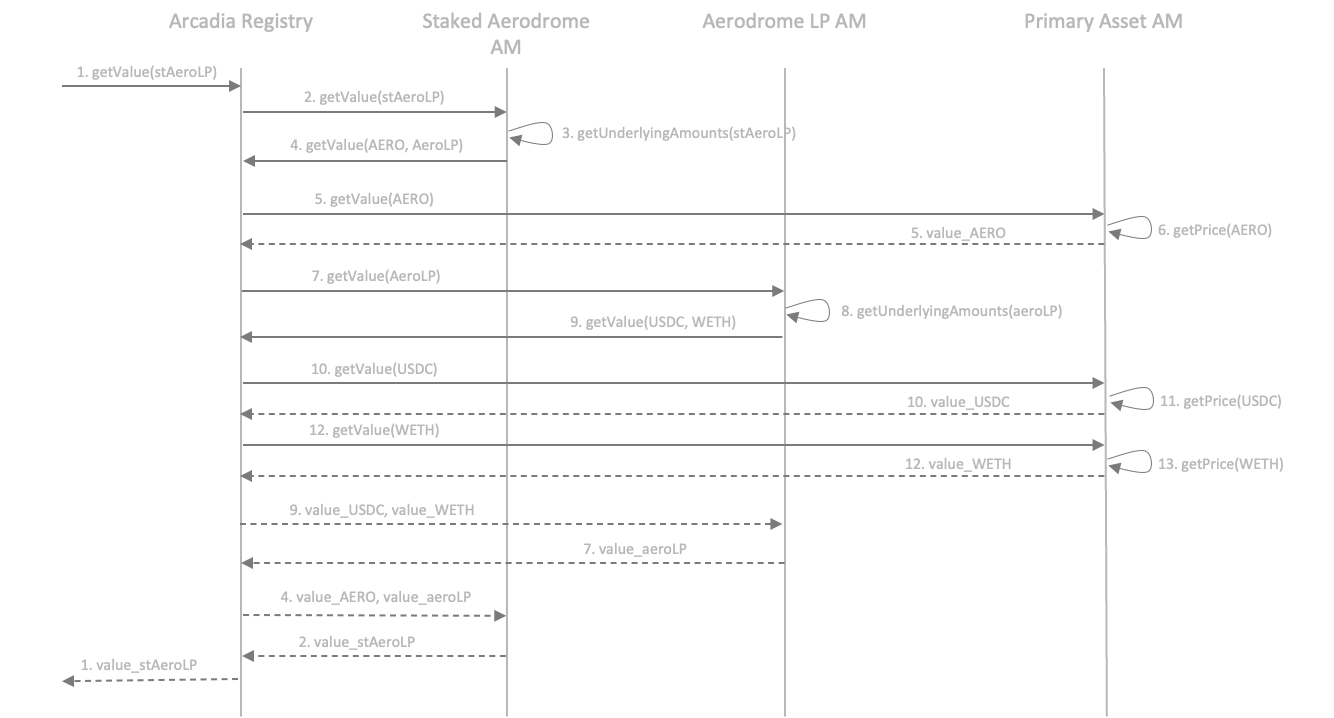
While this recursive process may look complex, only one function per Asset Module (no matter what type of asset) has to be implemented, the conversion of an amount of the composed token into the amounts of its underlying tokens (step 3 and 8).
All other steps are orchestrated by the Registry, and had to be implemented just once!
# Fees
Arcadia Protocol fee structure: yield success fees, swap fees, initiator fees, and how stAAA holdings reduce fees.
The protocol can charge the following fees. Yield, earnings and APYs displayed on the front-end take into account activated fees.
## Summary
| Fee Type | Amount | Notes |
| ------------------------------------ | -------- | ----------------------------------------------------------------- |
| Reserve factor for interest payments | 15% \* | Percentage of interests paid which goes towards the protocol |
| Liquidation Penalty | | On open debt of Accounts, according to: |
| - Liquidation Initiation | 0.12% | Paid to the keeper initiating the liquidation |
| - Liquidation Termination | 0.12% | Paid to the keeper terminating the liquidation |
| - Liquidation Penalty | 2% | Equally split between the protocol and liquidity providers |
| Origination Fee | 0% | Fee on new debt taken |
| Front-end Swap Fee | 0% | Fee on swaps executed through the front-end |
| Front-end Position Fee | 0% | Success fee on positions created and burned through the front-end |
| Front-end Yield Success Fee | 7.5% | Success fee on yield claimed manually through the front-end |
| Auto-Rebalancer | 0%\*\* | Yield success fee on rebalancing |
| Auto-Compounder | 0%\*\*\* | Yield success fee on compounding |
\* *This is not the interest rate itself, but the cut on interest payments.*\
\* \* *Rebalancing may incur other costs such as DEX swap fees and IL.*\
\* \* \* *Compounding may incur other costs such as DEX swap fees.*
## Lending
* A fee on interest payments, currently set to 15%.
* A share of the liquidation penalty, currently evenly split between the protocol treasury and the liquidity providers.
## Front-end
* A fee on swaps through the front end, currently set to 0%.
* A success fee on positions created and burned through the front end, currently set to 0%.
* A success fee on yield generated through the protocol. This fee is set to 7.5%.
## Asset Managers
Depending on the asset manager, the fees and usage limits can vary. For more information, see [Asset Managers](/protocol/asset-managers).
# Security & Risk
Security and risk management for Arcadia Protocol: audits, risk parameters, circuit breakers, insurance/cover options, and protocol roles.
Arcadia uses a multi layered security approach to protect users and the protocol.
1. All code is [audited](/security-and-risk/audits) by multiple parties and underwent a Sherlock auditing contest.
2. A [Risk Framework](/security-and-risk/risk) is developed with industry leading third parties and continuously monitored.
3. [Security breakers](/security-and-risk/circuit-breakers) are in place to protect against malicious actors.
4. User can opt-in for [Insurance](/security-and-risk/insurance) to protect their deposits.
For the formal risk model and protocol design rationale, see the [protocol whitepaper](https://github.com/arcadia-finance/whitepapers/blob/main/main.pdf).
**Disclaimer**: While we take extensive measures to ensure protocol security, users should always understand that no system is 100% immune to potential risks. We recommend users to read our audit reports, our documentations and risk measures.
# Audits
Arcadia Protocol audit history: completed security audits by Pashov Group, Sherlock, and other auditors, with links to audit reports.
At Arcadia, we prioritize the security of our protocol through comprehensive security measures and auditing processes. The DeFi landscape is evolving rapidly and is the primary target of bad actors. We work with the best teams in the security industry and researchers to ensure users' funds at Arcadia maximally protected.
We would like to thank [0xladboy](https://twitter.com/Xc1008Cui) and Lambda from [Trust Securities](https://www.trust-security.xyz/), [HollaDieWaldfee](https://twitter.com/HollaWaldfee100), [alexxander](https://twitter.com/__alexxander_) and [bytes032](https://twitter.com/bytes032) from [Renascense](https://twitter.com/RenascenceLabs), [Pashov](https://twitter.com/pashovkrum), [Ruhum](https://code4rena.com/@ruhum) and [carrotsmuggler](https://code4rena.com/@carrotsmuggler) from the [Pashov Audit Group](https://twitter.com/PashovAuditGrp) and [0x52](https://twitter.com/IAm0x52) together with the many Sherlock Watsons for helping us with security reviews for the protocol.
The complete Arcadia V2 contracts are audited by multiple parties and underwent a Sherlock auditing contest. Additionally, asset modules and periphery contracts have been fully audited.
The audit reports can be found below:
* **Nethermind (Q4 2022 - Q1 2023):** complete codebase Arcadia V1
* **Trust Securities (Q4 2023):** complete codebase Arcadia V2
* **Renascence (Q1 2024):** complete codebase Arcadia V2
* **Pashov Audit Group (Q1 2024):** complete codebase Arcadia V2
* **Sherlock Contest (Q1 2024):** complete codebase Arcadia V2
* **Sherlock Contest - Aerodrome Asset Modules (Q2 2024):** Aerodrome Asset Modules
* **Renascence (Q2 2024):** Aerodrome staked Slipstream, Auto-compounder and Tranche Wrapper
* **Pashov Group (Q3 2024):** Spot Accounts and Uniswap V4 Asset Module
* **Renascence (Q1 2025):** Staking contracts
* **Sherlock (Q3 2025):** New Account versions, multichain deployment
All completed audit reports can be found in the following Github repository:
We strongly recommend users to read our audit reports, our documentation and risk measures.
# Risk Management
Risk management in Arcadia: per-asset risk parameters (collateral factors, liquidation factors), risk exposure limits, and how Creditors configure risk.
Each collateral and numeraire pair within the Arcadia Protocol has specific risk values, which influence how assets are supplied and loans are issued.
Each asset has a different underlying risk, and it is crucial for users to understand the smart contract security, centralization risk, and market risks. Collateral and numeraire assets are onboarded with carefully designed risk mitigation parameters.
## Risk Parameters
Arcadia Protocol employs three main risk mitigation parameters:
1. **Collateral Factor**
2. **Liquidation Factor**
3. **Supply Caps**
These parameters help manage the market risk of supported collateral assets and are used for the [Margin Calculation](/protocol/margin-calculations-and-requirements) of Arcadia Accounts.
### Collateral Factor
Determines the numeraire amount available as debt for a collateral asset. The factor depends on:
* Asset quality
* Security risk
* Market risk
### Liquidation Factor
Used to:
* Determine when a collateral asset will be auctioned to pay off debt
* Calculate fair starting prices in auctions
The factor depends on:
* Asset quality
* Volatility relative to numeraire asset
### Supply Caps
Limits exposure to a single collateral asset or to a single type of asset by defining:
* Maximum numeraire debt for a given collateral
* Based on the on-chain liquidity of the collateral asset and the risk associated with the asset type.
## Detailed Methodology
For a comprehensive understanding of our risk parameter methodology, [visit our detailed research document](https://www.llamarisk.com/research/introducing-arcadiasim).
## Continuous Monitoring
We continuously monitor risk parameters to adapt to changing market conditions. Users can access our detailed risk dashboard, powered by LlamaRisk, [here](https://portal.llamarisk.com/arcadia/overview).
# Circuit Breakers
Arcadia circuit breakers: automated safety mechanisms that pause protocol operations during extreme market events or oracle failures.
Arcadia uses [Hexagate](https://www.hexagate.com/)'s monitoring tools to detect suspicious contract deployments and transactions. An automated pause mechanism is set up such that on suspicious events, the whole protocol can be paused minimizing the risk of exploits.
# Insurance/Cover
Insurance and cover options for Arcadia lending pool deposits: smart contract exploit protection via coverage protocols.
## Nexus Mutual
Arcadia's protocol is covered by [Nexus Mutual](https://v2.nexusmutual.io/cover/product/156) for comprehensive protection.\
Coverage can be purchased [through OpenCover](https://opencover.com/arcadia).
## Base DeFi Pass
Arcadia is also included in the [Base DeFi Pass](https://opencover.com/basepass/) through OpenCover.
# Roles
Protocol roles in Arcadia: owner, guardian, risk manager, and their permissions across Factory, Registry, Lending Pools, and Asset Modules.
All permissioned roles use Safe multisig's.
The Arcadia protocol has the following roles:
* Owner: Can append new Asset Modules and Account versions to the protocol.
* Risk Manager: Set per Creditor, can set risk parameters for collateral assets.
* Pause Guardian: Can pause the protocol in case of a security breach.
# Developers
Developer documentation for Arcadia Protocol: contract addresses, integration guides for Asset Managers, Liquidators, and Creditors.
# Contract Addresses
All Arcadia Protocol contract addresses across Base (8453), Optimism (10), Unichain (130) and Robinhood (4663), by category: core protocol, creditors and asset managers.
The Arcadia Protocol is deployed on **Base** (chain ID `8453`), **Optimism** (chain ID `10`), **Unichain** (chain ID `130`) and **Robinhood** (chain ID `4663`).
Most contracts share the same address across all chains. Each sub-page uses per-chain explorer columns to indicate where a contract is deployed — empty cells mean the contract is not available on that chain.
# Core protocol
Core Arcadia Protocol contract addresses across Base, Optimism, Unichain and Robinhood: Factory, Registry, Account implementations, Liquidator, Position Managers and Oracle Modules.
The Arcadia Protocol consists of a number of contracts
* **The Factory** creates all Arcadia Accounts, for all Account versions.
* **Pricing Modules** ensure the correct pricing of simple and complex assets.
* **Oracle modules** form a standardized manner to request external prices.
* **The Registry** is the overarching contract coordinating all contracts.
## Core
Core protocol contracts share the same address across all chains.
| Contract | Address | Base | Optimism | Unichain | Robinhood |
| ------------------------------------------------------------------------------------------ | -------------------------------------------- | ---------------------------------------------------------------------------- | --------------------------------------------------------------------------------------- | --------------------------------------------------------------------------- | ---------------------------------------------------------------------------- |
| [Factory](https://github.com/arcadia-finance/accounts-v2/blob/v2.0.0/src/Factory.sol) | `0xDa14Fdd72345c4d2511357214c5B89A919768e59` | [↗](https://basescan.org/address/0xDa14Fdd72345c4d2511357214c5B89A919768e59) | [↗](https://optimistic.etherscan.io/address/0xDa14Fdd72345c4d2511357214c5B89A919768e59) | [↗](https://uniscan.xyz/address/0xDa14Fdd72345c4d2511357214c5B89A919768e59) | [↗](https://robinscan.io/address/0xDa14Fdd72345c4d2511357214c5B89A919768e59) |
| [Registry](https://github.com/arcadia-finance/accounts-v2/blob/v2.0.0/src/Registry.sol) | `0xd0690557600eb8Be8391D1d97346e2aab5300d5f` | [↗](https://basescan.org/address/0xd0690557600eb8Be8391D1d97346e2aab5300d5f) | [↗](https://optimistic.etherscan.io/address/0xd0690557600eb8Be8391D1d97346e2aab5300d5f) | [↗](https://uniscan.xyz/address/0xd0690557600eb8Be8391D1d97346e2aab5300d5f) | [↗](https://robinscan.io/address/0xd0690557600eb8Be8391D1d97346e2aab5300d5f) |
| [Liquidator](https://github.com/arcadia-finance/lending-v2/blob/v2.0.0/src/Liquidator.sol) | `0xA4B0b9fD1d91fA2De44F6ABFd59cC14bA1E1a7Af` | [↗](https://basescan.org/address/0xA4B0b9fD1d91fA2De44F6ABFd59cC14bA1E1a7Af) | [↗](https://optimistic.etherscan.io/address/0xA4B0b9fD1d91fA2De44F6ABFd59cC14bA1E1a7Af) | [↗](https://uniscan.xyz/address/0xA4B0b9fD1d91fA2De44F6ABFd59cC14bA1E1a7Af) | [↗](https://robinscan.io/address/0xA4B0b9fD1d91fA2De44F6ABFd59cC14bA1E1a7Af) |
### Account Implementations
| Contract | Address | Base | Optimism | Unichain | Robinhood |
| ----------------------------------------------------------------------------------------------------------- | -------------------------------------------- | ---------------------------------------------------------------------------- | --------------------------------------------------------------------------------------- | --------------------------------------------------------------------------- | ---------------------------------------------------------------------------- |
| [AccountV1](https://github.com/arcadia-finance/accounts-v2/blob/v2.0.0/src/accounts/AccountV1.sol) (Margin) | `0xbea2B6d45ACaF62385877D835970a0788719cAe1` | [↗](https://basescan.org/address/0xbea2B6d45ACaF62385877D835970a0788719cAe1) | [↗](https://optimistic.etherscan.io/address/0xbea2B6d45ACaF62385877D835970a0788719cAe1) | [↗](https://uniscan.xyz/address/0xbea2B6d45ACaF62385877D835970a0788719cAe1) | [↗](https://robinscan.io/address/0xbea2B6d45ACaF62385877D835970a0788719cAe1) |
| [AccountV2](https://github.com/arcadia-finance/accounts-v2/blob/v2.0.0/src/accounts/AccountSpot.sol) (Spot) | `0xd8AF1F1dEe6EA38f9c08b5cfa31e01ad2Bfbef28` | [↗](https://basescan.org/address/0xd8AF1F1dEe6EA38f9c08b5cfa31e01ad2Bfbef28) | [↗](https://optimistic.etherscan.io/address/0xd8AF1F1dEe6EA38f9c08b5cfa31e01ad2Bfbef28) | [↗](https://uniscan.xyz/address/0xd8AF1F1dEe6EA38f9c08b5cfa31e01ad2Bfbef28) | [↗](https://robinscan.io/address/0xd8AF1F1dEe6EA38f9c08b5cfa31e01ad2Bfbef28) |
| [AccountV3](https://github.com/arcadia-finance/accounts-v2/blob/v2.3.0/src/accounts/AccountV3.sol) (Margin) | `0x78Db6a136EdD0F70bEd7a6eb5ca2fDF6eE16E8D6` | [↗](https://basescan.org/address/0x78Db6a136EdD0F70bEd7a6eb5ca2fDF6eE16E8D6) | [↗](https://optimistic.etherscan.io/address/0x78Db6a136EdD0F70bEd7a6eb5ca2fDF6eE16E8D6) | [↗](https://uniscan.xyz/address/0x78Db6a136EdD0F70bEd7a6eb5ca2fDF6eE16E8D6) | [↗](https://robinscan.io/address/0x78Db6a136EdD0F70bEd7a6eb5ca2fDF6eE16E8D6) |
| [AccountV4](https://github.com/arcadia-finance/accounts-v2/blob/v2.3.0/src/accounts/AccountV4.sol) (Spot) | `0xe976BFb44f9322164ca6fdA6C5B84fBb6163D442` | [↗](https://basescan.org/address/0xe976BFb44f9322164ca6fdA6C5B84fBb6163D442) | [↗](https://optimistic.etherscan.io/address/0xe976BFb44f9322164ca6fdA6C5B84fBb6163D442) | [↗](https://uniscan.xyz/address/0xe976BFb44f9322164ca6fdA6C5B84fBb6163D442) | [↗](https://robinscan.io/address/0xe976BFb44f9322164ca6fdA6C5B84fBb6163D442) |
## Position Managers
External protocol position managers have different addresses per chain. Arcadia wrapper contracts share the same address across all chains.
| Name | Base | Optimism | Unichain | Robinhood |
| ---------------------------- | --------------------------------------------------------------------------------------------------------------------- | -------------------------------------------------------------------------------------------------------------------------------- | -------------------------------------------------------------------------------------------------------------------- | --------------------------------------------------------------------------------------------------------------------- |
| UniswapV3 | [0x03a520b32C04BF3bEEf7BEb72E919cf822Ed34f1](https://basescan.org/address/0x03a520b32C04BF3bEEf7BEb72E919cf822Ed34f1) | [0xC36442b4a4522E871399CD717aBDD847Ab11FE88](https://optimistic.etherscan.io/address/0xC36442b4a4522E871399CD717aBDD847Ab11FE88) | [0x943e6e07a7E8E791dAFC44083e54041D743C46E9](https://uniscan.xyz/address/0x943e6e07a7E8E791dAFC44083e54041D743C46E9) | [0x73991a25C818Bf1f1128dEAaB1492D45638DE0D3](https://robinscan.io/address/0x73991a25C818Bf1f1128dEAaB1492D45638DE0D3) |
| UniswapV4 | [0x7C5f5A4bBd8fD63184577525326123B519429bDc](https://basescan.org/address/0x7C5f5A4bBd8fD63184577525326123B519429bDc) | [0x3C3Ea4B57a46241e54610e5f022E5c45859A1017](https://optimistic.etherscan.io/address/0x3C3Ea4B57a46241e54610e5f022E5c45859A1017) | [0x4529A01c7A0410167c5740C487A8DE60232617bf](https://uniscan.xyz/address/0x4529A01c7A0410167c5740C487A8DE60232617bf) | [0x58daec3116aae6D93017bAAea7749052E8a04fA7](https://robinscan.io/address/0x58daec3116aae6D93017bAAea7749052E8a04fA7) |
| Slipstream | [0x827922686190790b37229fd06084350E74485b72](https://basescan.org/address/0x827922686190790b37229fd06084350E74485b72) | [0x416b433906b1B72FA758e166e239c43d68dC6F29](https://optimistic.etherscan.io/address/0x416b433906b1B72FA758e166e239c43d68dC6F29) | [0x991d5546C4B442B4c5fdc4c8B8b8d131DEB24702](https://uniscan.xyz/address/0x991d5546C4B442B4c5fdc4c8B8b8d131DEB24702) | |
| Slipstream V2 | [0xa990C6a764b73BF43cee5Bb40339c3322FB9D55F](https://basescan.org/address/0xa990C6a764b73BF43cee5Bb40339c3322FB9D55F) | | | |
| Slipstream V3 | [0xe1f8cd9AC4e4A65F54f38a5CdAfCA44f6dD68b53](https://basescan.org/address/0xe1f8cd9AC4e4A65F54f38a5CdAfCA44f6dD68b53) | | | |
| Staked Slipstream | [0x1Dc7A0f5336F52724B650E39174cfcbbEdD67bF1](https://basescan.org/address/0x1Dc7A0f5336F52724B650E39174cfcbbEdD67bF1) | [0x1Dc7A0f5336F52724B650E39174cfcbbEdD67bF1](https://optimistic.etherscan.io/address/0x1Dc7A0f5336F52724B650E39174cfcbbEdD67bF1) | [0x1Dc7A0f5336F52724B650E39174cfcbbEdD67bF1](https://uniscan.xyz/address/0x1Dc7A0f5336F52724B650E39174cfcbbEdD67bF1) | |
| Staked Slipstream V2 | [0xBed6C3E35B9B1e044b3Bc71465769EdFDC0FDD4c](https://basescan.org/address/0xBed6C3E35B9B1e044b3Bc71465769EdFDC0FDD4c) | | | |
| Staked Slipstream V3 | [0xE0F20BE5886F11CbcD2cb5bA9987Bcbbf1d8ca7b](https://basescan.org/address/0xE0F20BE5886F11CbcD2cb5bA9987Bcbbf1d8ca7b) | | | |
| Wrapped Staked Slipstream | [0xD74339e0F10fcE96894916B93E5Cc7dE89C98272](https://basescan.org/address/0xD74339e0F10fcE96894916B93E5Cc7dE89C98272) | [0xD74339e0F10fcE96894916B93E5Cc7dE89C98272](https://optimistic.etherscan.io/address/0xD74339e0F10fcE96894916B93E5Cc7dE89C98272) | [0xD74339e0F10fcE96894916B93E5Cc7dE89C98272](https://uniscan.xyz/address/0xD74339e0F10fcE96894916B93E5Cc7dE89C98272) | |
| Wrapped Staked Slipstream V2 | [0x147a2CcbAF4521ad209A2875AE0B3c496f4B25a4](https://basescan.org/address/0x147a2CcbAF4521ad209A2875AE0B3c496f4B25a4) | | | |
| Wrapped Staked Slipstream V3 | [0x9189BC25f8faC157B4D87b0b3c14F56bA1477d53](https://basescan.org/address/0x9189BC25f8faC157B4D87b0b3c14F56bA1477d53) | | | |
| Wrapped Aerodrome | [0x17B5826382e3a5257b829cF0546A08Bd77409270](https://basescan.org/address/0x17B5826382e3a5257b829cF0546A08Bd77409270) | [0x17B5826382e3a5257b829cF0546A08Bd77409270](https://optimistic.etherscan.io/address/0x17B5826382e3a5257b829cF0546A08Bd77409270) | [0x17B5826382e3a5257b829cF0546A08Bd77409270](https://uniscan.xyz/address/0x17B5826382e3a5257b829cF0546A08Bd77409270) | |
| Staked Aerodrome | [0x9f42361B7602Df1A8Ae28Bf63E6cb1883CD44C27](https://basescan.org/address/0x9f42361B7602Df1A8Ae28Bf63E6cb1883CD44C27) | [0x9f42361B7602Df1A8Ae28Bf63E6cb1883CD44C27](https://optimistic.etherscan.io/address/0x9f42361B7602Df1A8Ae28Bf63E6cb1883CD44C27) | [0x9f42361B7602Df1A8Ae28Bf63E6cb1883CD44C27](https://uniscan.xyz/address/0x9f42361B7602Df1A8Ae28Bf63E6cb1883CD44C27) | |
## Pricing Modules
Pricing Module (Asset Module) addresses are shared across all chains. Some modules are only active on chains where their underlying protocol exists.
| Contract | Address | Base | Optimism | Unichain | Robinhood |
| ------------------------------------------------------------------------------------------------------------------------------------------- | -------------------------------------------- | ---------------------------------------------------------------------------- | --------------------------------------------------------------------------------------- | --------------------------------------------------------------------------- | ---------------------------------------------------------------------------- |
| [ERC20PrimaryAM](https://github.com/arcadia-finance/accounts-v2/blob/v2.0.0/src/asset-modules/ERC20-Primaries/ERC20PrimaryAM.sol) | `0xfBecEaFC96ed6fc800753d3eE6782b6F9a60Eed7` | [↗](https://basescan.org/address/0xfBecEaFC96ed6fc800753d3eE6782b6F9a60Eed7) | [↗](https://optimistic.etherscan.io/address/0xfBecEaFC96ed6fc800753d3eE6782b6F9a60Eed7) | [↗](https://uniscan.xyz/address/0xfBecEaFC96ed6fc800753d3eE6782b6F9a60Eed7) | [↗](https://robinscan.io/address/0xfBecEaFC96ed6fc800753d3eE6782b6F9a60Eed7) |
| [UniswapV3AM](https://github.com/arcadia-finance/accounts-v2/blob/v2.0.0/src/asset-modules/UniswapV3/UniswapV3AM.sol) | `0x21bd524cC54CA78A7c48254d4676184f781667dC` | [↗](https://basescan.org/address/0x21bd524cC54CA78A7c48254d4676184f781667dC) | [↗](https://optimistic.etherscan.io/address/0x21bd524cC54CA78A7c48254d4676184f781667dC) | [↗](https://uniscan.xyz/address/0x21bd524cC54CA78A7c48254d4676184f781667dC) | [↗](https://robinscan.io/address/0x21bd524cC54CA78A7c48254d4676184f781667dC) |
| [UniswapV4HooksRegistry](https://github.com/arcadia-finance/accounts-v2/blob/v2.3.0/src/asset-modules/UniswapV4/UniswapV4HooksRegistry.sol) | `0x8B0fd5352caE4E7c86632CA791229d132Fef5D3C` | [↗](https://basescan.org/address/0x8B0fd5352caE4E7c86632CA791229d132Fef5D3C) | [↗](https://optimistic.etherscan.io/address/0x8B0fd5352caE4E7c86632CA791229d132Fef5D3C) | [↗](https://uniscan.xyz/address/0x8B0fd5352caE4E7c86632CA791229d132Fef5D3C) | [↗](https://robinscan.io/address/0x8B0fd5352caE4E7c86632CA791229d132Fef5D3C) |
| [DefaultUniswapV4AM](https://github.com/arcadia-finance/accounts-v2/blob/v2.3.0/src/asset-modules/UniswapV4/DefaultUniswapV4AM.sol) | `0xb808971ea73341b0d7286B3D67F08De321f80465` | [↗](https://basescan.org/address/0xb808971ea73341b0d7286B3D67F08De321f80465) | [↗](https://optimistic.etherscan.io/address/0xb808971ea73341b0d7286B3D67F08De321f80465) | [↗](https://uniscan.xyz/address/0xb808971ea73341b0d7286B3D67F08De321f80465) | [↗](https://robinscan.io/address/0xb808971ea73341b0d7286B3D67F08De321f80465) |
| [AerodromePoolAM](https://github.com/arcadia-finance/accounts-v2/blob/v2.1.0/src/asset-modules/Aerodrome-Finance/AerodromePoolAM.sol) | `0xfe0FA1FD8F8E889062F03e2f126Fc7B9DE6091A5` | [↗](https://basescan.org/address/0xfe0FA1FD8F8E889062F03e2f126Fc7B9DE6091A5) | [↗](https://optimistic.etherscan.io/address/0xfe0FA1FD8F8E889062F03e2f126Fc7B9DE6091A5) | [↗](https://uniscan.xyz/address/0xfe0FA1FD8F8E889062F03e2f126Fc7B9DE6091A5) | |
| [WrappedAerodromeAM](https://github.com/arcadia-finance/accounts-v2/blob/v2.1.0/src/asset-modules/Aerodrome-Finance/WrappedAerodromeAM.sol) | `0x17B5826382e3a5257b829cF0546A08Bd77409270` | [↗](https://basescan.org/address/0x17B5826382e3a5257b829cF0546A08Bd77409270) | [↗](https://optimistic.etherscan.io/address/0x17B5826382e3a5257b829cF0546A08Bd77409270) | [↗](https://uniscan.xyz/address/0x17B5826382e3a5257b829cF0546A08Bd77409270) | |
| [StakedAerodromeAM](https://github.com/arcadia-finance/accounts-v2/blob/v2.1.0/src/asset-modules/Aerodrome-Finance/StakedAerodromeAM.sol) | `0x9f42361B7602Df1A8Ae28Bf63E6cb1883CD44C27` | [↗](https://basescan.org/address/0x9f42361B7602Df1A8Ae28Bf63E6cb1883CD44C27) | [↗](https://optimistic.etherscan.io/address/0x9f42361B7602Df1A8Ae28Bf63E6cb1883CD44C27) | [↗](https://uniscan.xyz/address/0x9f42361B7602Df1A8Ae28Bf63E6cb1883CD44C27) | |
| [SlipstreamAM](https://github.com/arcadia-finance/accounts-v2/blob/v2.1.0/src/asset-modules/Slipstream/SlipstreamAM.sol) | `0xd3A7055bBcDA4F8F49e5c5dE7E83B09a33633F44` | [↗](https://basescan.org/address/0xd3A7055bBcDA4F8F49e5c5dE7E83B09a33633F44) | [↗](https://optimistic.etherscan.io/address/0xd3A7055bBcDA4F8F49e5c5dE7E83B09a33633F44) | [↗](https://uniscan.xyz/address/0xd3A7055bBcDA4F8F49e5c5dE7E83B09a33633F44) | |
| [StakedSlipstreamAM](https://github.com/arcadia-finance/accounts-v2/blob/v2.1.0/src/asset-modules/Slipstream/StakedSlipstreamAM.sol) | `0x1Dc7A0f5336F52724B650E39174cfcbbEdD67bF1` | [↗](https://basescan.org/address/0x1Dc7A0f5336F52724B650E39174cfcbbEdD67bF1) | [↗](https://optimistic.etherscan.io/address/0x1Dc7A0f5336F52724B650E39174cfcbbEdD67bF1) | [↗](https://uniscan.xyz/address/0x1Dc7A0f5336F52724B650E39174cfcbbEdD67bF1) | |
| SlipstreamV2AM | `0x3aDE1F1FdC666B1bFAd376345EA878D1c11EB73B` | [↗](https://basescan.org/address/0x3aDE1F1FdC666B1bFAd376345EA878D1c11EB73B) | | | |
| SlipstreamV3AM | `0xcaf4167dE878Cfb23D9912b1ff5869F2b3527189` | [↗](https://basescan.org/address/0xcaf4167dE878Cfb23D9912b1ff5869F2b3527189) | | | |
| StakedSlipstreamV2AM | `0xBed6C3E35B9B1e044b3Bc71465769EdFDC0FDD4c` | [↗](https://basescan.org/address/0xBed6C3E35B9B1e044b3Bc71465769EdFDC0FDD4c) | | | |
| StakedSlipstreamV3AM | `0xE0F20BE5886F11CbcD2cb5bA9987Bcbbf1d8ca7b` | [↗](https://basescan.org/address/0xE0F20BE5886F11CbcD2cb5bA9987Bcbbf1d8ca7b) | | | |
| [StargateAM](https://github.com/arcadia-finance/accounts-v2/blob/v2.0.0/src/asset-modules/Stargate-Finance/StargateAM.sol) | `0x20f7903290bF98716B62Dc1c9DA634291b8cfeD4` | [↗](https://basescan.org/address/0x20f7903290bF98716B62Dc1c9DA634291b8cfeD4) | [↗](https://optimistic.etherscan.io/address/0x20f7903290bF98716B62Dc1c9DA634291b8cfeD4) | | |
| [StakedStargateAM](https://github.com/arcadia-finance/accounts-v2/blob/v2.0.0/src/asset-modules/Stargate-Finance/StakedStargateAM.sol) | `0xae909e19fd13C01c28d5Ee439D403920CF7f9Eea` | [↗](https://basescan.org/address/0xae909e19fd13C01c28d5Ee439D403920CF7f9Eea) | [↗](https://optimistic.etherscan.io/address/0xae909e19fd13C01c28d5Ee439D403920CF7f9Eea) | | |
| [AlienBaseAM](https://github.com/arcadia-finance/accounts-v2/blob/v2.0.0/src/asset-modules/UniswapV3/UniswapV3AM.sol) | `0x79dD8b8d4abB5dEEA986DB1BF0a02E4CA42ae416` | [↗](https://basescan.org/address/0x79dD8b8d4abB5dEEA986DB1BF0a02E4CA42ae416) | | | |
## Oracles
| Contract | Address | Base | Optimism | Unichain | Robinhood |
| ------------------------------------------------------------------------------------------------------------ | -------------------------------------------- | ---------------------------------------------------------------------------- | --------------------------------------------------------------------------------------- | --------------------------------------------------------------------------- | ---------------------------------------------------------------------------- |
| [ChainlinkOM](https://github.com/arcadia-finance/accounts-v2/blob/v2.0.0/src/oracle-modules/ChainlinkOM.sol) | `0x6a5485E3ce6913890ae5e8bDc08a868D432eEB31` | [↗](https://basescan.org/address/0x6a5485E3ce6913890ae5e8bDc08a868D432eEB31) | [↗](https://optimistic.etherscan.io/address/0x6a5485E3ce6913890ae5e8bDc08a868D432eEB31) | [↗](https://uniscan.xyz/address/0x6a5485E3ce6913890ae5e8bDc08a868D432eEB31) | [↗](https://robinscan.io/address/0x6a5485E3ce6913890ae5e8bDc08a868D432eEB31) |
## Common Tokens
Token addresses vary by chain. WETH uses the standard OP-stack address on all chains.
| Token | Decimals | Base | Optimism | Unichain | Robinhood |
| ------------------- | -------- | --------------------------------------------------------------------------------------------------------------------- | -------------------------------------------------------------------------------------------------------------------------------- | -------------------------------------------------------------------------------------------------------------------- | --------------------------------------------------------------------------------------------------------------------- |
| WETH | 18 | [0x4200000000000000000000000000000000000006](https://basescan.org/address/0x4200000000000000000000000000000000000006) | [0x4200000000000000000000000000000000000006](https://optimistic.etherscan.io/address/0x4200000000000000000000000000000000000006) | [0x4200000000000000000000000000000000000006](https://uniscan.xyz/address/0x4200000000000000000000000000000000000006) | [0x0Bd7D308f8E1639FAb988df18A8011f41EAcAD73](https://robinscan.io/address/0x0Bd7D308f8E1639FAb988df18A8011f41EAcAD73) |
| USDC | 6 | [0x833589fCD6eDb6E08f4c7C32D4f71b54bdA02913](https://basescan.org/address/0x833589fCD6eDb6E08f4c7C32D4f71b54bdA02913) | [0x0b2C639c533813f4Aa9D7837CAf62653d097Ff85](https://optimistic.etherscan.io/address/0x0b2C639c533813f4Aa9D7837CAf62653d097Ff85) | [0x078D782b760474a361dDA0AF3839290b0EF57AD6](https://uniscan.xyz/address/0x078D782b760474a361dDA0AF3839290b0EF57AD6) | |
| cbBTC | 8 | [0xcbB7C0000aB88B473b1f5aFd9ef808440eed33Bf](https://basescan.org/address/0xcbB7C0000aB88B473b1f5aFd9ef808440eed33Bf) | | | |
| AERO / VELO / xVELO | 18 | [0x940181a94A35A4569E4529A3CDfB74e38FD98631](https://basescan.org/address/0x940181a94A35A4569E4529A3CDfB74e38FD98631) | [0x9560e827aF36c94D2Ac33a39bCE1Fe78631088Db](https://optimistic.etherscan.io/address/0x9560e827aF36c94D2Ac33a39bCE1Fe78631088Db) | [0x7f9AdFbd38b669F03d1d11000Bc76b9AaEA28A81](https://uniscan.xyz/address/0x7f9AdFbd38b669F03d1d11000Bc76b9AaEA28A81) | |
| AAA | 18 | [0xaaa843fb2916c0B57454270418E121C626402AAa](https://basescan.org/address/0xaaa843fb2916c0B57454270418E121C626402AAa) | | | |
| stAAA | 18 | [0xDeA1531d8a1505785eb517C7A28526443df223F3](https://basescan.org/address/0xDeA1531d8a1505785eb517C7A28526443df223F3) | | | |
# Creditors
Arcadia Creditor contract addresses across Base, Optimism, Unichain and Robinhood: Lending Pools (WETH, USDC, cbBTC, USDG), Tranches and Wrapped Tranches (ERC-4626).
## Lending Pools
The Lending pools are responsible for the:
* Accounting of the liabilities of borrowers via the debt tokens (ERC4626).
* Accounting of the liquidity of the Liquidity Providers, via one or more Tranche(s) (ERC4626).
* Management of issuing and repaying debt.
* Management of interest payments.
* Settlement of liquidations and default events.
| Contract | Address | Base | Optimism | Unichain | Robinhood |
| -------------------------------------------------------------------------------------------------- | -------------------------------------------- | ---------------------------------------------------------------------------- | --------------------------------------------------------------------------------------- | --------------------------------------------------------------------------- | ---------------------------------------------------------------------------- |
| [LendingPool WETH](https://github.com/arcadia-finance/lending-v2/blob/v2.0.0/src/LendingPool.sol) | `0x803ea69c7e87D1d6C86adeB40CB636cC0E6B98E2` | [↗](https://basescan.org/address/0x803ea69c7e87D1d6C86adeB40CB636cC0E6B98E2) | [↗](https://optimistic.etherscan.io/address/0x803ea69c7e87D1d6C86adeB40CB636cC0E6B98E2) | [↗](https://uniscan.xyz/address/0x803ea69c7e87D1d6C86adeB40CB636cC0E6B98E2) | [↗](https://robinscan.io/address/0x803ea69c7e87D1d6C86adeB40CB636cC0E6B98E2) |
| [LendingPool USDC](https://github.com/arcadia-finance/lending-v2/blob/v2.0.0/src/LendingPool.sol) | `0x3ec4a293Fb906DD2Cd440c20dECB250DeF141dF1` | [↗](https://basescan.org/address/0x3ec4a293Fb906DD2Cd440c20dECB250DeF141dF1) | [↗](https://optimistic.etherscan.io/address/0x3ec4a293Fb906DD2Cd440c20dECB250DeF141dF1) | [↗](https://uniscan.xyz/address/0x3ec4a293Fb906DD2Cd440c20dECB250DeF141dF1) | |
| [LendingPool cbBTC](https://github.com/arcadia-finance/lending-v2/blob/v2.0.0/src/LendingPool.sol) | `0xa37e9b4369dc20940009030bfbc2088f09645e3b` | [↗](https://basescan.org/address/0xa37e9b4369dc20940009030bfbc2088f09645e3b) | | | |
| [LendingPool USDG](https://github.com/arcadia-finance/lending-v2/blob/v2.0.0/src/LendingPool.sol) | `0xf37c0C5996503Fdd2b5CCCE36E659cD30393AE59` | | | | [↗](https://robinscan.io/address/0xf37c0C5996503Fdd2b5CCCE36E659cD30393AE59) |
## Tranches
Each Lending Pool has one or more Tranche(s). The Liquidity Providers do not provide Liquidity directly to the Lending Pool, but via a Tranche. Each Tranche contract will do the accounting of the balances of its Liquidity Providers, while the Lending Pool will do the accounting of the balances of its Tranches. A Tranche is according the ERC4626 standard, with a certain ERC20 as underlying asset. The Tranche is not compliant with ERC4626 on the approval flow: the approval goes to the Lending Pool instead of the Tranche, the deposit() is called on the Tranche itself.
| Contract | Address | Base | Optimism | Unichain | Robinhood |
| ------------------------------------------------------------------------------------------------ | -------------------------------------------- | ---------------------------------------------------------------------------- | --------------------------------------------------------------------------------------- | --------------------------------------------------------------------------- | ---------------------------------------------------------------------------- |
| [SeniorTranche WETH](https://github.com/arcadia-finance/lending-v2/blob/v2.0.0/src/Tranche.sol) | `0x393893caeB06B5C16728bb1E354b6c36942b1382` | [↗](https://basescan.org/address/0x393893caeB06B5C16728bb1E354b6c36942b1382) | [↗](https://optimistic.etherscan.io/address/0x393893caeB06B5C16728bb1E354b6c36942b1382) | [↗](https://uniscan.xyz/address/0x393893caeB06B5C16728bb1E354b6c36942b1382) | [↗](https://robinscan.io/address/0x393893caeB06B5C16728bb1E354b6c36942b1382) |
| [SeniorTranche USDC](https://github.com/arcadia-finance/lending-v2/blob/v2.0.0/src/Tranche.sol) | `0xEFE32813dBA3A783059d50e5358b9e3661218daD` | [↗](https://basescan.org/address/0xEFE32813dBA3A783059d50e5358b9e3661218daD) | [↗](https://optimistic.etherscan.io/address/0xEFE32813dBA3A783059d50e5358b9e3661218daD) | [↗](https://uniscan.xyz/address/0xEFE32813dBA3A783059d50e5358b9e3661218daD) | |
| [SeniorTranche cbBTC](https://github.com/arcadia-finance/lending-v2/blob/v2.0.0/src/Tranche.sol) | `0x9c63a4c499b323a25d389da759c2ac1e385eec92` | [↗](https://basescan.org/address/0x9c63a4c499b323a25d389da759c2ac1e385eec92) | | | |
| [SeniorTranche USDG](https://github.com/arcadia-finance/lending-v2/blob/v2.0.0/src/Tranche.sol) | `0xA5e1E1F92A244f192943899EB5810E2bAB372ea4` | | | | [↗](https://robinscan.io/address/0xA5e1E1F92A244f192943899EB5810E2bAB372ea4) |
## Wrapped Tranches
A Wrapper of the Tranche contract is deployed for each Tranche. The Wrapper is fully compliant with ERC4626 and can be preferably used in integrations.
| Contract | Address | Base | Optimism | Unichain | Robinhood |
| ----------------------------------------------------------------------------------------------------------------------------------------- | -------------------------------------------- | ---------------------------------------------------------------------------- | --------------------------------------------------------------------------------------- | --------------------------------------------------------------------------- | ---------------------------------------------------------------------------- |
| [Wrapped SeniorTranche WETH](https://github.com/arcadia-finance/lending-v2/blob/v2.0.1/src/periphery/tranche-wrapper/TrancheWrapper.sol) | `0xD82BFa27D49e5a394ba371B293DaE65E9B7a8C60` | [↗](https://basescan.org/address/0xD82BFa27D49e5a394ba371B293DaE65E9B7a8C60) | [↗](https://optimistic.etherscan.io/address/0xD82BFa27D49e5a394ba371B293DaE65E9B7a8C60) | [↗](https://uniscan.xyz/address/0xD82BFa27D49e5a394ba371B293DaE65E9B7a8C60) | [↗](https://robinscan.io/address/0xD82BFa27D49e5a394ba371B293DaE65E9B7a8C60) |
| [Wrapped SeniorTranche USDC](https://github.com/arcadia-finance/lending-v2/blob/v2.0.1/src/periphery/tranche-wrapper/TrancheWrapper.sol) | `0xbc10718571fcB3c3F67800e7C0887E450D2Ff398` | [↗](https://basescan.org/address/0xbc10718571fcB3c3F67800e7C0887E450D2Ff398) | [↗](https://optimistic.etherscan.io/address/0xbc10718571fcB3c3F67800e7C0887E450D2Ff398) | [↗](https://uniscan.xyz/address/0xbc10718571fcB3c3F67800e7C0887E450D2Ff398) | |
| [Wrapped SeniorTranche cbBTC](https://github.com/arcadia-finance/lending-v2/blob/v2.0.1/src/periphery/tranche-wrapper/TrancheWrapper.sol) | `0x7Cc8013e784418dc9771403DD057f55cEb34Ba3A` | [↗](https://basescan.org/address/0x7Cc8013e784418dc9771403DD057f55cEb34Ba3A) | | | |
| [Wrapped SeniorTranche USDG](https://github.com/arcadia-finance/lending-v2/blob/v2.0.1/src/periphery/tranche-wrapper/TrancheWrapper.sol) | `0x490D997D69Ed770CC510fF4a080416BB563b979b` | | | | [↗](https://robinscan.io/address/0x490D997D69Ed770CC510fF4a080416BB563b979b) |
# Asset Managers
Arcadia Asset Manager contract addresses across Base, Optimism, Unichain and Robinhood: Compounders, Rebalancers, Yield Claimers, CoW Swapper and Merkl Operators.
## Compounders
The [Compounder](/protocol/asset-managers/compounders) will act as an Asset Manager for Arcadia Accounts. It will allow third parties to trigger the compounding functionality for non staked Liquidity Positions in the Account.
| Contract | Address | Base | Optimism | Unichain | Robinhood |
| ------------------------------------------------------------------------------------------------------------------------------------------ | -------------------------------------------- | ---------------------------------------------------------------------------- | --------------------------------------------------------------------------------------- | --------------------------------------------------------------------------- | ---------------------------------------------------------------------------- |
| [CompounderSlipstreamV1](https://github.com/arcadia-finance/asset-managers/blob/main/src/cl-managers/compounders/CompounderSlipstream.sol) | `0x467837f44A71e3eAB90AEcfC995c84DC6B3cfCF7` | [↗](https://basescan.org/address/0x467837f44A71e3eAB90AEcfC995c84DC6B3cfCF7) | [↗](https://optimistic.etherscan.io/address/0x467837f44A71e3eAB90AEcfC995c84DC6B3cfCF7) | [↗](https://uniscan.xyz/address/0x467837f44A71e3eAB90AEcfC995c84DC6B3cfCF7) | |
| [CompounderSlipstreamV2](https://github.com/arcadia-finance/asset-managers/blob/main/src/cl-managers/compounders/CompounderSlipstream.sol) | `0x35e59448C7145482E56212510cC689612AB4F61f` | [↗](https://basescan.org/address/0x35e59448C7145482E56212510cC689612AB4F61f) | | | |
| [CompounderSlipstreamV3](https://github.com/arcadia-finance/asset-managers/blob/main/src/cl-managers/compounders/CompounderSlipstream.sol) | `0xd42A3Ac56456bD5422835B36C35Cacb6448ddCd9` | [↗](https://basescan.org/address/0xd42A3Ac56456bD5422835B36C35Cacb6448ddCd9) | | | |
| [CompounderUniswapV3](https://github.com/arcadia-finance/asset-managers/blob/main/src/cl-managers/compounders/CompounderUniswapV3.sol) | `0x02e1fa043214E51eDf1F0478c6D0d3D5658a2DC3` | [↗](https://basescan.org/address/0x02e1fa043214E51eDf1F0478c6D0d3D5658a2DC3) | [↗](https://optimistic.etherscan.io/address/0x02e1fa043214E51eDf1F0478c6D0d3D5658a2DC3) | [↗](https://uniscan.xyz/address/0x02e1fa043214E51eDf1F0478c6D0d3D5658a2DC3) | [↗](https://robinscan.io/address/0x02e1fa043214E51eDf1F0478c6D0d3D5658a2DC3) |
| [CompounderUniswapV4](https://github.com/arcadia-finance/asset-managers/blob/main/src/cl-managers/compounders/CompounderUniswapV4.sol) | `0xAA95c9c402b195D8690eCaea2341a76e3266B189` | [↗](https://basescan.org/address/0xAA95c9c402b195D8690eCaea2341a76e3266B189) | [↗](https://optimistic.etherscan.io/address/0xAA95c9c402b195D8690eCaea2341a76e3266B189) | [↗](https://uniscan.xyz/address/0xAA95c9c402b195D8690eCaea2341a76e3266B189) | [↗](https://robinscan.io/address/0xAA95c9c402b195D8690eCaea2341a76e3266B189) |
## Rebalancers
The [Rebalancer](/protocol/asset-managers/rebalancers) will act as an Asset Manager for Arcadia Accounts. It will allow third parties to trigger the rebalancing functionality for Liquidity Positions in the Account.
| Contract | Address | Base | Optimism | Unichain | Robinhood |
| ------------------------------------------------------------------------------------------------------------------------------------------ | -------------------------------------------- | ---------------------------------------------------------------------------- | --------------------------------------------------------------------------------------- | --------------------------------------------------------------------------- | ---------------------------------------------------------------------------- |
| [RebalancerSlipstreamV1](https://github.com/arcadia-finance/asset-managers/blob/main/src/cl-managers/rebalancers/RebalancerSlipstream.sol) | `0x5802454749cc0c4A6F28D5001B4cD84432e2b79F` | [↗](https://basescan.org/address/0x5802454749cc0c4A6F28D5001B4cD84432e2b79F) | [↗](https://optimistic.etherscan.io/address/0x5802454749cc0c4A6F28D5001B4cD84432e2b79F) | [↗](https://uniscan.xyz/address/0x5802454749cc0c4A6F28D5001B4cD84432e2b79F) | |
| [RebalancerSlipstreamV2](https://github.com/arcadia-finance/asset-managers/blob/main/src/cl-managers/rebalancers/RebalancerSlipstream.sol) | `0x953Ff365d0b562ceC658dc46B394E9282338d9Ea` | [↗](https://basescan.org/address/0x953Ff365d0b562ceC658dc46B394E9282338d9Ea) | | | |
| [RebalancerSlipstreamV3](https://github.com/arcadia-finance/asset-managers/blob/main/src/cl-managers/rebalancers/RebalancerSlipstream.sol) | `0x37c6258aEe125d520B6f03fc2cb490955050D557` | [↗](https://basescan.org/address/0x37c6258aEe125d520B6f03fc2cb490955050D557) | | | |
| [RebalancerUniswapV3](https://github.com/arcadia-finance/asset-managers/blob/main/src/cl-managers/rebalancers/RebalancerUniswapV3.sol) | `0xbA1D0c99c261F94b9C8b52465890Cca27dd993Bd` | [↗](https://basescan.org/address/0xbA1D0c99c261F94b9C8b52465890Cca27dd993Bd) | [↗](https://optimistic.etherscan.io/address/0xbA1D0c99c261F94b9C8b52465890Cca27dd993Bd) | [↗](https://uniscan.xyz/address/0xbA1D0c99c261F94b9C8b52465890Cca27dd993Bd) | [↗](https://robinscan.io/address/0xbA1D0c99c261F94b9C8b52465890Cca27dd993Bd) |
| [RebalancerUniswapV4](https://github.com/arcadia-finance/asset-managers/blob/main/src/cl-managers/rebalancers/RebalancerUniswapV4.sol) | `0x01EDaF0067a10D18c88D2876c0A85Ee0096a5Ac0` | [↗](https://basescan.org/address/0x01EDaF0067a10D18c88D2876c0A85Ee0096a5Ac0) | [↗](https://optimistic.etherscan.io/address/0x01EDaF0067a10D18c88D2876c0A85Ee0096a5Ac0) | [↗](https://uniscan.xyz/address/0x01EDaF0067a10D18c88D2876c0A85Ee0096a5Ac0) | [↗](https://robinscan.io/address/0x01EDaF0067a10D18c88D2876c0A85Ee0096a5Ac0) |
## Yield Claimers
The Yield Claimer will act as an Asset Manager for Arcadia Accounts. It will allow third parties to Claim yield or staking rewards from Liquidity Positions in the Account, and send it to a designated recipient.
| Contract | Address | Base | Optimism | Unichain | Robinhood |
| ------------------------------------------------------------------------------------------------------------------------------------------------- | -------------------------------------------- | ---------------------------------------------------------------------------- | --------------------------------------------------------------------------------------- | --------------------------------------------------------------------------- | ---------------------------------------------------------------------------- |
| [YieldClaimerSlipstreamV1](https://github.com/arcadia-finance/asset-managers/blob/main/src/cl-managers/yield-claimers/YieldClaimerSlipstream.sol) | `0x5a8278D37b7a787574b6Aa7E18d8C02D994f18Ba` | [↗](https://basescan.org/address/0x5a8278D37b7a787574b6Aa7E18d8C02D994f18Ba) | [↗](https://optimistic.etherscan.io/address/0x5a8278D37b7a787574b6Aa7E18d8C02D994f18Ba) | [↗](https://uniscan.xyz/address/0x5a8278D37b7a787574b6Aa7E18d8C02D994f18Ba) | |
| [YieldClaimerSlipstreamV2](https://github.com/arcadia-finance/asset-managers/blob/main/src/cl-managers/yield-claimers/YieldClaimerSlipstream.sol) | `0xc8bF4B2c740FF665864E9494832520f18822871C` | [↗](https://basescan.org/address/0xc8bF4B2c740FF665864E9494832520f18822871C) | | | |
| [YieldClaimerSlipstreamV3](https://github.com/arcadia-finance/asset-managers/blob/main/src/cl-managers/yield-claimers/YieldClaimerSlipstream.sol) | `0x8c1Fbf38118fD5A704b6E7babcB7AF1a9A291980` | [↗](https://basescan.org/address/0x8c1Fbf38118fD5A704b6E7babcB7AF1a9A291980) | | | |
| [YieldClaimerUniswapV3](https://github.com/arcadia-finance/asset-managers/blob/main/src/cl-managers/yield-claimers/YieldClaimerUniswapV3.sol) | `0x75Ed28EA8601Ce9F5FbcAB1c2428f04A57aFaA16` | [↗](https://basescan.org/address/0x75Ed28EA8601Ce9F5FbcAB1c2428f04A57aFaA16) | [↗](https://optimistic.etherscan.io/address/0x75Ed28EA8601Ce9F5FbcAB1c2428f04A57aFaA16) | [↗](https://uniscan.xyz/address/0x75Ed28EA8601Ce9F5FbcAB1c2428f04A57aFaA16) | [↗](https://robinscan.io/address/0x75Ed28EA8601Ce9F5FbcAB1c2428f04A57aFaA16) |
| [YieldClaimerUniswapV4](https://github.com/arcadia-finance/asset-managers/blob/main/src/cl-managers/yield-claimers/YieldClaimerUniswapV4.sol) | `0xD8aa21AB7f9B8601CB7d7A776D3AFA1602d5D8D4` | [↗](https://basescan.org/address/0xD8aa21AB7f9B8601CB7d7A776D3AFA1602d5D8D4) | [↗](https://optimistic.etherscan.io/address/0xD8aa21AB7f9B8601CB7d7A776D3AFA1602d5D8D4) | [↗](https://uniscan.xyz/address/0xD8aa21AB7f9B8601CB7d7A776D3AFA1602d5D8D4) | [↗](https://robinscan.io/address/0xD8aa21AB7f9B8601CB7d7A776D3AFA1602d5D8D4) |
## CoW Swapper
The [CoW Swapper](/protocol/asset-managers/cow-swapper) enables trustless, MEV-protected ERC20-to-ERC20 swaps within Arcadia Accounts via CoW Protocol batch auctions.
| Contract | Address | Base | Optimism | Unichain | Robinhood |
| ------------------------------------------------------------------------------------------------------------------- | -------------------------------------------- | ---------------------------------------------------------------------------- | -------- | -------- | --------- |
| [CoW Swapper v1.0.0](https://github.com/arcadia-finance/asset-managers/blob/43b1104/src/cow-swapper/CowSwapper.sol) | `0xc928013A219EC9F18dE7B2dee6A50Ba626811854` | [↗](https://basescan.org/address/0xc928013A219EC9F18dE7B2dee6A50Ba626811854) | | | |
| [CoW Swapper v1.1.0](https://github.com/arcadia-finance/asset-managers/blob/8c82438/src/cow-swapper/CowSwapper.sol) | `0xFfC742E68D41389BE9Ef1aFD518F036064DA2Bb6` | [↗](https://basescan.org/address/0xFfC742E68D41389BE9Ef1aFD518F036064DA2Bb6) | | | |
| [CoW Swapper v1.1.1](https://github.com/arcadia-finance/asset-managers/blob/main/src/cow-swapper/CowSwapper.sol) | `0xb988a32DeF54821Dde0D7382e8a74f1BE4da1f23` | [↗](https://basescan.org/address/0xb988a32DeF54821Dde0D7382e8a74f1BE4da1f23) | | | |
CoW Swapper v1.1.1 is the current deployment and the one the protocol routes to. The v1.0.0 and v1.1.0 entries are earlier deployments, kept here for reference only: they remain on chain but are no longer used. Each deployment exposes its own version through `VERSION()`. The superseded rows link to the source pinned at that version; the current row tracks `main`.
## Merkl Operators
The [Merkl Operator](/protocol/asset-managers/merkl-operators) automatically claim Merkl rewards and send them to a receiver, set by the Account Owner.
| Contract | Address | Base | Optimism | Unichain | Robinhood |
| ---------------------------------------------------------------------------------------------------------------------- | -------------------------------------------- | ---------------------------------------------------------------------------- | --------------------------------------------------------------------------------------- | --------------------------------------------------------------------------- | ---------------------------------------------------------------------------- |
| [Merkl Operator](https://github.com/arcadia-finance/asset-managers/blob/main/src/merkl-operator/MerklOperatorBase.sol) | `0x969F0251360b9Cf11c68f6Ce9587924c1B8b42C6` | [↗](https://basescan.org/address/0x969F0251360b9Cf11c68f6Ce9587924c1B8b42C6) | [↗](https://optimistic.etherscan.io/address/0x969F0251360b9Cf11c68f6Ce9587924c1B8b42C6) | [↗](https://uniscan.xyz/address/0x969F0251360b9Cf11c68f6Ce9587924c1B8b42C6) | [↗](https://robinscan.io/address/0x969F0251360b9Cf11c68f6Ce9587924c1B8b42C6) |
# Integrations
Integration guides for building on the Arcadia Protocol: how to build Asset Managers, Liquidation bots, and custom Creditors.
# Asset Managers
Developer guide: how to build custom Asset Managers for Arcadia Accounts — interface requirements, permissions model, and flash action integration.
## Overview
Arcadia Accounts offer users the flexibility to delegate control of their assets to third-party Asset Managers. Asset Managers are smart contracts that execute specific strategies on behalf of an account owner, such as rebalancing or compounding liquidity positions. By leveraging Asset Managers, users can optimize the performance of their accounts while maintaining control over the delegation process.
## Key Features
1. **Delegation:** Users can authorize an Asset Manager to perform actions on their behalf.
2. **Full Access:** The Asset Manager has access to all assets within the assigned Arcadia Account.
3. **Flexible Strategies:** Asset Managers can perform complex operations, such as rebalancing or interacting with DeFi protocols.
4. **Health Check for Margin Accounts:** Asset Managers must ensure that a margin account remains in a healthy state after executing actions.
5. **Spot Accounts:** No health check is required for operations on spot accounts.
## Workflow
### 1. Setting an Asset Manager
The account owner assigns an Asset Manager to their account by calling the `setAssetManager()` function:
```
account.setAssetManager(assetManager, true);
```
* **Parameters:**
* `assetManager`: Address of the Asset Manager contract.
* `true`: Enables the Asset Manager.
Once set, the Asset Manager can perform actions using the `flashAction()` function.
### 2. Performing a Flash Action
The `flashAction()` function enables Asset Managers to execute complex operations. It allows the chaining of multiple actions in a single transaction, with the following capabilities:
* **Withdraw Assets:** Transfer assets from the Arcadia Account to the `actionTarget`.
* **Direct Transfers:** Transfer assets directly from the account owner to the `actionTarget`.
* **Execute External Logic:** Interact with DeFi protocols via the `actionTarget` (e.g., staking, swapping, or claiming rewards).
* **Deposit Back:** Deposit the resultant tokens back into the Arcadia Account.
At the end of the flash action, a health check ensures the margin account remains solvent (collateral value > liabilities). If the check fails, the transaction reverts.
#### Flash Action Parameters
```
flashAction(
address actionTarget,
bytes memory actionData
);
```
* `actionTarget`**:** The contract address where external logic is executed.
* `actionData`**:** Encoded data containing:
* `withdrawData`: Asset withdrawal details from the Arcadia Account to the actionTarget.
* `transferFromOwnerData`: Asset transfer details from the owner to the actionTarget.
* `permit`: Permit for the Permit2 transfer.
* `signature`: Signature for the Permit2 transfer.
* `actionTargetData`: The encoded calldata required to perform the series of contract calls needed to execute a specific action or operation with the assets.
#### How Chaining of Calls Works
The `flashAction()` function enables chaining by executing a series of tightly coupled operations in a single transaction. Here’s a step-by-step breakdown:
1. **Decoding Input Data:** The function decodes the `actionData` input into its respective components:
* Withdrawal details (`withdrawData`)
* Transfer details (`transferFromOwnerData`)
* Permit details for `Permit2`
* Action target logic (`actionTargetData`)
2. **Asset Withdrawal:** Using `_withdraw()`, assets are transferred from the Arcadia Account to the `actionTarget` based on the `withdrawData`.
3. **Direct Transfers:** If `transferFromOwnerData` specifies additional assets, `_transferFromOwner()` transfers them from the owner’s wallet to the `actionTarget`.
4. **Permit-Based Transfers:** If a `signature` and `permit` are provided, `_transferFromOwnerWithPermit()` is called to initiate a `Permit2`-based asset transfer.
5. **External Logic Execution:** The Asset Manager calls `executeAction()` on the `actionTarget`, passing the `actionTargetData` to interact with external protocols (e.g., swapping tokens, staking).
6. **Deposit Back to Account:** After executing external logic, `_deposit()` transfers the resulting assets back into the Arcadia Account. The `_deposit()` function uses `depositData`, which is returned from the `executeAction()` call on the `actionTarget`, to determine the assets and amounts to deposit.
7. **Health Check (Margin Accounts Only):** The `isAccountUnhealthy()` function ensures the margin account remains solvent. If not, the transaction reverts.
## Interfaces for Asset Managers
To interact with the `flashAction()` function, developers must implement the following interfaces:
```
// Struct with information to pass to and from the actionTarget.
struct ActionData {
// Array of the contract addresses of the assets.
address[] assets;
// Array of the IDs of the assets.
uint256[] assetIds;
// Array with the amounts of the assets.
uint256[] assetAmounts;
// Array with the types of the assets.
uint256[] assetTypes;
}
interface IActionBase {
/**
* @notice Calls an external target contract with arbitrary calldata.
* @param actionTargetData A bytes object containing the encoded input for the actionTarget.
* @return resultData An ActionData struct with the final balances of this actionTarget contract.
*/
function executeAction(bytes calldata actionTargetData) external returns (ActionData memory);
}
```
### Requirements for Asset Managers
An Asset Manager should implement the following steps to function correctly:
1. **Call `flashAction()` on the Account:**
* The Asset Manager must call the `flashAction()` function on the Arcadia Account.
* The input to `flashAction()` includes:
* The address of the `actionTarget` contract.
* Encoded `actionData`, which must be formatted as follows:
```
(
ActionData memory withdrawData,
ActionData memory transferFromOwnerData,
IPermit2.PermitBatchTransferFrom memory permit,
bytes memory signature,
bytes memory actionTargetData
) = abi.decode(actionData, (ActionData, ActionData, IPermit2.PermitBatchTransferFrom, bytes, bytes));
```
2. **Implement `executeAction()` in the ActionTarget Contract:**
* The `actionTarget` contract must include an `executeAction()` function that:
* Accepts `actionTargetData` as input.
* Executes all the required logic to perform the desired operation or strategy.
* Returns an `ActionData` struct that contains the addresses and amounts of assets to be deposited back into the Arcadia Account.
3. **Handle the Returned Data:**
* The `ActionData` struct returned by `executeAction()` is used to call `_deposit()` and finalize the process by returning the assets to the Arcadia Account.
# Liquidators
Developer guide: how to build liquidation bots for Arcadia — monitoring unhealthy accounts, participating in Dutch auctions, and settlement.
## Overview
This document serves as a guide for actors looking to build liquidation bots for Arcadia Finance. Liquidators play a crucial role in maintaining the solvency of the system by participating in auctions when an Arcadia Account falls below its required margin. Arcadia uses a three-step liquidation mechanism, ensuring fairness and efficiency in the liquidation process.
## Liquidation Process
### Step 1: Initiating Liquidation
The liquidation of an Account is triggered in the **Liquidator** contract when an account fails to meet its margin requirement. Any user can act as an **initiator** and trigger liquidation. The initiator receives an **initiator fee** as an incentive for starting the liquidation process. Once liquidation is initiated, an **auction is launched**, allowing other users (liquidators) to bid on the account's assets.
### Step 2: Bidding on an Ongoing Auction
Once an auction is live, liquidators can **submit bids** to purchase a portion of the account's assets. Arcadia supports **partial liquidations**, meaning that a liquidator does not have to buy all the assets at once, but can choose a portion of the assets to acquire. The auction mechanism ensures that assets are sold at fair market prices, protecting both the account owner and the liquidators.
### Step 3: Ending the Auction
The auction can only be **finalized** once the account is restored to a **healthy state** (i.e., the remaining assets sufficiently cover the outstanding liabilities). A separate **end-liquidation reward** is distributed to the user who successfully triggers the auction's completion. This mechanism ensures that liquidators remain incentivized to follow through until the auction is resolved.
## Technical Implementation of the Liquidation Steps
### Step 1: Initiating Liquidation
To start the liquidation process, a liquidation initiator should call the [`liquidateAccount()`](https://github.com/arcadia-finance/lending-v2/blob/main/src/Liquidator.sol#L256) function in `Liquidator.sol`.
The liquidation will only be initiated if the account does not meet the margin requirements. Specifically, the **liquidation value** must be smaller than the **used margin**, where:
* `usedMargin = openDebt + minimumMargin_`
To get the **liquidation value**, you can call `getLiquidationValue()` on the Account. Additionally, you can easily check if an account is liquidatable by calling `isAccountLiquidatable()` on the Account. Additionally, to determine the **initiator weight** and **termination weight**, you can fetch the liquidation parameters from the creditor. These values are used to compute the initiator and terminator fees based on the open debt.
For more details on reward calculations, refer to the [`_calculateRewards()`](https://github.com/arcadia-finance/lending-v2/blob/main/src/LendingPool.sol#L1162) function in `LendingPool.sol`.
### Step 2: Bidding on an Ongoing Auction
Once an auction is live, liquidators can participate by calling the [`bid()`](https://github.com/arcadia-finance/lending-v2/blob/main/src/Liquidator.sol#L375) function in `Liquidator.sol`. This function allows liquidators to purchase a portion of the liquidated assets at the current auction price.
#### How to Place a Bid
* A liquidator calls `bid()` with the desired amount of assets to purchase.
* The contract calculates the **current auction price** based on the exponential decay model.
* If the bid is valid, the liquidator receives the purchased assets, and the bid amount is used to cover the account’s outstanding liabilities.
* The bidding continues until either the full liquidation amount is covered, the auction reaches the cutoff time, or a user manually ends the auction if the account is brought back to a healthy state.
#### Key Considerations for Bidding
* **Partial liquidations** are supported, meaning liquidators can bid on only a portion of assets instead of the entire liquidated position.
* Once the **cutoff time** is reached, any remaining assets are transferred to the protocol owner for manual liquidation.
### Step 3: Ending the Auction
To finalize the auction, an actor must call the [`endAuction()`](https://github.com/arcadia-finance/lending-v2/blob/main/src/Liquidator.sol#L532) function in `Liquidator.sol`. This function ensures that the account is returned to a **healthy state** before the auction is officially closed.
#### Conditions for Ending the Auction
* The auction can only be ended if:
* The **collateral value** is greater than or equal to the **used margin**.
* These values can be retrieved from the account contract:
```
account.getCollateralValue();
account.getUsedMargin();
```
#### Reward for Ending the Auction
* A **termination reward** is distributed to the actor who successfully ends the auction.
* To calculate the **termination fee**, refer to the same [`_calculateRewards()`](https://github.com/arcadia-finance/lending-v2/blob/main/src/LendingPool.sol#L1162) function in `LendingPool.sol` as outlined in Step 1.
By executing `endAuction()`, the liquidator ensures that the account has recovered, any unsold assets are handled properly, and the liquidation process is successfully completed.
# Creditors
Developer guide: how to integrate as a Creditor with Arcadia Protocol — implementing the creditor interface, setting risk parameters, and managing debt.
## Overview
Arcadia enables the integration of custom creditors with its Margin Accounts system, actively encouraging teams to build new financial products and protocols on top of Arcadia Accounts. These could include perpetuals, options, lending platforms, or other innovative solutions that leverage the infrastructure provided by Arcadia. By leveraging Arcadia Margin Accounts, creditors can build their own logic tailored to their application while adhering to the interface required by Arcadia Accounts. This guide outlines the requirements and best practices for developing a creditor for Arcadia Accounts.
*Note: This guide is based on* [*AccountV1.sol*](https://github.com/arcadia-finance/accounts-v2/blob/main/src/accounts/AccountV1.sol) *from Arcadia Finance. While this document provides a detailed explanation of the integration process, note that other versions of Arcadia Margin Accounts may differ slightly in their implementation.*
## Minimum logic required for a Creditor
1. **Open Margin Accounts:** Enable accounts to borrow funds from the creditor.
2. **Close Margin Accounts:** Ensure liabilities are zero before an account can close its creditor relationship.
3. **Debt Tracking:** Allow accounts to query their open positions with the creditor.
4. **Liquidation Mechanism:** Provide functionality to initiate liquidation when the margin requirement is not met.
5. **Flash Action Callback:** Implement callbacks for flash actions initiated by the creditor.
## Workflow
### 1. Opening a Margin Account
To open a margin account, the creditor must implement the `openMarginAccount()` function, which will be called by an Arcadia Account when initiating a new creditor:
```
function openMarginAccount(uint256 accountVersion)
external
returns (bool success, address numeraire, address liquidator_, uint256 minimumMargin_);
```
* **Parameters:**
* `accountVersion`: The version of the Arcadia Account attempting to open a margin account.
* **Returns:**
* `success`: Indicates whether the account satisfies the creditor's requirements.
* `numeraire`: The asset that will serve as the borrowed asset.
* `liquidator_`: The address responsible for liquidating the account.
* `minimumMargin_`: The minimum collateral required to open a position.
**Behavior:**
* The creditor should validate that the provided `accountVersion` is supported.
* Return the required parameters for the Arcadia Account to proceed.
***
### 2. Closing a Margin Account
When an account wants to close its relationship with the creditor, the `closeMarginAccount()` function is called:
```
function closeMarginAccount(address account) external;
```
* **Parameters:**
* `account`: The address of the Arcadia Account.
**Behavior:**
* Ensure that the liabilities (open positions) are zero before allowing the account to close.
* If the open debt is non-zero, the transaction should revert.
***
### 3. Querying Open Positions
The creditor must provide a way to query the debt of an account:
```
function getOpenPosition(address account) external view returns (uint256 openPosition);
```
* **Parameters:**
* `account`: The address of the Arcadia Account.
* **Returns:**
* `openPosition`: The outstanding debt of the account.
**Behavior:**
* Return the current open position (debt) the account has with the creditor.
***
### 4. Starting Liquidation
Liquidation is initiated by an initiator in the Account itself, in which the `startLiquidation` function in the creditor is called when the margin requirement is not met:
```
function startLiquidation(address initiator, uint256 minimumMargin_)
external
returns (uint256 startDebt);
```
* **Parameters:**
* `initiator`: The address initiating the liquidation.
* `minimumMargin_`: The minimum margin required for the account.
* **Returns:**
* `startDebt`: The outstanding debt at the time of liquidation initiation.
**Behavior:**
* Verify that the liquidation conditions are met.
* Begin the liquidation process and return the debt amount.
***
### 5. Flash Action Callback
The creditor must implement a callback function to handle flash actions, if needed:
```
function flashActionCallback(bytes calldata callbackData) external;
```
* **Parameters:**
* `callbackData`: Data containing the actions to be executed during the flash action.
**Behavior:**
* Execute the required logic for the flash action.
* For example, a creditor could use this function to reimburse the debt of a previous creditor and take over the account’s debt.
## Interface for Creditors
The following interface outlines the required functions for a creditor interacting with Arcadia Accounts:
See [ICreditor](https://github.com/arcadia-finance/accounts-v2/blob/main/src/interfaces/ICreditor.sol).
```
/**
* @title Creditor implementation.
* @notice This contract contains the minimum functionality a Creditor needs to implement for Arcadia Accounts.
*/
interface ICreditor {
function openMarginAccount(uint256 accountVersion) external returns (bool, address, address, uint256);
function closeMarginAccount(address account) external;
function getOpenPosition(address account) external view returns (uint256);
function riskManager() external view returns (address riskManager);
function flashActionCallback(bytes calldata callbackData) external;
function startLiquidation(address initiator, uint256 minimumMargin) external returns (uint256);
}
```
# Wallets & Indexers
Integration guide for wallets and indexers surfacing Arcadia positions on Base, Optimism, Unichain and Robinhood. Covers Account discovery, Margin and Spot Accounts, collateral and debt.
Arcadia Finance is a DeFi yield-earning platform that lets users run leveraged automated-market-maker liquidity strategies on major DEXes (Uniswap, Aerodrome, Velodrome). Under the hood, the Arcadia Protocol provides user-owned, non-custodial smart-contract **Accounts** that come in two flavours: **Margin** Accounts (can borrow against deposited collateral) and **Spot** Accounts (pure asset holders for non-leveraged strategies). Arcadia supports both virtual and concentrated-liquidity positions and is live on Base, Optimism, Unichain and Robinhood.
This page describes how to surface Arcadia positions in a wallet UI or indexer. End-users do not hold assets directly in their EOA; they hold them in **Arcadia Accounts**, which are proxy smart contracts owned by the EOA.
> All Arcadia contracts are deployed with **CREATE2**, so the core and periphery addresses are **identical on Base, Optimism, Unichain and Robinhood**. The chain-specific differences are:
>
> * Lending pools available (Base: USDC, WETH, cbBTC; Optimism: USDC, WETH; Unichain: USDC, WETH but **margin is not yet enabled**, no Account versions are currently allowlisted to borrow there; Robinhood: WETH, USDG).
> * Slipstream V3 Asset Module and wrapper addresses (different on Optimism, which has a separate Velodrome v3 deployment; not deployed on Unichain or Robinhood, which have no Slipstream or Velodrome).
> * Underlying DEX deployments (Uniswap V3/V4 position managers, Slipstream / Velodrome position managers).
## Chain Deployments
| Chain | Chain ID | Block Explorer |
| --------- | -------- | ---------------------------------------------------------- |
| Base | 8453 | [basescan.org](https://basescan.org) |
| Optimism | 10 | [optimistic.etherscan.io](https://optimistic.etherscan.io) |
| Unichain | 130 | [uniscan.xyz](https://uniscan.xyz) |
| Robinhood | 4663 | [robinscan.io](https://robinscan.io) |
## 1. The Factory
The **Factory** mints a non-transferable-by-itself ERC-721 (`ArcadiaAccount`) whose `tokenId == accountIndex`. Each token wraps an Account proxy.
```
Factory 0xDa14Fdd72345c4d2511357214c5B89A919768e59 (Base + Optimism + Unichain + Robinhood)
```
The Account NFT IS the right to control the underlying Account proxy. Transferring the NFT transfers the Account.
### Key Factory ABI
```solidity
// ERC-721 over Account ownership.
function ownerOf(uint256 tokenId) external view returns (address);
function balanceOf(address owner) external view returns (uint256);
// Map an Account proxy address to its NFT tokenId (returns 0 if not an Account).
function accountIndex(address account) external view returns (uint256);
// Reverse lookup: get the proxy address for a tokenId (storage array; 0-indexed in code, 1-indexed in NFT id).
function allAccounts(uint256 index) external view returns (address);
// Owner of an Account proxy.
function ownerOfAccount(address account) external view returns (address);
// Is the address an Arcadia Account?
function isAccount(address account) external view returns (bool);
// Total number of Accounts created.
function allAccountsLength() external view returns (uint256);
// Account creation.
function createAccount(uint32 userSalt, uint256 accountVersion, address creditor)
external returns (address account);
```
### Key Factory events
```solidity
// ERC-721 mint/transfer, fired on every Account creation and transfer.
event Transfer(address indexed from, address indexed to, uint256 indexed id);
// Account upgraded to a new implementation version.
event AccountUpgraded(address indexed accountAddress, uint88 indexed newVersion);
```
The simplest way to index "Accounts owned by an EOA" is to subscribe to `Transfer` on the Factory.
## 2. Two Account Types: Margin (V3) and Spot (V4)
Each Account is a proxy. Its implementation determines its type. Because of CREATE2, the same implementation addresses are used across chains:
| Version | Type | Implementation address |
| ------- | --------------- | -------------------------------------------- |
| 1 | Margin (legacy) | `0xbea2B6d45ACaF62385877D835970a0788719cAe1` |
| 2 | Spot (legacy) | `0xd8AF1F1dEe6EA38f9c08b5cfa31e01ad2Bfbef28` |
| 3 | Margin | `0x78Db6a136EdD0F70bEd7a6eb5ca2fDF6eE16E8D6` |
| 4 | Spot | `0xe976BFb44f9322164ca6fdA6C5B84fBb6163D442` |
Per-chain availability:
| Version | Base | Optimism | Unichain |
| ------------------ | --------- | ---------------------- | ----------------------------------- |
| 1 (Margin, legacy) | available | not used (placeholder) | not used (placeholder) |
| 2 (Spot, legacy) | available | not used (placeholder) | not used (placeholder) |
| 3 (Margin) | available | available | available (no borrow allowlist yet) |
| 4 (Spot) | available | available | available |
> **Legacy caveat.** V1 (margin) and V2 (spot) Accounts only exist on Base and are considered legacy. The storage layout and most of the ABI (`creditor()`, `numeraire()`, `generateAssetData()`, `getUsedMargin()`, balance mappings, `Transfers` events) are the same as V3/V4, so the same indexing logic works. Newly-created Accounts on Base default to V3/V4; you may still encounter V1/V2 Accounts that were never upgraded.
To determine the type of an Account at runtime, call:
```solidity
function ACCOUNT_VERSION() external pure returns (uint256);
```
* `ACCOUNT_VERSION() ∈ {1, 3}` → **Margin Account** (can have debt).
* `ACCOUNT_VERSION() ∈ {2, 4}` → **Spot Account** (no debt; pure asset holder).
### Common state on every Account (from `AccountStorageV1`)
```solidity
function owner() external view returns (address); // current owner (mirrors NFT owner)
function registry() external view returns (address); // pricing/allowlist registry
function creditor() external view returns (address); // 0x0 for Spot, LendingPool address for Margin
function numeraire() external view returns (address); // the unit liabilities are denominated in
function minimumMargin() external view returns (uint96); // gas-buffer margin (in numeraire decimals)
function liquidator() external view returns (address); // 0x0 if no creditor
// Internal balance bookkeeping used by Margin (V3) Accounts; written only via routed
// deposit/withdraw flows. Not populated on Spot (V4) Accounts: do NOT use these for V4
// balance queries (see section 4).
function erc20Balances(address token) external view returns (uint256);
function erc1155Balances(address token, uint256 id) external view returns (uint256);
```
## 3. Margin Account (V3): Assets and Debt
A **Margin Account** is linked to exactly one Creditor (a LendingPool). Read it with:
```solidity
function creditor() external view returns (address);
```
### Possible creditors (LendingPools)
LendingPool addresses are identical on all three chains (CREATE2). The debt-asset address depends on the chain.
| Pool | LendingPool address | Underlying (Base) | Underlying (Optimism) | Underlying (Unichain) |
| ----- | -------------------------------------------- | -------------------------------------------- | -------------------------------------------- | -------------------------------------------- |
| USDC | `0x3ec4a293Fb906DD2Cd440c20dECB250DeF141dF1` | `0x833589fCD6eDb6E08f4c7C32D4f71b54bdA02913` | `0x0b2C639c533813f4Aa9D7837CAf62653d097Ff85` | `0x078D782b760474a361dDA0AF3839290b0EF57AD6` |
| WETH | `0x803ea69c7e87D1d6C86adeB40CB636cC0E6B98E2` | `0x4200000000000000000000000000000000000006` | `0x4200000000000000000000000000000000000006` | `0x4200000000000000000000000000000000000006` |
| cbBTC | `0xa37E9b4369dc20940009030BfbC2088F09645e3B` | `0xcbB7C0000aB88B473b1f5aFd9ef808440eed33Bf` | *not deployed* | *not deployed* |
> On **Unichain**, the USDC and WETH LendingPools exist but no Account versions are currently allowlisted to borrow against them. In practice, Unichain Accounts today are all Spot (V4).
(The numeraire of the Account equals the underlying asset of the Creditor.)
The LendingPool itself is an ERC-4626 with the debt token as the underlying. Each pool has a Tranche (an interest-bearing share) and a Wrapped Tranche (ERC-4626 wrapper of the Tranche).
### Reading assets in a Margin Account
```solidity
function generateAssetData()
external
view
returns (
address[] memory assetAddresses, // ERC-20 / ERC-721 / ERC-1155 contract addresses
uint256[] memory assetIds, // 0 for ERC-20; tokenId for ERC-721/1155
uint256[] memory assetAmounts // balance for ERC-20/1155; 1 for ERC-721
);
function getAccountValue(address numeraire_) external view returns (uint256 accountValue);
function getCollateralValue() external view returns (uint256 collateralValue);
function getLiquidationValue() external view returns (uint256 liquidationValue);
```
`generateAssetData()` returns three parallel arrays of every asset held in the Account, including ERC-721 LP NFTs and ERC-1155 positions, with no off-chain indexing required.
### Reading debt and open liabilities
```solidity
function getUsedMargin() external view returns (uint256 usedMargin);
function getFreeMargin() external view returns (uint256 freeMargin);
function isAccountUnhealthy() external view returns (bool isUnhealthy);
```
> **Note.** `usedMargin = openDebt + minimumMargin` (the latter is a small fixed gas buffer). The bare open liability is:
>
> ```solidity
> // On the LendingPool / Creditor:
> function getOpenPosition(address account) external view returns (uint256 openPosition);
> // openPosition is denominated in the pool's underlying asset (with its native decimals).
> ```
Alternative: the user's "debt token" balance is also visible directly through the LendingPool's ERC-4626-like accounting:
```solidity
function maxWithdraw(address account) external view returns (uint256); // same value as getOpenPosition
```
### Health metrics (for UI display)
Margin Accounts expose everything needed to render health, borrow capacity, and liquidation risk in the wallet UI. All values are denominated in the Account's `numeraire` (with that asset's native decimals).
```solidity
function getAccountValue(address numeraire_) external view returns (uint256 accountValue); // mark-to-market total
function getCollateralValue() external view returns (uint256 collateralValue); // MTM minus collateral-factor haircut
function getLiquidationValue() external view returns (uint256 liquidationValue); // MTM minus liquidation-factor haircut (covers penalty + slippage + auction fees)
function getUsedMargin() external view returns (uint256 usedMargin); // openDebt + minimumMargin
function getFreeMargin() external view returns (uint256 freeMargin); // max(collateralValue - usedMargin, 0)
function isAccountUnhealthy() external view returns (bool); // collateralValue < usedMargin
function isAccountLiquidatable() external view returns (bool); // liquidationValue < usedMargin
```
Suggested derived metrics for a wallet UI:
* **Total value:** `getAccountValue(numeraire)` (raw mark-to-market, ignoring haircuts).
* **Net equity:** `getAccountValue(numeraire) - getOpenPosition(account)`.
* **Borrow capacity remaining:** `getFreeMargin()`.
* **Health factor (collateral-side):** `getCollateralValue() / getUsedMargin()`. Below `1.0` the Account is unhealthy (cannot borrow more, owner must repay or add collateral).
* **Health factor (liquidation-side):** `getLiquidationValue() / getUsedMargin()`. Below `1.0` the Account is liquidatable and may be put up for Dutch auction.
If the Account has no debt (`creditor() == 0x0` or `getOpenPosition(account) == 0`), `usedMargin` collapses to just `minimumMargin` and health checks are trivially satisfied.
## 4. Spot Account (V4): Assets
Spot Accounts have **no creditor**, **no debt**, and **no `generateAssetData()`**. They are pure asset holders.
**Spot Account holdings must be indexed via the token contracts, not the Account itself.** V4 does not store any per-asset bookkeeping: `_deposit()` and `_withdraw()` only execute the token transfer and emit `Transfers`. They do **not** update `erc20Balances` / `erc1155Balances`. Those mappings are inherited from `AccountStorageV1` but are never written on V4, so they are permanently zero on Spot Accounts (any pre-existing values are cleared by `upgradeHook` when an Account is upgraded from V1/V2). Combined with the fact that anyone can send tokens directly to the Account proxy with a plain ERC-20 / ERC-721 / ERC-1155 transfer that bypasses the Account entirely, this means neither the Account's `Transfers` event nor its storage mappings are authoritative.
Index ERC-20 / ERC-721 / ERC-1155 `Transfer` events on the underlying token contracts, filtered by `to == accountProxy` (inflows) and `from == accountProxy` (outflows). For the current balance, call `balanceOf(accountProxy)` or `ownerOf(tokenId)` directly on the token contract.
```solidity
// On the ERC-20 / ERC-721 / ERC-1155 token contract:
event Transfer(address indexed from, address indexed to, uint256 valueOrTokenId); // ERC-20 / ERC-721
event TransferSingle(address indexed operator, address indexed from, address indexed to, uint256 id, uint256 value); // ERC-1155
event TransferBatch (address indexed operator, address indexed from, address indexed to, uint256[] ids, uint256[] values);
function balanceOf(address account) external view returns (uint256); // ERC-20 / ERC-1155 (with id)
function ownerOf(uint256 tokenId) external view returns (address); // ERC-721
```
## 5. Arcadia Asset Addresses (LP positions, staked, wrapped)
These are the assets that Margin and Spot Accounts will most commonly hold (on top of plain ERC-20s).
### 5.1 CL position managers (the assets themselves)
| Protocol | Position Manager (Base) | Position Manager (Optimism) | Position Manager (Unichain) |
| --------------------------------------- | -------------------------------------------- | -------------------------------------------- | -------------------------------------------- |
| Uniswap V3 | `0x03a520b32C04BF3bEEf7BEb72E919cf822Ed34f1` | `0xC36442b4a4522E871399CD717aBDD847Ab11FE88` | `0x943e6e07a7E8E791dAFC44083e54041D743C46E9` |
| Uniswap V4 | `0x7C5f5A4bBd8fD63184577525326123B519429bDc` | `0x3C3Ea4B57a46241e54610e5f022E5c45859A1017` | `0x4529A01c7A0410167c5740C487A8DE60232617bf` |
| Slipstream V1 (Aero v1 CL / Velo v1 CL) | `0x827922686190790b37229fd06084350E74485b72` | `0x416b433906b1B72FA758e166e239c43d68dC6F29` | `0x991d5546C4B442B4c5fdc4c8B8b8d131DEB24702` |
| Slipstream V2 (Aero v2 CL) | `0xa990C6a764b73BF43cee5Bb40339c3322FB9D55F` | *(not deployed)* | *(not deployed)* |
| Slipstream V3 (Aero v3 CL / Velo v3 CL) | `0xe1f8cd9AC4e4A65F54f38a5CdAfCA44f6dD68b53` | `0xf7f8ccce99Ca2896eC75D3A399D152dB96808399` | *(not deployed)* |
These are standard Uniswap-V3-style ERC-721 position NFTs. An Arcadia Account can hold them directly (both Spot and Margin).
### 5.2 Staked Slipstream positions: Asset Modules (also ERC-721)
The Staked Slipstream Asset Modules are themselves the ERC-721 contracts that represent a Slipstream position that has been deposited into its gauge. **The position ID is preserved**: staked-position id `1000` corresponds to the underlying Slipstream position id `1000` on the relevant position manager.
| Asset | Address (Base) | Address (Optimism) | Address (Unichain) |
| --------------------- | -------------------------------------------- | -------------------------------------------- | -------------------------------------------- |
| Staked Slipstream V1 | `0x1Dc7A0f5336F52724B650E39174cfcbbEdD67bF1` | `0x1Dc7A0f5336F52724B650E39174cfcbbEdD67bF1` | `0x1Dc7A0f5336F52724B650E39174cfcbbEdD67bF1` |
| Staked Slipstream V2 | `0xBed6C3E35B9B1e044b3Bc71465769EdFDC0FDD4c` | *(not deployed)* | *(not deployed)* |
| Staked Slipstream V3 | `0xE0F20BE5886F11CbcD2cb5bA9987Bcbbf1d8ca7b` | `0xF6a87d944204bb5Fdb9CF5534c03c46895f78eCd` | *(not deployed)* |
| Staked Aerodrome (LP) | `0x9f42361B7602Df1A8Ae28Bf63E6cb1883CD44C27` | n/a (Aerodrome is Base-only) | n/a |
| Staked Stargate | `0xae909e19fd13C01c28d5Ee439D403920CF7f9Eea` | n/a | n/a |
ABI for any Staked Slipstream Asset Module (same shape across V1/V2/V3):
```solidity
// ERC-721
function ownerOf(uint256 tokenId) external view returns (address);
function balanceOf(address owner) external view returns (uint256);
// The reward token (AERO on Base, VELO on Optimism, XVELO on Unichain).
function REWARD_TOKEN() external view returns (address);
// Pending rewards on a position (gauge-style "earned").
function rewardOf(uint256 positionId) external view returns (uint256 rewards);
```
### 5.3 Wrapped Staked Slipstream: for Spot Accounts (ERC-721 wrappers)
Margin Accounts can hold **Staked Slipstream** positions directly. Spot Accounts cannot (they do not price liabilities), so Arcadia exposes **Wrapped Staked Slipstream** wrappers; these are ERC-721s with the **same position id** as the underlying Slipstream NFT.
| Wrapped Asset | Address (Base) | Address (Optimism) | Address (Unichain) |
| ----------------------------- | -------------------------------------------- | -------------------------------------------- | -------------------------------------------- |
| Wrapped Staked Slipstream V1 | `0xD74339e0F10fcE96894916B93E5Cc7dE89C98272` | `0xD74339e0F10fcE96894916B93E5Cc7dE89C98272` | `0xD74339e0F10fcE96894916B93E5Cc7dE89C98272` |
| Wrapped Staked Slipstream V2 | `0x147a2CcbAF4521ad209A2875AE0B3c496f4B25a4` | *(not deployed)* | *(not deployed)* |
| Wrapped Staked Slipstream V3 | `0x9189BC25f8faC157B4D87b0b3c14F56bA1477d53` | `0xC4D3d804ed64C1f78097799208D46b1db4252749` | *(not deployed)* |
| Wrapped Staked Aerodrome (LP) | `0x17B5826382e3a5257b829cF0546A08Bd77409270` | n/a | n/a |
ABI (same `rewardOf` semantics as the Staked AM):
```solidity
function ownerOf(uint256 tokenId) external view returns (address);
function balanceOf(address owner) external view returns (uint256);
function REWARD_TOKEN() external view returns (ERC20); // AERO / VELO / XVELO
function POSITION_MANAGER() external view returns (address); // the underlying Slipstream NPM
function idToGauge(uint256 positionId) external view returns (address); // the CLGauge backing the wrapped position
function rewardOf(uint256 positionId) external view returns (uint256 rewards);
event RewardPaid(uint256 indexed positionId, address indexed reward, uint128 amount);
```
> **Position id transparency.** For every "staked" and "wrapped staked" wrapper, the tokenId equals the underlying Slipstream Position Manager tokenId. So position id `1000` on `0x9189BC25f8faC157B4D87b0b3c14F56bA1477d53` (Wrapped Staked Slipstream V1, Base) refers to the same underlying Slipstream V1 liquidity position with id `1000` on `0x827922686190790b37229fd06084350E74485b72`. The user's net exposure is: the underlying LP composition + accrued LP fees + accrued gauge rewards (`rewardOf(id)`).
### 5.4 Other assets that Arcadia Accounts may hold
| Asset | Address (Base) | Notes |
| -------------------- | ---------------------------------------------------------------------------------------------------------- | --------------------------- |
| Stargate LP (ERC-20) | factory `0xAf5191B0De278C7286d6C7CC6ab6BB8A73bA2Cd6`, staking `0x06Eb48763f117c7Be887296CDcdfad2E4092739C` | Base only |
| Aerodrome v1 pools | indexed via Aero factory `0x420DD381b31aEf6683db6B902084cB0FFECe40Da` | LP tokens are plain ERC-20s |
### 5.5 Registry and Asset Modules (for advanced lookups)
For programmatic "is this address recognized by Arcadia, and what type is it?":
```
Registry 0xd0690557600eb8Be8391D1d97346e2aab5300d5f (all chains)
ERC20 Primary Asset Module 0xfBecEaFC96ed6fc800753d3eE6782b6F9a60Eed7 (all chains)
Uniswap V3 Asset Module 0x21bd524cC54CA78A7c48254d4676184f781667dC (all chains)
Uniswap V4 Asset Module 0xb808971ea73341b0d7286B3D67F08De321f80465 (all chains)
Slipstream V1 AM 0xd3A7055bBcDA4F8F49e5c5dE7E83B09a33633F44 (all chains)
Slipstream V2 AM 0x3aDE1F1FdC666B1bFAd376345EA878D1c11EB73B (Base only)
Slipstream V3 AM (Base) 0xcaf4167dE878Cfb23D9912b1ff5869F2b3527189
Slipstream V3 AM (Optimism) 0xb5bD6B1f9282328B4f21337Fd3BeFe49964627d7
Wrapped Aerodrome AM 0x17B5826382e3a5257b829cF0546A08Bd77409270 (Base only)
```
## 6. End-to-end Indexer Pseudocode
```ts
// 1) Find all Arcadia Accounts owned by an EOA.
const factory = "0xDa14Fdd72345c4d2511357214c5B89A919768e59";
const balance = await Factory.balanceOf(eoa);
// Either: enumerate via Factory `Transfer` event logs (recommended),
// or page over allAccountsLength() + allAccounts(i) + ownerOfAccount(account) === eoa.
for (const account of accounts) {
const version = await IAccount(account).ACCOUNT_VERSION();
const isMargin = version === 1n || version === 3n;
const creditor = await IAccount(account).creditor(); // 0x0 if Spot
if (isMargin) {
// Assets.
const [addrs, ids, amounts] = await IAccount(account).generateAssetData();
// Debt.
const debt = creditor !== ZERO
? await ICreditor(creditor).getOpenPosition(account) // pool's underlying decimals
: 0n;
const usedMargin = await IAccount(account).getUsedMargin(); // = debt + minimumMargin
const collateralValue = await IAccount(account).getCollateralValue();
} else {
// Spot: there is no on-chain enumerator AND the Account's own state is not authoritative
// (direct transfers to the proxy bypass the Account's bookkeeping).
// Discover holdings by indexing ERC-20/721/1155 `Transfer` events on the token contracts,
// filtered by `to == account` (inflows) and `from == account` (outflows).
// For the current balance, query the token contract directly:
const usdcBal = await IERC20(USDC).balanceOf(account);
}
}
```
For Slipstream / Staked Slipstream positions surfaced above:
* Compose the LP token0/token1 underlying via the position manager's `positions(id)` call.
* Add pending fees from `positions(id).tokensOwed0/1` (Uniswap V3 / Slipstream).
* Add pending gauge rewards via `rewardOf(id)` on the (Wrapped) Staked Slipstream contract.
# For AI Agents
Integration guide for AI agents interacting with Arcadia Protocol: chain deployments, key contract addresses, common read operations, account queries, and programmatic docs access via llms.txt.
This page provides a structured reference for AI agents, bots, and automated systems that need to interact with Arcadia Protocol programmatically.
## Chain Deployments
| Chain | Chain ID | Block Explorer |
| --------- | -------- | ---------------------------------------------------------- |
| Base | 8453 | [basescan.org](https://basescan.org) |
| Optimism | 10 | [optimistic.etherscan.io](https://optimistic.etherscan.io) |
| Unichain | 130 | [uniscan.xyz](https://uniscan.xyz) |
| Robinhood | 4663 | [robinscan.io](https://robinscan.io) |
The core protocol contracts (Factory, Registry, Liquidator) share the same addresses across chains.
## Key Contract Addresses
These are the most commonly needed addresses for programmatic interaction. For the full list, see [Contract Addresses](/developers/contract-addresses).
| Contract | Address | Purpose |
| ----------------- | -------------------------------------------- | ------------------------------------------------------- |
| Factory | `0xDa14Fdd72345c4d2511357214c5B89A919768e59` | Creates and manages Arcadia Accounts (ERC721) |
| Registry | `0xd0690557600eb8Be8391D1d97346e2aab5300d5f` | Asset/oracle module coordination, pricing orchestration |
| Liquidator | `0xA4B0b9fD1d91fA2De44F6ABFd59cC14bA1E1a7Af` | Dutch auctions for unhealthy account liquidation |
| LendingPool WETH | `0x803ea69c7e87D1d6C86adeB40CB636cC0E6B98E2` | WETH lending pool |
| LendingPool USDC | `0x3ec4a293Fb906DD2Cd440c20dECB250DeF141dF1` | USDC lending pool |
| LendingPool cbBTC | `0xa37e9b4369dc20940009030bfbc2088f09645e3b` | cbBTC lending pool |
## Common Tokens (Base)
| Token | Address | Decimals |
| ----- | -------------------------------------------- | -------- |
| WETH | `0x4200000000000000000000000000000000000006` | 18 |
| USDC | `0x833589fCD6eDb6E08f4c7C32D4f71b54bdA02913` | 6 |
| cbBTC | `0xcbB7C0000aB88B473b1f5aFd9ef808440eed33Bf` | 8 |
| AERO | `0x940181a94A35A4569E4529A3CDfB74e38FD98631` | 18 |
| AAA | `0xaaa843fb2916c0B57454270418E121C626402AAa` | 18 |
| stAAA | `0xDeA1531d8a1505785eb517C7A28526443df223F3` | 18 |
## Common Read Operations
### Get total number of accounts
```solidity
Factory(0xDa14...8e59).allAccountsLength() → uint256
```
### Get account address by index
```solidity
Factory(0xDa14...8e59).allAccounts(uint256 index) → address
```
### Get account owner
```solidity
Factory(0xDa14...8e59).ownerOf(uint256 accountId) → address
```
### Check if an account is liquidatable
```solidity
AccountV1(accountAddress).isAccountLiquidatable() → bool
```
### Get account health (liquidation value vs used margin)
```solidity
AccountV1(accountAddress).getLiquidationValue() → uint256
AccountV1(accountAddress).getUsedMargin() → uint256
```
A healthy account has `liquidationValue > usedMargin`.
### Get account assets
```solidity
AccountV1(accountAddress).generateAssetData() → (address[] assets, uint256[] assetIds, uint256[] assetAmounts)
```
### Get asset value in a numeraire
```solidity
Registry(0xd069...d5f).getTotalValue(address numeraire, address creditor, address[] assets, uint256[] assetIds, uint256[] assetAmounts) → uint256
```
## Arcadia API
The Arcadia REST API provides off-chain data for accounts, pools, and asset prices. Base URL: `https://api.arcadia.finance/v1/api`
| Endpoint | Description |
| ------------------------------------------ | ------------------------- |
| `GET /pools?chain_id=8453` | List all lending pools |
| `GET /assets?chain_id=8453` | List all supported assets |
| `GET /price?chain_id=8453&asset=` | Get asset price |
| `GET /accounts?chain_id=8453` | List all accounts |
No API key is required.
## Programmatic Docs Access
The full documentation is available in machine-readable format:
* **Structured summary**: [docs.arcadia.finance/llms.txt](https://docs.arcadia.finance/llms.txt)
* **Full content**: [docs.arcadia.finance/llms-full.txt](https://docs.arcadia.finance/llms-full.txt)
## MCP Server
The [Arcadia MCP Server](/developers/integrations/mcp-server) lets AI agents interact with the protocol through the Model Context Protocol. It provides tools to read account data, pool stats, and strategies, and to build unsigned transactions for deposits, borrowing, liquidity management, and more. See the [MCP Server](/developers/integrations/mcp-server) page for setup instructions and the full tool reference.
## Source Code
| Repository | Description |
| -------------------------------------------------------------------------------- | ---------------------------------------------------------------------- |
| [accounts-v2](https://github.com/arcadia-finance/accounts-v2) | Account contracts, Registry, Asset Modules, Oracle Modules |
| [lending-v2](https://github.com/arcadia-finance/lending-v2) | Lending Pools, Tranches, Liquidator |
| [asset-managers](https://github.com/arcadia-finance/asset-managers) | Compounders, Rebalancers, Yield Claimers, CoW Swapper, Merkl Operators |
| [mcp-server](https://github.com/arcadia-finance/mcp-server) | MCP Server for AI agent integration |
| [whitepapers](https://github.com/arcadia-finance/whitepapers/blob/main/main.pdf) | Protocol whitepaper |
# MCP Server
Use the Arcadia MCP Server to let AI agents manage liquidity positions, borrow, deposit, and interact with the Arcadia Protocol via Claude, Cursor, or any MCP-compatible client.
The [Arcadia MCP Server](https://github.com/arcadia-finance/mcp-server) enables AI agents to interact with the Arcadia Protocol through the [Model Context Protocol](https://modelcontextprotocol.io/). It supports reading protocol data and building unsigned transactions for LP management, borrowing, deposits, and more.
Supported networks: **Base** (8453), **Unichain** (130), **Optimism** (10) and **Robinhood** (4663).
## Setup
### Remote (recommended)
No installation required. Point your MCP client to the hosted server:
```
https://mcp.arcadia.finance/mcp
```
**Claude Code:**
```bash
claude mcp add arcadia-finance --transport http https://mcp.arcadia.finance/mcp
```
**Claude Desktop / Cursor / Windsurf:**
```json
{
"mcpServers": {
"arcadia-finance": {
"url": "https://mcp.arcadia.finance/mcp"
}
}
}
```
### Local (via npx)
Running locally allows you to provide your own RPC endpoints and use the dev signing tool.
**Claude Code:**
```bash
claude mcp add arcadia-finance -- npx -y @arcadia-finance/mcp-server
```
**Claude Desktop / Cursor / Windsurf:**
```json
{
"mcpServers": {
"arcadia-finance": {
"command": "npx",
"args": ["-y", "@arcadia-finance/mcp-server"],
"env": {
"RPC_URL_BASE": "https://base-mainnet.g.alchemy.com/v2/"
}
}
}
}
```
### Environment Variables
| Variable | Required | Description |
| ------------------ | -------- | ------------------------------------------------------ |
| `RPC_URL_BASE` | No | Base RPC endpoint (falls back to public RPC) |
| `RPC_URL_UNICHAIN` | No | Unichain RPC endpoint (falls back to public RPC) |
| `RPC_URL_OPTIMISM` | No | Optimism RPC endpoint (falls back to public RPC) |
| `PK` | No | Private key for the `dev.send` tool (development only) |
## Available Tools
### Read Tools
| Tool | Description |
| ------------------------------ | ----------------------------------------------------------------- |
| `read_account_info` | Health factor, collateral, debt, positions, liquidation price |
| `read_account_history` | Historical account value tracking |
| `read_account_pnl` | Yield and P\&L data |
| `read_assets` | Supported collateral with addresses, types, decimals, USD pricing |
| `read_wallet_balances` | ERC20 and ETH balances for any address |
| `read_wallet_allowance` | Check token approvals before deposits |
| `read_points` | Wallet points balance or leaderboard |
| `read_pools` | TVL, APY, utilization, liquidity, historical APY trends |
| `read_strategy_list` | LP strategies with APY, underlying assets, pool info |
| `read_strategy_recommendation` | Rebalancing suggestions for an account |
| `read_guides` | Documentation on automation, strategy selection, templates |
### Write Tools
All write tools return unsigned transactions (`{ to, data, value, chainId }`). They do not sign or broadcast.
| Tool | Description |
| -------------------------------- | ----------------------------------------------- |
| `write_wallet_approve` | Grant token spending permissions |
| `write_account_create` | Deploy a new Arcadia account |
| `write_account_deposit` | Deposit assets into an account |
| `write_account_withdraw` | Withdraw assets from an account |
| `write_account_borrow` | Borrow from a lending pool |
| `write_account_repay` | Repay debt |
| `write_account_add_liquidity` | Flash-action: deposit + swap + mint LP position |
| `write_account_remove_liquidity` | Remove liquidity from a position |
| `write_account_close` | Atomically burn position + swap + repay |
| `write_account_swap` | Token swap within an account |
| `write_account_deleverage` | Sell collateral to repay debt atomically |
| `write_account_stake` | Stake LP positions for rewards |
| `write_asset_manager_set` | Enable an asset manager on an account |
| `write_asset_manager_configure` | Configure rebalancing/compounding parameters |
### Development Tools
| Tool | Description |
| ---------- | ---------------------------------------------------------------------------------------------------- |
| `dev.send` | Sign and broadcast a transaction using a local private key (requires `PK` env var, development only) |
## Transaction Signing
The MCP server returns unsigned transactions only. To execute them in production, pass the transaction object to your signing infrastructure:
* **MPC wallets**: Fireblocks, Dfns, Turnkey
* **Smart accounts**: Safe, Biconomy
* **Embedded wallets**: Privy, Dynamic
* **Client-side**: viem or ethers
```typescript
const hash = await walletClient.sendTransaction(tx);
```
For local development and testing, use the `dev.send` tool with the `PK` environment variable.
## Skills
The MCP server repository includes [skills](https://github.com/arcadia-finance/mcp-server/tree/main/skills) for Claude Code that provide domain knowledge about Arcadia workflows, concentrated liquidity management, asset manager patterns, and more. Install them by symlinking into your skills directory:
```bash
ln -s /path/to/mcp-server/skills/ ~/.claude/skills/
```
Once installed, Claude Code can reference these skills when helping you interact with the protocol.
# Deep Dives
Technical deep dives into Arcadia Protocol internals: mathematical derivations, trust models, fee structures and implementation details for Asset Managers, pricing and delta neutral strategies.
In-depth technical articles covering the inner workings of the Arcadia Protocol. These complement the higher-level documentation with mathematical derivations, detailed trust model analysis, fee breakdowns, and implementation specifics.
## Asset Managers
* [Compounders: Deep Dive](/deep-dives/compounders) — How the immutable, stateless, permissionless Compounder works: pool balance verification, fee rebalancing math, slippage protection, and sandwich attack prevention.
* [Rebalancers: Deep Dive](/deep-dives/rebalancers) — How the Rebalancer automates concentrated liquidity position management: trust assumptions, the rebalance() function, Lmax calculation, swap routing, and initiator fees.
* [CoW Swapper: Deep Dive](/deep-dives/cow-swapper) — How the CoW Swapper enables trustless, MEV-protected ERC20-to-ERC20 swaps via CoW Protocol batch auctions, with Order Hooks for custom constraints.
## Protocol Internals
* [Composable Pricing Logic](/deep-dives/composable-pricing-logic) — How Arcadia values complex composed assets on-chain using recursive decomposition through the Registry and Asset Module architecture.
## Strategies
* [Delta Neutral Strategies](/deep-dives/delta-neutral-strategies) — The Greeks (Delta, Gamma), True Delta Neutral (leveraged stable pools), Pseudo Delta Neutral (2x leveraged volatile pools), with full Uniswap V2 mathematical derivations.
## Ecosystem
* [Arcadia and Uniswap v4](/deep-dives/arcadia-and-uniswap-v4) — What Uniswap v4 hooks mean for traders, LPs, and protocols, and how Arcadia serves as an intelligent Liquidity Management Layer.
# Delta Neutral Strategies
The Greeks (Delta, Gamma), delta and gamma neutral portfolios, True Delta Neutral (leveraged stable pools) and Pseudo Delta Neutral (2x leveraged volatile pools), with full mathematical derivations.
*Source:* [*Arcadia Finance Blog*](https://arcadiafinance.notion.site/Delta-Neutral-strategies-1f7f4240c3264bec82608a85b58329a1)
Up till now we used a strategy that is both delta neutral and gamma neutral, where we leverage stable pools, by borrowing the same asset. Since these strategies got saturated during the last weeks, yields declined and we worked on a new type of delta neutral strategy with higher returns.
In this article we introduce the new strategy: **The Pseudo delta neutral strategy!**
This strategy uses a 2x leveraged volatile pool, a big difference however is that this strategy is not Gamma neutral. Practically this means that the strategy has to be rebalanced more often, and that very big market moves still have an impact on the portfolio value.
At the end of this article we will discuss in depth how both the old and new delta neutral strategy work, but first we will give a short refresher what Delta, Gamma and Delta Neutral Portfolios actually mean.
## 1. The Greeks
The Greeks are variables that are used to assess risks of financial instruments/portfolios. Each greek variable expresses how the value of the financial instrument/portfolio is influenced by a small change of a certain underlying parameter. It is a measure how sensitive a portfolio is to said underlying parameter.
The value of a Greek is not static but changes over time, or with big market movements. Investors aiming to keep a certain Greek value of their portfolio fixed need to periodically rebalance their portfolio.
### 1.1 Delta
Delta expresses the rate of change between a financial instrument/portfolio and an underlying asset price.
If a portfolio has a positive delta of +0.2 with the price of Ethereum, then when the Ethereum price increases with 1%, the value of the portfolio will increase with 0.2%.
Mathematically, the Delta ($$\Delta$$) can be expressed as the first-order partial derivative of the portfolio value ($$V$$) with respect to the price of an underlying asset ($$S$$).
$$
\Delta = \frac{\partial V}{\partial S}
$$
### 1.2 Gamma
Gamma expresses the rate of change between the Delta of a financial instrument/portfolio and the underlying asset price. Gamma measures how sensitive delta itself is to changes in the price of the underlying asset. It gives a measure how hard a portfolio will be influenced by big market movements, or how often a portfolio has to be rebalanced to keep its delta fixed.
Mathematically, Gamma ($$\Gamma$$) can be expressed as the first-order partial derivative of the Delta value with respect to the price of an underlying asset ($$S$$), hence it equals to the second-order partial derivative of the portfolio value.
$$
\Gamma = \frac{\partial \Delta}{\partial S} = \frac{\partial^2 V}{\partial S^2}
$$
## 2. Portfolios
Investors can use the Greeks to quantify or mitigate certain risks when building portfolios. Two popular strategies are delta-neutral portfolios and gamma-neutral portfolios.
### 2.1 Delta neutral portfolios
With a Delta neutral portfolio, the overall delta of the portfolio is 0. This means that the total value of the portfolio does not change due to small increases/decreases in the price of an underlying asset.
Important to note is that this is only valid for small changes in price.
### 2.2 Gamma neutral portfolios
With Gamma neutral portfolios, typically both the delta and the gamma of the portfolio are 0. Since the gamma is 0, the delta itself is very insensitive to price movement, hence even with significant changes of the price of the underlying asset, the portfolio value remains constant.
In general you can say that every Gamma neutral portfolio is also Delta neutral. But the opposite is not necessarily true, not every Delta neutral portfolio is Gamma neutral.
## 3. Arcadia's Delta-neutral Strategies
### 3.1 True Delta Neutral: Leveraged Stable pools
For this strategy we use two pegged assets in an LP-pool and borrow an asset that is either equal to one of the two assets, or to a third asset that is also pegged to the two other assets.
Examples are:
* cbETH - WETH pool with WETH debt
* DAI - USDC with USDC debt
* cbETH - wstETH pool with WETH debt
In these strategies all assets and debt are either USDC based, or WETH based. Hence the portfolio value is completely independent from the WETH/USD price.
Since the portfolio value $$V$$ is not a function of the WETH/USD price $$S$$, its partial derivatives with respect to $$S$$ are zero.
$$
\Delta = \frac{\partial V}{\partial S} = 0
$$
$$
\Gamma = \frac{\partial^2 V}{\partial S^2} = 0
$$
This strategy is truly delta neutral, since the portfolio is both Delta neutral and Gamma neutral.
If we plot the normalised\* portfolio value $$V$$ (vertical axis) in function of the normalised\* WETH/USD price $$s$$ (horizontal axis) we see that V is independent of $$s$$.
\* Since we normalise the axis, 1 on the vertical axis corresponds to the initial portfolio value and 1 on the horizontal axis corresponds to the initial price.
### 3.2 Pseudo delta neutral: 2x Leveraged symmetric Volatile pools
This strategy uses a symmetric volatile LP position as underlying asset, and one of the two underlying assets is borrowed.
Intuitively it can be shown why this portfolio is delta neutral with an example. Lets use a WETH/USDC pool, the initial WETH/USD price equals $3000 and we borrow WETH:
* We start with 3000 USDC and borrow 1 WETH which we both deposit in a WETH/USDC pool.
* We now have $6000 worth of assets and $3000 debt
* Our portfolio value is $3000
* Our leverage is 2x
* If the WETH/USD increases with $1, both the WETH in our LP position as our WETH debt will increase with $1
* We now have $6001 worth of assets and $3001 debt
* Our portfolio value is still $3000
* Our portfolio is delta neutral!
Unfortunately when the underlying price changes, the LP position will no longer be perfectly symmetric (Impermanent loss!!). The bigger the underlying price changes from the initial price, the less balanced our LP position is and the less delta neutral.
Our position is not gamma neutral.
We can also show this graphically. The value of a generic LP position with relation to the underlying price of the assets is quite complex and non-linear (depending on the AMM bonding curve, available liquidity, liquidity ranges...).
Luckily the relation for a Uniswap V2 pool ($$k = x \cdot y$$) is still quite simple and we can plot the normalised portfolio value $$V(s)$$ with respect to the normalised underlying price $$s$$ (see for derivation in the appendix below).
We see that for a "normal LP position" (without debt) both delta (first derivative V') and gamma (second derivative V'') are non-zero at the initial point (1, 1).
If we now use our 2x Leveraged strategy (see for derivation in the Appendix below), we see that Delta (V') is indeed 0 at the initial price, but Gamma (V'') is non-zero.
* Portfolio is initially Delta neutral
* Portfolio is not Gamma neutral
For Uniswap V3 (and other CLAMMs) the general principle holds but we have another degree of freedom, the liquidity ranges.
* We can use asymmetric positions, and for each asymmetric position there is exactly one amount of leverage such that the initial position is delta neutral. For symmetric positions delta is again 0 when we use 2x leverage.
* In general the smaller the liquidity range, the bigger the impermanent loss and hence the bigger Gamma is (which is bad for our Delta neutral strategy).
## Appendix
### 1. Derivation portfolio value Uniswap V2
A Uniswap V2 position consists of two tokens: let's call the amount of the token0 $$x$$ and the amount of token1 $$y$$.
The total value of the LP-position equals (note that the amounts of x and y depend on the relative prices of both tokens):
$$
v(p\_x, p\_y) = x(p\_x, p\_y) \cdot p\_x + y(p\_x, p\_y) \cdot p\_y
$$
If we define the portfolio value in units of token0, then the previous equation becomes:
$$
v(s) = x(s) + y(s) \cdot s
$$
With $$s$$ defined as the price of token1 in units of token0:
$$
s := \frac{p\_y}{p\_x}
$$
And the initial value of the position is then equal to:
$$
V\_0 = X\_0 + S\_0 \cdot Y\_0
$$
For a Uniswap V2 pool in equilibrium with external markets, the value of the reserves of token0 should equal the value of reserves of token1. If this would not be true, arbitrageurs could make a profit until the pool is in equilibrium:
$$
x \cdot p\_x = y \cdot p\_y \implies \frac{x}{y} = \frac{p\_y}{p\_x} = s
$$
$$
\implies x = y \cdot s \text{ And } X\_0 = Y\_0 \cdot S\_0
$$
So for a LP position of a pool in equilibrium, the value equals:
$$
v(s) = 2 \cdot x(s) \text{ And } V\_0 = 2 \cdot X\_0
$$
For Uniswap V2 pools, the relation between $$x$$ and $$y$$ is defined via the bonding curve:
$$
k = x \cdot y = X\_0 \cdot Y\_0
$$
Which we can rewrite as:
$$
x \cdot \frac{x}{s} = X\_0 \cdot \frac{X\_0}{S\_0} \implies x = X\_0 \sqrt{\frac{s}{S\_0}}
$$
Now we can finally rewrite our LP value as only a function of $$s$$:
$$
v(s) = 2 \cdot X\_0 \sqrt{\frac{s}{S\_0}} = V\_0 \sqrt{\frac{s}{S\_0}}
$$
If we define the normalised portfolio value in function of the normalised underlying price s as:
$$
v\_n := \frac{v}{V\_0} \text{ And } s\_n := \frac{s}{S\_0}
$$
Then we find our relation:
$$
v\_n(s\_n) = \sqrt{s\_n}
$$
### 2. Derivation portfolio value 2x Leveraged symmetric Volatile pools
In this strategy we start with the full portfolio value in token0, and we borrow an equal value in token1, we again deposit the initial token0 and borrowed token1 in a Uniswap V2 pool. The total portfolio value in units of token0 is then given as:
$$
v(s) = x(s) + y(s) \cdot s - Y\_0 \cdot s
$$
And the initial value of the portfolio, denominated in token0, is equal to:
$$
V\_0 = X\_0 + S\_0 \cdot Y\_0 - S\_0 \cdot Y\_0 = X\_0
$$
For a pool in equilibrium, the previous defined relationship still holds ($$x = y \cdot s$$):
$$
\implies v(s) = 2 \cdot x(s) - \frac{X\_0}{S\_0} \cdot s
$$
And also the bonding curve for Uniswap V2 AMMs is still valid ($$x = X\_0 \sqrt{\frac{s}{S\_0}}$$)
$$
\implies v(s) = 2 \cdot X\_0 \sqrt{\frac{s}{S\_0}} - \frac{X\_0}{S\_0} s = 2 \cdot V\_0 \sqrt{\frac{s}{S\_0}} - V\_0\frac{s}{S\_0}
$$
Which gives after normalisation:
$$
v\_n(s\_n) = 2 \sqrt{s\_n} - s\_n
$$
# Compounders: Deep Dive
How the Compounder Asset Manager works: immutable, stateless, permissionless fee compounding for concentrated liquidity positions. Covers fee thresholds, rebalancing math and sandwich protection.
*Source:* [*Arcadia Finance Blog*](https://arcadiafinance.notion.site/Compounders-eee496c7b53c471d947bb53ae450d6e5)
In this post we will outline how the compounders work and what the trust assumptions are.
Compounders are a specific implementation of an Arcadia Asset Manager, hence before we dive deeper into how the compounders work, let's start with explaining what Asset Managers are and how they can be used.
## Asset Managers
An Asset Manager of an Arcadia Account is a privileged role that can, as the name implies, manage the assets of an Account. Their main purpose is to enable a wide range of automation for the owner of the Arcadia Account, without the owner having to give up self-custody of their assets.
Each Arcadia Account may have one or more Asset Managers, and only the owner of an Account can add or remove Asset Managers. Asset Managers can perform the following actions:
* Deposit assets.
* Withdraw assets.
* Transfer funds from the Owner.
* Execute flash actions (optimistically execute arbitrary logic with the withdrawn/transferred assets).
Any Ethereum address, whether a smart contract or an externally owned account, can be set as an Asset Manager. This opens up a wide range of solutions for users with varying trust assumptions. We can roughly define three models in this context: permissionless, permissioned, and custodial.
1. **Non-Custodial Permissionless**: Asset Managers are immutable, trustless smart contracts that can only perform a single action and do not require any additional user input. An example of this are the Compounders that will be described in more detail in this article.
2. **Non-Custodial Permissioned**: Asset Managers can be smart contracts that restrict the actions they can perform to a single purpose, but do require user input. An example would be an Asset Manager to rebalance Liquidity Positions. While the contract can only change the range of a position and not, say, withdraw assets, it might require a permissioned role that only triggers a rebalance when it makes sense.
3. **Custodial**: Asset Managers can be EOAs that run strategies as a service for users. While there might be off-chain agreements regarding what these managers can and cannot do, these are not enforced on-chain, and the Asset Managers essentially have full power over the Account.
Some examples how asset management can be automated with Arcadia Accounts and Asset Managers are:
* Compounding fees
* Rebalancing portfolios
* Managing Liquidity ranges
* Stop losses
## Compounders
Uniswap V3 (and similar CLAMMs like Slipstream) do not natively compound the yield earned by liquidity providers. Automatically compounding the yield for these protocols is an effective way to boost returns, leading to an exponential rather than a linear increase in the portfolio's value.
The code of the Arcadia Compounders can be found here:
The compounder embodies the essence of true DeFi:
* It is **immutable**.
* It is **100% permissionless**, with the compounder having no special privileges or admin roles. Anyone can initiate a compound, as long as all the contract-defined conditions are met.
* It is **stateless**, the contract has no storage variables (except a reentrancy lock that is reset at the end of each transaction), but still operates for any liquidity positions in an Arcadia Account.
* The contract relies on **economic incentives**, with the initiator of the compound earning a small reward when compounding the fees of a position.
We kept the logic for the Compounder as simple as possible, it only has a single function `compoundFees()`.
The function only takes two variables as input, the Id of the Liquidity Position and the Arcadia Account that owns the Liquidity Position. That's it, all the logic regarding how to rebalance the fees, how to swap fees etc. is done on-chain.
The asset manager will execute a number of actions and checks, we will go into detail how each of these steps is done, and why they are necessary:
### Verify that the pool is balanced
Before we compound the fees, it is important to check that the liquidity pool of our position is balanced.
If this was not the case, an attacker could execute something similar to a sandwich attack:
* Bring the pool out of balance (this could be done with a flash loan).
* Call our compounder, which now adds the yield in an unbalanced pool.
* Bring the pool back into balance.
Since the total liquidity of the pool is bigger after the yield is added, the profit from bringing the pool in balance is bigger than the cost to bring the pool out of balance.
To check if a pool is balanced, we need to compare the current price of the pool (which can be manipulated) with the expected price, based on the trusted price feeds of both underlying assets. Luckily all that pricing logic is already implemented in the Arcadia Registry!
The compounder will fetch the USD-price for token0 ($$P\_{0 \rightarrow usd}$$) and token1 ($$P\_{1 \rightarrow usd}$$) and check that:
$$
P\_{pool} = \frac{P\_{0 \rightarrow usd}}{P\_{1 \rightarrow usd}}
$$
### Collect the fees earned by the position
This step is straightforward, an amount of $$fee\_0$$ and $$fee\_1$$ is collected by the compounder.
The initiator will take a share of the fees collected, as a reward for executing the transaction. For the current Compounders, the reward for the initiator is 1% of the fees collected.
### Verify that the fee value is bigger than the threshold required to trigger a compound
For too small values, rounding errors might give issues and we don't want to spam the sequencer with negligible value transactions.
Hence we check if the total value of the fees exceeds a certain Threshold, $$T\_{min}$$, ($5 for the current Compounders).
This extra check is almost for free anyway, since we already have the USD-prices of the underlying assets from step 1!
$$
fee\_0 \cdot P\_{0 \rightarrow usd} + fee\_1 \cdot P\_{1 \rightarrow usd} \geq T\_{min}
$$
### Rebalance the fee amounts so that the maximum amount of liquidity can be added
When adding liquidity to a Uniswap V3 position, token0 and token1 (the underlying tokens) have to be added in a certain ratio depending on the lower and upper tick of the liquidity position and on the current price of the pool.
The amounts of $$fee\_0$$ and $$fee\_1$$, do under most circumstances not match the required ratio, directly adding the collected fees as liquidity will result in some leftover for either token0 or token1.
In order to maximise the amount of liquidity that can be added, the compounder will first rebalance the fee amounts to match the ratio required by Uniswap V3.
For positions out of range this is straightforward:
* If the current tick is above the upper tick, all $$fee\_0$$ has to be swapped to token1.
* If the current tick is below the lower tick, all $$fee\_1$$ has to be swapped to token0.
For positions in range, we first need to calculate if we need to swap token0 to token1 or opposite, and next we need to know exactly how much to swap.
To do this we first calculate the ratio of how much of the total value of a liquidity position has to be provided in token1, based on the upper tick, the lower tick and the current pool price. We call this the **Target ratio**, since this ratio maximises how much fees we can add as liquidity:
$$
R\_{target} := \frac{value\_1}{ value\_0 + value\_1}
$$
If we price all values in token1:
$$
R\_{target} = \frac{amount\_1}{ amount\_0 \cdot P\_{0 \rightarrow 1} + amount\_1}
$$
For a Uniswap V3 liquidity position, all three unknowns ($$amount\_0$$, $$amount\_1$$ and $$P\_{0 \rightarrow 1}$$) can be expressed in terms of sqrtRatios of the current Pool price ($$sqrtPrice$$), the lower tick ($$sqrtPriceLower$$), and the upper tick ($$sqrtPriceUpper$$), which are all known variables on-chain.
For $$P\_{0 \rightarrow 1}$$:
$$
P\_{0 \rightarrow 1} = sqrtPrice^2
$$
For $$amount\_0$$:
$$
amount\_0 = liquidity \cdot \frac{sqrtRatioUpper - sqrtPrice}{sqrtRatioUpper \cdot sqrtPrice}
$$
For $$amount\_1$$:
$$
amount\_1 = liquidity \cdot (sqrtPrice - sqrtRatioLower)
$$
Rewriting our ratio in these terms finally gives us:
$$
R\_{target} = \frac{sqrtPrice - sqrtRatioLower}{2 \cdot sqrtPrice - sqrtRatioLower - \frac{sqrtPrice^2}{sqrtRatioUpper}}
$$
Next we calculate the current ratio of the value of fee1 compared with the total value of the fees:
$$
R\_{current} := \frac{fee\_1 }{fee\_0 \cdot P\_{0 \rightarrow 1} + fee\_1} = \frac{fee\_1 }{fee\_0 \cdot sqrtPrice^2 + fee\_1}
$$
If we want to compound as much fees as possible, both ratios should be equal (so that there are no leftover token0 and token1 after increasing liquidity).
If $$R\_{target} \neq R\_{fees}$$, we need to swap token0 and token1 to bring $$R\_{fees}$$ in balance. The amount of token1 that needs to be swapped equals:
$$
\Delta amount\_1 = (R\_{target} - R\_{current}) \cdot (fee\_0 \cdot sqrtPrice^2 + fee\_1)
$$
A positive $$\Delta amount\_1$$ means we have to swap token0 for token1, a negative we have to swap token1 for token0.
The calculations above assume zero slippage (and fees) for the swap. In reality all swaps do have fees and slippage. To protect the owner of the Liquidity Positions we use swaps with a fixed amountOut instead of a fixed amountIn. This results in the initiator getting less rewards instead of the owner getting less liquidity.
### Verify that the slippage of the rebalance is within a defined tolerance
We have seen at the end of the previous step that slippage does not result in the owner getting less liquidity, but in the initiator getting less rewards.
Still there is another problem with slippage, since we swap in the pool of the Liquidity Position itself, a lot of slippage might result in the pool no longer being in balance!
Therefore we limit the max slippage so that the pool is still balanced after the swap.
### Increase the liquidity of the current position
With all checks passing and the fee amounts balanced, we can finally add the fees to the Liquidity position.
### Transfer a fee to the keeper that initiated the compound
Lastly, the reward is transferred to the initiator (1% of collected fees minus slippage and other costs related to the swap).
# Rebalancers: Deep Dive
How the Rebalancer Asset Manager works: why CLPs need rebalancing, trust assumptions (permissioned but non-custodial), the rebalance() function, max liquidity (Lmax) and initiator fees.
*Source:* [*Arcadia Finance Blog*](https://arcadiafinance.notion.site/Rebalancers-15804482afa7801a9c77ca1d2a932040)
The Rebalancer serves a single purpose: to automate the rebalancing of concentrated liquidity positions (CLPs) when the relative prices of their underlying assets change.
In this post we will outline what Rebalancers are, what the trust assumptions are and how the Rebalancers work.
## Why you need Rebalancers
DEXs like Uniswap V3, Uniswap V4, Slipstream, use concentrated liquidity. As a Liquidity Provider you only supply liquidity between a lower and an upper price. If the price moves outside of this range, you will no longer be earning fees as LP.
Hence in order to continue earning fees as Liquidity provider, these CLPs have to be managed and rebalanced so that the amount of fees earned is maximised, while costs (like swap fees, Impermanent Loss (IL) etc.) are minimised.
Finding the optimal strategy that determines when to rebalance, and which new lower and upper price to use, is a complex problem to solve, and it depends on multiple factors:
* Type of liquidity pool (stable pool, correlated assets, volatile assets...)
* Market conditions (bullish, bearish, flat)
* Objectives of the position owner
* Chain conditions e.g. gas price
Some simple rebalance strategies can be:
* Rebalance when out of range back to a 50/50 position
* Trailing strategies: only rebalance when out of range in one direction
* Rebalance after fixed time periods
But they can (and should) be much more complex:
* Non-symmetric positions
* Use variable ranges depending on volatility
* Increase ranges to avoid IL
* Multi CLP strategies with different liquidity distributions (gaussian, triangle...)
The Rebalancer is made in such a way that it works with any rebalance strategy. The main logic is strategy agnostic: it takes as input an old position, the new upper price and the new lower price. Optionally, Arcadia Account Owners can impose strategy specific restrictions (such as min/max ranges, cooldown periods etc.) via separate hooks contracts.
## Trust Assumptions
The Rebalancer is of the Non-Custodial Permissioned type. It is a smart contract that can only perform a single atomic action (rebalancing CLPs), it never holds assets and can never be used to withdraw assets from an Account.
But it does require input from a permissioned (whitelisted) user (further called the Initiator).
The initiator has to call the Rebalancer contract and has to determine:
* When to rebalance
* The range of the new Liquidity Position
A malicious initiator can still only rebalance via the Rebalancer, while it is a trusted role, they can never steal funds or Liquidity from the Account Owner.
The worst a malicious/incompetent Rebalancer can do, is trigger Rebalances at bad moments and move liquidity to non-optimal ranges, resulting in value lost due to swap fees, slippage and opportunity cost. But they can never "rug" the assets of an Account.
Since Initiators can be revoked/replaced at any time by the Account Owner, they are incentivised to rebalance optimally, to keep earning fees for their services.
The Rebalancer is permissioned, but that does not mean it is centralised. Each Account Owner can choose if they enable the Rebalancer at all. And if they do, they can choose who they set as initiator. Different initiators can for instance run different rebalance strategies, or ask different fee amounts for their services.
## Rebalancer Implementation
The code of the Arcadia Rebalancer can be found here:
We kept the logic for the Rebalancer as simple as possible, it has a single function to rebalance the position:
```solidity
rebalance(
address account,
address positionManager,
uint256 oldId,
int24 tickLower,
int24 tickUpper,
bytes calldata swapData
)
```
Which accepts the following inputs (to be provided by the Initiator):
* The account for which a CLP has to be rebalanced
* Information about the old position: positionManager and oldId. The Rebalancer works for different CLAMMs such as Uniswap V3, Slipstream (both staked and unstaked)
* Information about the new position: tickLower and tickUpper
* Optionally swapData: the initiator can specify custom swap data (to limit slippage). If not provided, the Rebalancer will use the underlying Pool of the CLP to rebalance.
The Rebalancer will execute a number of checks and actions:
### Verifications before the rebalance
The following checks are performed before the rebalance:
* The Arcadia Account exists
* The Initiator is whitelisted by the Account Owner
* Optionally: any strategy specific constraints (such as cooldown periods, range limitations...) are checked on the Strategy Hook contract.
* Verify that the pool is balanced (see next paragraph).
### Verify that the pool is balanced
Before we rebalance, it is important to check that the liquidity pool of our position is balanced.
If this was not the case, a malicious Initiator could execute something similar to a sandwich attack:
* Bring the pool out of balance (this could be done with a flash loan).
* Call the Rebalancer, which now creates a new position in an unbalanced pool.
* Bring the pool back into balance.
If the total active liquidity of the pool is bigger after the rebalance, the profit from bringing the pool in balance is bigger than the cost to bring the pool out of balance.
Note that the Account Owner must have approved this malicious Initiator before this is possible!
To check if a pool is balanced, we need to compare the current price of the pool (which can be manipulated) with the expected price, based on the trusted price feeds of both underlying assets. Luckily all that pricing logic is already implemented in the Arcadia Registry!
The Rebalancer will fetch the USD-price for token0 ($$P\_{0 \rightarrow usd}$$) and token1 ($$P\_{1 \rightarrow usd}$$) and check that:
$$
P\_{pool} = \frac{P\_{0 \rightarrow usd}}{P\_{1 \rightarrow usd}}
$$
### Burn the old Liquidity position
This step is straightforward, the liquidity position is decomposed in its underlying assets, and any pending fees (or rewards for staked positions) are claimed.
After burning the old position, the Rebalancer will hold a certain $$balance\_0$$ and $$balance\_1$$ of the underlying assets.
### Calculate the theoretical Maximum of liquidity that can be added
After the new position is minted, the actual minted liquidity is compared with the theoretical Maximum and should be within acceptable bounds.
When adding liquidity to a Uniswap V3 position, token0 and token1 (the underlying tokens) have to be added in a certain ratio depending on the lower and upper tick of the liquidity position and on the current price of the pool.
The amounts of $$balance\_0$$ and $$balance\_1$$, do under most circumstances not match the required ratio, directly adding the balances as liquidity will result in some leftover for either token0 or token1.
To calculate the theoretical Maximum amount of liquidity, $$L\_{max}$$, we first rebalance token0 and token1 such that after minting the liquidity position there are no leftovers in either token0 or token1. In order to do this, an amount of token0 has to be swapped into token1 (or opposite).
In the theoretical maximum we assume we can swap without slippage (the current price of the pool, $$P\_{0 \rightarrow 1}$$, remains constant), but we take into account swapping fees.
We can calculate the optimal swap amounts $$\Delta amount\_{0}$$ and $$\Delta amount\_{1}$$ analytically in the no slippage case.
#### Derivation of optimal swap amounts
In the no slippage case (constant pool price), the relation between $$amount\_{in}$$ and its corresponding $$amount\_{out}$$ is given as:
$$
amount\_{out} = (1-fee) \cdot amount\_{in} \cdot P\_{in \rightarrow out} \quad (1)
$$
For new positions that are out of range the optimal swap amounts are straightforward:
* If the current tick is above the upper tick, all $$balance\_0$$ has to be swapped to token1.
* If the current tick is below the lower tick, all $$balance\_1$$ has to be swapped to token0.
For positions in range, we first calculate the Target ratio:
$$
R\_{target} = \frac{sqrtPrice - sqrtRatioLower}{2 \cdot sqrtPrice - sqrtRatioLower - \frac{sqrtPrice^2}{sqrtRatioUpper}} \quad (2)
$$
And the current ratio:
$$
R\_{current} := \frac{balance\_1 }{balance\_0 \cdot sqrtPrice^2 + balance\_1} \quad (3)
$$
If we want to mint as much liquidity as possible, both ratios should be equal after the swap:
$$
R\_{target} = \frac{balance\_1 + \Delta amount\_{1}}{(balance\_0+ \Delta amount\_{0}) \cdot sqrtPrice^2 + (balance\_1+ \Delta amount\_{1})} \quad (4)
$$
Combining equations (1), (3) and (4):
If $$R\_{target} > R\_{current}$$, we need to swap token0 for token1:
$$
\Delta amount\_{0} = -\frac{\Delta amount\_{1}} {(1-fee) \cdot sqrtPrice^2}
$$
$$
\Delta amount\_1 = \frac{(R\_{target} - R\_{current}) \cdot (balance\_0 \cdot sqrtPrice^2 + balance\_1)}{1 + R\_{target} \frac{fee}{1-fee}}
$$
If $$R\_{target} < R\_{current}$$, we swap token1 for token0:
$$
\Delta amount\_{0} = \frac{(1-fee) \cdot \Delta amount\_{1}} {sqrtPrice^2}
$$
$$
\Delta amount\_1 = - \frac{(R\_{current} - R\_{target}) \cdot (balance\_0 \cdot sqrtPrice^2 + balance\_1)}{1 - R\_{target} \cdot fee}
$$
Given the balances after the swap and the required upper and lower price of the range we can calculate the minted liquidity $$L\_{max}$$ via `getLiquidityForAmounts()`.
This theoretical maximum will be used in a later check after the position is minted, to enforce that the amount of liquidity added is close to the theoretical maximum.
It protects the Account Owner to loss of liquidity due to any of the following attack vectors:
* Excessive slippage during the swap.
* Initiator who steals funds during a custom swap.
* Minting of the new position with unbalanced underlying amounts, resulting in leftovers of either token0 or token1.
### Rebalance the underlying assets
To execute the actual rebalance on-chain, there are two options: swap through the pool itself or the initiator can provide a custom router and custom swap data.
The second option is mainly for big positions, or for pools with limited liquidity, where doing the rebalance through the underlying pool might result in excessive slippage (resulting in reverting rebalances, not in funds lost!).
**Swaps through the underlying pool:** If no custom swap data is provided, the swap will be done through the underlying pool itself. For actual swaps, the no slippage hypothesis no longer holds, since the current price of the pool changes after the swap. A recursive approach is used to approximate the solution, using the analytical no-slippage solution as the initial approximation.
**Swaps with custom router:** Initiators can provide custom swap data as input, specifying the router contract, the amountIn, and the calldata required by the router. This allows optimizing the routing and minimising swapping fees and slippage.
### Mint the new Liquidity Position
The new position will be minted in the same pool (and be staked if the old position was staked).
### Verifications after the rebalance
The following checks are performed after the rebalance:
* The amount of liquidity minted should be very close to the calculated $$L\_{max}$$.
* The pool should still be balanced after the swap.
* Optionally: any strategy specific constraints are checked on the Strategy Hook contract.
### Transfer a fee to the initiator
The reward is calculated as a fixed percentage of the amountIn of the token that had to be swapped.
Taking a fee as a percentage of the amount swapped is a deliberate choice. It works well for very different rebalance strategies:
* Rebalancing very often, but the amounts that need to be swapped to rebalance the position are limited each time: many small fee amounts for the initiator.
* Rebalancing as little as possible, but requiring big amounts to be swapped: limited number of big fee amounts for the initiator.
> An Arcadia Account can never end up in an unhealthy position at the end of a transaction. This includes the rebalancer. Make sure your Account remains in a healthy state, otherwise it won't be rebalanced.
### Overview fees & costs involved with rebalancing
* **Initiator fee**: The initiator of the rebalance (who triggers it) receives a 0.05% fee on the amount swapped.
* **Swap fee**: The swap fee is at most the fee of the LP pool itself (e.g., a 0.01% pool means a max swap fee of 0.01%).
* **Slippage & leftovers**: Slippage and leftovers are capped at 99% of the optimal rebalance (i.e., assuming infinite liquidity and no slippage). Leftovers aren't an actual cost.
* **Impermanent loss** (IL): Rebalancing locks in any impermanent loss, making it permanent. However, IL itself isn't a direct cost.
To minimize swap fees and slippage we use optimizers for routing like Odos.
# Composable Pricing Logic
How Arcadia values composed assets on-chain by recursive decomposition: the Registry breaks composed tokens into underlying assets via Asset Modules, each an inverse transformation f⁻¹().
*Source:* [*Arcadia Finance Blog*](https://arcadiafinance.notion.site/Composable-pricing-logic-f7c35dd3308243b484d852b6aff984e3)
Borrowing against Staked vAMM USDC/AERO? Possible with Arcadia Finance! But how do we value such complex and composed assets? Spoiler alert, we purposely use Reentrance! Let's dive in!
With Arcadia Finance, we have built infrastructure and tooling to manage and collateralise active on-chain assets (composed tokens).
In order to use these active assets as collateral, we must know their value on-chain, 24/7. Unfortunately, directly using e.g. Chainlink oracles for these assets is not feasible. There are already 684,243 Liquidity Positions for Uniswap V3 on mainnet alone, these cannot all have their own price feed.
Instead, Arcadia relies on the composability of DeFi and uses a recursive process to break down each composed asset in its underlying assets.
Before we go into detail how this is done, a brief 101 on what composability actually is.
## Composability
### Composed protocols
Composability in DeFi refers to the ability of different financial protocols to integrate seamlessly and interact atomically with one another.
Developers can create new financial products by combining existing protocols, without needing any permissions or modifications of the underlying protocols. It is for this reason that DeFi protocols are sometimes referred to as financial lego blocks.
Take as example a lending protocol (e.g. Aave) and a Decentralised exchange (e.g. Uniswap). For both, a WETH - USDC market exists (to borrow one against the other, or to swap one into the other). We can combine both and create a new protocol, which is composed of both underlying protocols, where users can take leveraged positions (e.g. DeFi Saver).
### Composed assets
Similarly, tokens (ERC20, ERC721, ERC4626...) can be composed of other tokens. When you deposit two ERC20 tokens in a Uniswap V2 Liquidity pool, you receive LP-tokens (ERC20) in return, representing the total share of liquidity of the pool you own.
These can be further deposited in for instance staking contracts, to incentivise Liquidity Providers with additional staking rewards. The staked position is non-fungible (when you stake two equal amounts of LP tokens at different times, a different amount of staking rewards will be earned) and can be represented with an ERC721 token.
The resulting staked position could in turn be used by third protocols and so forth (money legos right...).
## Arcadia's Approach: Simplifying DeFi
All interactions with DeFi protocols can be simplified as the conversion of one set of tokens into another set of tokens. We can use this to abstract any DeFi protocol as a deterministic transformation: $$f()$$, that converts "Token(s) In" into "Token(s) Out".
Hence for composed assets, we can use the inverse of this transformation: $$f^{-1}()$$, to calculate what the underlying "Token(s) In" are, for a given "Token Out".
In Arcadia we use this process recursively to break down an asset in its underlying assets, which, in turn, can be further broken down into their underlying assets and so on. The recursion stops when the underlying asset cannot be further broken down.
**Example: a staked Aerodrome WETH-USDC pool:**
The staked position has as underlying assets the Liquidity position and the AERO rewards (a Primary Asset). The Liquidity position is further composed of both WETH and USDC (two primary assets).
## Arcadia Registry and Asset Modules
The Arcadia Protocol consists of a main coordinating smart contract (The Arcadia Registry) and multiple append-only Modules.
The Arcadia Registry coordinates the recursion to value assets. It knows for each asset which Asset Module to use.
Each Asset Module is a separate smart contract, with the pricing logic for a specific Asset type (e.g. a Uniswap V3 Liquidity Position, A-tokens...).
To value a certain amount of a composed asset, the Asset Module has to:
1. Decompose the asset in its underlying assets (the inverse transformation $$f^{-1}()$$ as previously defined).
2. Calculate the values of the corresponding underlying asset amounts.
3. Sum the values of its underlying assets.
The Asset Module luckily does not have to implement the pricing logic for each Underlying Asset, it can just ask the Arcadia Registry what the values are for each of the Underlying Assets — long live Reentrance!
This goes on until the underlying asset is not composed of any other assets (also referred to as Primary Assets), and we use an on-chain Oracle to determine its value.
While this recursive process may look complex, only one function per Asset Module (no matter what type of asset) has to be implemented: the conversion $$f^{-1}()$$ of an amount of the composed token into the amounts of its underlying tokens.
All other steps are orchestrated by the Registry, and had to be implemented just once!
### Benefits
* No need to duplicate logic (and introduce bugs) when an asset is an underlying asset for multiple composed assets.
* Multiple layers of composability add no extra work/complexity. If we can value Uniswap V3, Aave pools and USDC, we can immediately value aUSDC-USDC liquidity pools.
* Scales with assets that have a lot of valid combinations of underlying assets (e.g. per two ERC20 tokens there are 4 valid Uniswap V3 pools) since we do not have to add all individual pools.
### Downsides
* **Gas usage**: Asset modules have to adhere to a fixed standard, additional overhead in many cases. Only deployable on L2s (post Dencun). Sometimes the same logic/calculations are done redundantly.
* **Layering risks**: Every additional underlying asset increases the potential of bugs and rounding errors will multiply with every additional layer. Each Creditor can set a maximum to the number of recursive calls made.
To summarise, when we want to add assets of a new protocol, we have to develop a new Asset Module. To value the assets, we just have to implement a single function: the conversion of an amount of the composed token into the amounts of its underlying tokens.
In reality Asset Modules do more than pricing assets, they also do some risk management e.g. ensuring that LPs are not over-exposed to certain assets or protocols.
# Arcadia and Uniswap v4
What Uniswap v4 brings (hooks, customizable pools, gas savings) and its impact on traders, LPs and protocols. How Arcadia acts as a Liquidity Management Layer for LPs across v4 pools.
*Source:* [*Arcadia Finance Blog*](https://arcadiafinance.notion.site/Arcadia-and-Uniswap-v4-1b404482afa780a78deedc5cdde38b0c)
### What is Uniswap v4
Uniswap v4 is the next iteration of the Uniswap Protocol, the leading EVM-based Decentralized Exchange (DEX).
Next to serious gas savings, the main difference compared to previous versions is that v4 is a customizable platform. When dev teams want to iterate or modify the Uniswap protocol, they no longer need to fork and modify the Uniswap code base, coming with all its security risks. Instead they can add custom logic on top of v4, or even replace certain parts of the code base. They do this through modular plugins better known as "hooks".
Hooks can be built for creating pools, swapping, adding liquidity and/or removing liquidity in any combination.
Some examples are: new order types for traders, dynamic fees that react on market conditions, new ways to incentivise liquidity, built-in oracles, different bonding curves, lifecycle management, built-in compliance... In short the possibilities are endless.
### V4 for Traders
Focusing on the traders (swappers) first, v4 will result in overall better execution prices. Different hooks will implement different fee and liquidity dynamics, or have custom bonding curves, optimised for certain token pairs and market conditions.
For each market condition and token pair, there will be a combination of optimal v4 pools to swap through. This also means there will be an explosion in the number of pools for each token pair, possibly 100+ pools for the same pair on the same chain (for comparison, in Uniswap v2 there is just a single pool per token pair, or in Uniswap v3 there are only 1 to 3 pools per pair).
The beauty of the current state of DeFi is that you as a swapper shouldn't need to know which pools to choose! DEX aggregators like 1inch, Odos, Paraswap... have made it their whole business model to optimize the routing of swaps as efficiently as possible. The new v4 pools offer extra options, resulting in better prices.
### V4 for Liquidity Providers
For Liquidity Providers the story is similar, v4 will result in higher yields. Certain hooks will optimize to make providing liquidity in certain market conditions for certain token pairs as capital efficient as possible. Some might give LPs extra liquidity incentives, capture and distribute some MEV etc.
So again for each token pair in each market condition there will be interesting high yield opportunities for Liquidity Providers. And likewise, even for the same token pairs there will be 100+ different pools.
Again the question arises, how should LPs know which pools to choose and how should they manage and move liquidity, given changing market conditions or changes in portfolio objectives?
**This is where Arcadia plays a crucial role. Arcadia is an intelligent Liquidity Management Layer for DEX ecosystems.**
Arcadia can be thought of as an aggregator across DEXs for Liquidity Providers, just like Odos is an aggregator across DEXs for traders. There are some differences (swaps are atomic, providing liquidity not etc.), but the aggregator analogy is still a good mental model.
As abstraction layer above the DEXs, Arcadia helps Liquidity providers to:
* Choose between all the different options based on objective onchain data.
* Provide optimised and curated LP strategies for given token pairs and market conditions.
* Move liquidity in/out/between different v4 pools.
* Automate management of liquidity (auto-compounding, auto-rebalancing, stop-losses...).
* Depending on the underlying assets, let users borrow against liquidity positions.
* In the future: offer recommendations how to hedge given positions.
With Arcadia, Liquidity Providers can enjoy the higher yields Uniswap v4 will bring, without having to worry about the additional complexities.
### V4 for Protocols and Tokens
Also for protocols, Uniswap v4 will bring novel ways they can incentivise liquidity for their token, or manage protocol owned liquidity. But just like with the traders and LPs, the fact there will be dozens of pools will bring some additional challenges.
What if the protocols for instance want to incentivise liquidity on Uniswap v4, without having to pick 'winners' (define per hook how much incentives they get)?
With the Arcadia liquidity management layer, protocols will be able to give incentives per unit of liquidity on Uniswap v4, regardless in which hook it ends up.
# CoW Swapper: Deep Dive
How the CoW Swapper enables trustless, MEV-protected ERC20-to-ERC20 swaps in Arcadia Accounts via CoW Protocol batch auctions. Covers the order flow, use cases, trust model, Order Hooks and fees.
*Source:* [*Arcadia Finance Blog*](https://arcadiafinance.notion.site/CoW-Swapper-30d04482afa7803392e8c53d26af1cde)
In this post we will outline what the CowSwapper does, what the trust assumptions are, and how it works under the hood.
The CowSwapper enables trustless, MEV-protected ERC20-to-ERC20 swaps, while assets remain deployed as collateral inside an Arcadia Account. It can be used for compounding staked positions, auto-repaying debt, stop losses and much more!
## Why you need the CowSwapper
Let's first quickly go over the existing Arcadia automations: the [Compounder](/protocol/asset-managers/compounders) and [Rebalancer](/protocol/asset-managers/rebalancers).
Both are for managing DEX liquidity positions and the names are self-explanatory: the Compounder adds fees collected in the underlying tokens of the pool to the position, while the Rebalancer changes the range of the liquidity position.
They are triggered by an external initiator, but can be trustless. The smart contracts enforce that the pool is not manipulated, that swaps are executed without extracting assets or excessive slippage, and that a minimum amount of liquidity is minted after the compound or rebalance.
Both the Rebalancer and Compounder can do trustless swaps, since they rely on information from the pool itself. They are however limited to the two tokens of the DEX pool; the same mechanism cannot be generalised to swap between any two ERC20 tokens. For many use cases we need to swap to and from third tokens as well. Staking rewards are often paid in a third token (e.g. OP, ARB, AERO). Taking profit might mean swapping yield into a stablecoin. Repaying debt requires converting into the borrowed asset.
For these third-token swaps we still want the same guarantees: trustless execution, minimal slippage, and protection against MEV.
One approach would be to rely on price oracles to calculate minimum output amounts on-chain. But this only works for token pairs where oracles are already configured — it does not generalise to any-to-any token swaps.
The solution is an integration with CoW Protocol. The initiator still triggers the swap, but the actual execution is delegated to CoW Protocol's batch auction. Solvers compete to offer the best price, and the winning solver settles the trade. This guarantees competitive rates while providing MEV protection, since CoW Protocol settles trades off-chain in batches rather than exposing them to the public mempool.
Additionally, CoW Protocol allows users to execute arbitrary logic before or after the swap. This means that swaps can happen within Arcadia Flash Actions: assets can be swapped while they continue to serve as collateral. Nothing needs to be withdrawn by the Account Owner first, no debt needs to be repaid first. One token leaves and the second token enters in a single transaction, and the Account's health is never at risk.
## Use Cases
Combining CoW Protocol swaps with Arcadia Flash Actions unlocks a number of features:
* **Compounding staked positions**: Staking rewards (paid in a third token like OP, ARB, or AERO) are automatically swapped back into the pool's underlying tokens and compounded into the liquidity position. The CowSwapper handles the third-token swap, the existing Compounder handles the rest.
* **Take profit in any token of choice**: Account Owners can automatically take a portion of their earned yield and swap it into any token they prefer (e.g. USDC) rather than compounding everything back into the pool.
* **General ERC20-to-ERC20 swaps**: Any ERC20 token held in an Arcadia Account can be swapped to any other ERC20 token via CoW Protocol, enabling flexible portfolio management without ever leaving the Account.
* **Repay debt with yield**: For leveraged positions, earned yield can be automatically swapped into the debt token and used to repay the loan, gradually deleveraging the position over time.
* **Stop losses**: Automatically swap a position's assets when certain price conditions are met, protecting against downside risk.
## How it works
### 0. Setup
Only the Account Owner can configure the CoW Swapper. They have to set which address to whitelist as Initiator, a `maxSwapFee` cap on what the Initiator can charge (can be 0), and which OrderHook contract to use for additional per-account restrictions.
### 1. Signing the order
When the Initiator (or the Account Owner themselves) decides a swap should be done (e.g. to compound claimed staking rewards), they start by constructing and signing a valid CoW swap order. This order is then submitted to CoW's order book.
### 2. CoW Auction
The CoW Protocol runs a ['Fair Combinatorial Auction'](https://arxiv.org/abs/2408.12225), where solvers compete to fill the order within a set amount of time.
The solver that can quote the best price wins the auction and can fill the order.
### 3. Settlement
The winning solver executes the order on-chain. The solver triggers the transaction via CoW's Flash Loan Router, which initiates a flash action on the Arcadia Account, pulling tokenIn out to the CowSwapper.
First, the CowSwapper logic is triggered. The CowSwapper reconstructs the order based on the input data, computes its hash, and stores the hash in transient storage.
Next, a user-defined OrderHook is called. Via this hook the user can enforce additional, highly customisable constraints (more on this in the next section).
Lastly, the actual swap is settled via CoW's Settlement contract. The settlement contract executes the swap and does a number of checks:
* Check that the order has not expired
* Check that the order has not been previously filled
* Check that the actual execution price was equal to or better than what was specified in the order
* Check the order's signature: for the CowSwapper we use [EIP-1271](https://eips.ethereum.org/EIPS/eip-1271#specification) signatures. The contract checks two things: the hash matches what was just reconstructed from the order parameters, and the signature over that hash came from the Initiator or Account Owner.
The hash construction is the core of the trust model. Every field in the order — tokenOut, amountOut, deadline, fee — feeds into the hash that gets verified on-chain. If a solver modified any parameter between the Initiator's submission and settlement, the on-chain reconstruction produces a different hash, the signature check fails, and the transaction reverts. The Initiator commits to specific terms upfront. Those exact terms are what gets executed.
## Order Hooks
Account Owners who want more control can use custom Order Hooks. Some examples of what a custom hook can do:
**Oracle check.** Verify the solver's output is within acceptable range of an on-chain price, as a second layer of protection on top of solver competition.
**Token filters.** Whitelist or blacklist specific assets. Stops the Initiator from swapping into tokens the owner hasn't approved.
**Rate limits.** Cap swap frequency or maximum size per time window, useful for strategies that should execute gradually rather than all at once.
## Trust Assumptions
### Initiators
Initiators can decide when to swap tokens, the tokenIn and tokenOut, the amountIn and the minimum amountOut.
The Account Owner can easily restrict the tokenIn and tokenOut via the Order Hook:
* Whitelist/blacklist, or fix tokenIn and/or tokenOut
* Set minimum cooldown periods
For the minimum amountOut, the decentralised batch auction provides a safety net. Even with a very low minimum amountOut, the batch auction should guarantee a competitive actual price. Account Owners can additionally use third-party oracles to set a minimum value via a custom Order Hook.
### Solvers
Solvers cannot modify anything in the order. If they change any field of the order, or skip certain steps such as the flash loan or hook calls, the on-chain calculated hash will not match the signature.
If the auction mechanism fails or solvers collude, the worst case is that the minimum amountOut specified by the Initiator is what gets quoted.
## Overview fees & costs
The Initiator can charge a fee: a percentage of the tokenOut received, where the percentage is set per order but always capped by the `maxSwapFee` configured by the Account Owner.
CoW Protocol charges the user gas costs indirectly by factoring them into the price quoted for the swap.
# Resources
Arcadia Finance resources: brand assets, contact information, and community links.
# Brand Assets
Arcadia Finance brand assets: logos, colors, and guidelines for using Arcadia branding.
## Guidelines
{% embed url="" %}
## Assets
   
 
[Download Logo Pack](https://github.com/arcadia-finance/docs/blob/main/resources/assets/Arcadia%20Logo%20Pack.zip)
[Download Creative Assets](https://github.com/arcadia-finance/docs/blob/main/resources/assets/Arcadia%20Creative%20Assets.zip)
# Contact and Support
Contact Arcadia Finance: Discord, Twitter/X, and support channels for questions and strategy discussions.
## Community
[Discord](https://discord.gg/PXcr8SEeTH)
[Twitter / X](https://twitter.com/ArcadiaFi)
[Blog](https://arcadiafinance.medium.com/)
## Ecosystem
[Website and App](https://arcadia.finance/)
## Developers
[Github](https://github.com/arcadia-finance)


